API for Ecommerce: Build a Smarter Store with SMS Automation
An API for ecommerce is a connector that lets your store talk to other services automatically, and 82% of organizations have adopted an API-first approach, with 25% describing themselves as fully API-first. In practical terms, that means no manual data entry or spreadsheet syncing between your storefront, SMS platform, payment gateway, inventory system, and shipping tools.
It's 11 PM, a customer is asking where an order is, another wants to know whether a product is back in stock, and you're copying tracking numbers from three dashboards into messages. Most Shopify owners don't have an operations problem because they lack effort. They have one because their systems don't exchange information quickly enough.
The right API setup changes that. A cart abandonment event can trigger an SMS without you touching the order. A fulfillment update can send a delivery notification. A stock change can update every connected sales channel. The technical connection matters because it turns routine customer actions into timely revenue and service workflows.
Table of Contents
- What an API for Ecommerce Actually Does for Your Store
- The Main API Types Every Ecommerce Merchant Should Know
- Authentication, Rate Limits, and Webhooks Explained Simply
- How an API Powers SMS Marketing Automation in Practice
- Real Shopify Workflows That Turn API Calls into Revenue
- REST versus GraphQL for Shopify API Calls
- When API-First Commerce Pays Off and When It Is Overkill
- Your First API-Powered Ecommerce Integration Checklist
What an API for Ecommerce Actually Does for Your Store
An API for ecommerce is a connector between your storefront and another application. Think of it as a bilingual translator. Your Shopify store speaks one technical language, your SMS provider speaks another, and the API translates requests and responses so both systems can act on the same customer or order event.
The exchange usually follows a simple pattern:
- An event happens. A shopper abandons checkout, places an order, or receives a tracking update.
- Your store sends data. The integration passes approved details such as the customer identifier, cart contents, order status, or tracking link.
- The receiving service acts. An SMS platform sends a message, an inventory tool adjusts stock, or a payment service authorizes a transaction.
- The result returns. The integration records whether the message was delivered, the payment succeeded, or the stock update failed.
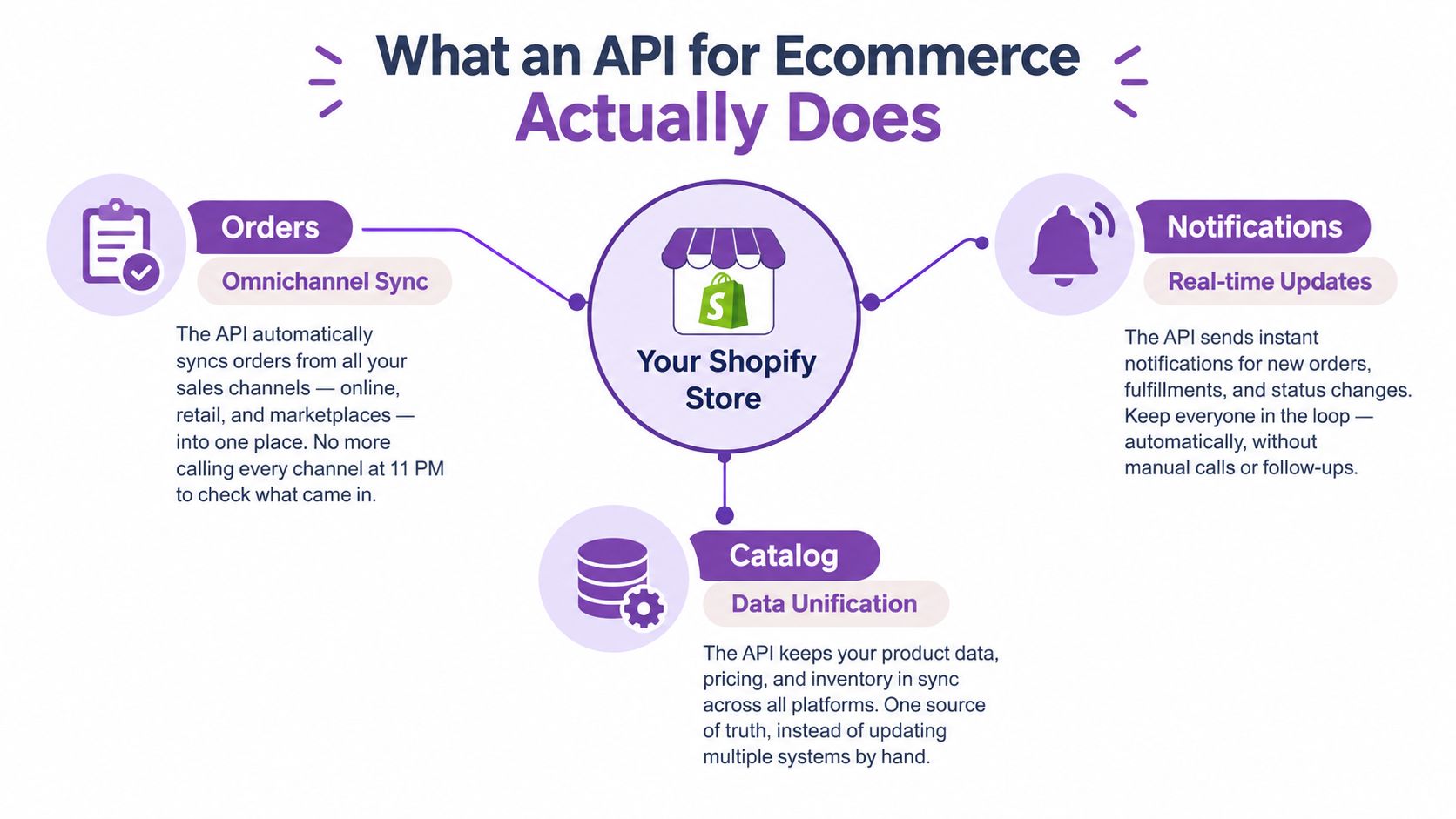
That replaces the spreadsheet handoff with an automated handshake. When a shopper leaves a cart, Shopify can notify the messaging service, the service can create a personalized text, and the customer can return through a tracked link. You still decide the offer, timing, and audience. The API handles the repetitive exchange.
The broader shift is architectural, not just operational. The ecommerce industry's move toward specialized, fast, scalable APIs accelerated by 2015, when platforms began prioritizing broader ecosystem connections instead of keeping APIs limited to internal merchant functions. Those connections enabled external integrations, headless storefronts, and modular commerce stacks, as described in the history of ecommerce integrations.
Practical rule: Start with one customer or operational event that costs you money when handled late. Automating that event gives your API project a business purpose before anyone discusses endpoints.
For a store owner, the payoff is straightforward. Orders reach fulfillment tools without rekeying. Customers receive useful updates while the information is still relevant. Marketing gets behavioral triggers instead of static lists. An API becomes valuable when it removes a delay between what the customer does and how your business responds.
The Main API Types Every Ecommerce Merchant Should Know
Shopify merchants usually encounter several API families, but they don't all solve the same problem. Choosing the right one depends on whether you're changing back-office data, building a customer-facing experience, sending product information elsewhere, or collecting money.
| API Family | Primary Use | Typical Merchant Scenario | Complexity Level |
|---|---|---|---|
| Admin API | Products, orders, customers, inventory, and fulfillment data | Updating stock after a warehouse event or retrieving an order for a support workflow | Moderate |
| Storefront API | Customer-facing product discovery, carts, and checkout experiences | Powering a custom storefront with live product and cart data | Moderate to high |
| Content and Shopping APIs | Catalog feeds, syndication, reporting, and external commerce channels | Sending product information to a shopping platform or retrieving performance reports | Moderate |
| Payment API | Authorization, capture, refunds, and payment-related workflows | Connecting a payment provider or handling a payment state inside a custom checkout | High |
The Admin API is where most operational automations begin. A fulfillment event can update an order, an inventory integration can read location data, and an SMS workflow can use an approved order status to decide which message belongs next.
The Storefront API matters when the standard Shopify theme no longer gives you the experience you need. A headless brand might use it to render product pages, carts, and checkout components in a separate frontend. That flexibility brings more responsibility for caching, error states, analytics, and accessibility.
GraphQL isn't a separate business function in the same way. It's a query language and API approach that can sit across commerce data when the integration needs carefully selected fields from related objects. Content and Shopping APIs deserve separate attention because they connect your catalog and reporting workflows to external discovery and retail systems. Google has moved merchants toward the Merchant API after the Content API for Shopping sunset on August 18, 2026, with progressive request errors beginning September 1, 2026, according to Google's Shopping trends documentation.
Headless and composable commerce show why these choices matter. A market summary estimates the headless commerce sector at $1.74 billion in 2025, projecting $7.16 billion by 2032 at a 22.4% CAGR. The same summary reports that 73% of businesses use headless website architecture, while 72% of retailers have implemented composable approaches, with the figures detailed in headless commerce statistics.
A conventional Shopify store may need only the Admin API and a few specialized integrations. A brand with a custom frontend, multiple sales channels, or complex catalog operations may need all four families, plus a clear ownership plan for the data.
Authentication, Rate Limits, and Webhooks Explained Simply
Authentication is the digital key card for your integration. It proves that an approved application can access specific store data, and it should grant only the permissions the workflow needs. An SMS automation might need customer, checkout, and order information. It doesn't automatically need permission to change products or billing settings.
Rate limits are speed bumps. Shopify uses a leaky-bucket model for its REST Admin API, which allows requests to accumulate up to a plan-specific capacity and then drains that capacity as the integration processes work. Standard stores receive 2 requests per second, Advanced Shopify receives 4, Shopify Plus receives 20, and Commerce Components receives 40. Requests beyond the available bucket return HTTP 429 Too Many Requests, as documented in Shopify's REST API rate limits.
That matters during catalog imports, order synchronization, and peak-season traffic. A script that loops through every product and immediately retries every failure can create a queue of duplicate work. Use batching where the endpoint supports it, exponential backoff after throttling, and a persistent job queue for work that doesn't need to happen inside the customer's browser session.
What this means today: A successful test with a small catalog doesn't prove the integration will survive a sale. Test the slow path, the retry path, and the path where a connected service is unavailable.
Webhooks change the direction of communication. Polling asks the store repeatedly, “Did anything happen?” A webhook lets the store push an event when something happens, such as an order being created or a fulfillment being updated. That reduces wasted requests and makes customer messaging more timely.
The distinction is explained clearly in this guide to webhook vs API for founders. For a Shopify implementation, also keep the API key setup guidance close to your deployment checklist.
A reliable webhook handler should verify the request, record the event, process it idempotently, and acknowledge it quickly. If downstream SMS delivery is slow, place the message job in a queue instead of making Shopify wait for the entire delivery process. Monitor failed deliveries and unprocessed events in a dashboard that someone on your team checks.
How an API Powers SMS Marketing Automation in Practice
The useful part of an ecommerce API isn't the request itself. It's the sequence of actions that request sets in motion.
A practical abandoned-cart flow looks like this:
- The shopper leaves. Shopify records a checkout or cart event with the information the shopper has consented to provide.
- The store emits an event. A webhook tells the SMS platform that the workflow may need to start.
- The integration validates access. The receiving service checks the token and confirms that the request is permitted.
- The message enters a queue. The service applies the campaign rules, selects the approved template, and schedules delivery.
- The result returns. The store or marketing platform records delivery status and can decide whether a later follow-up is appropriate.
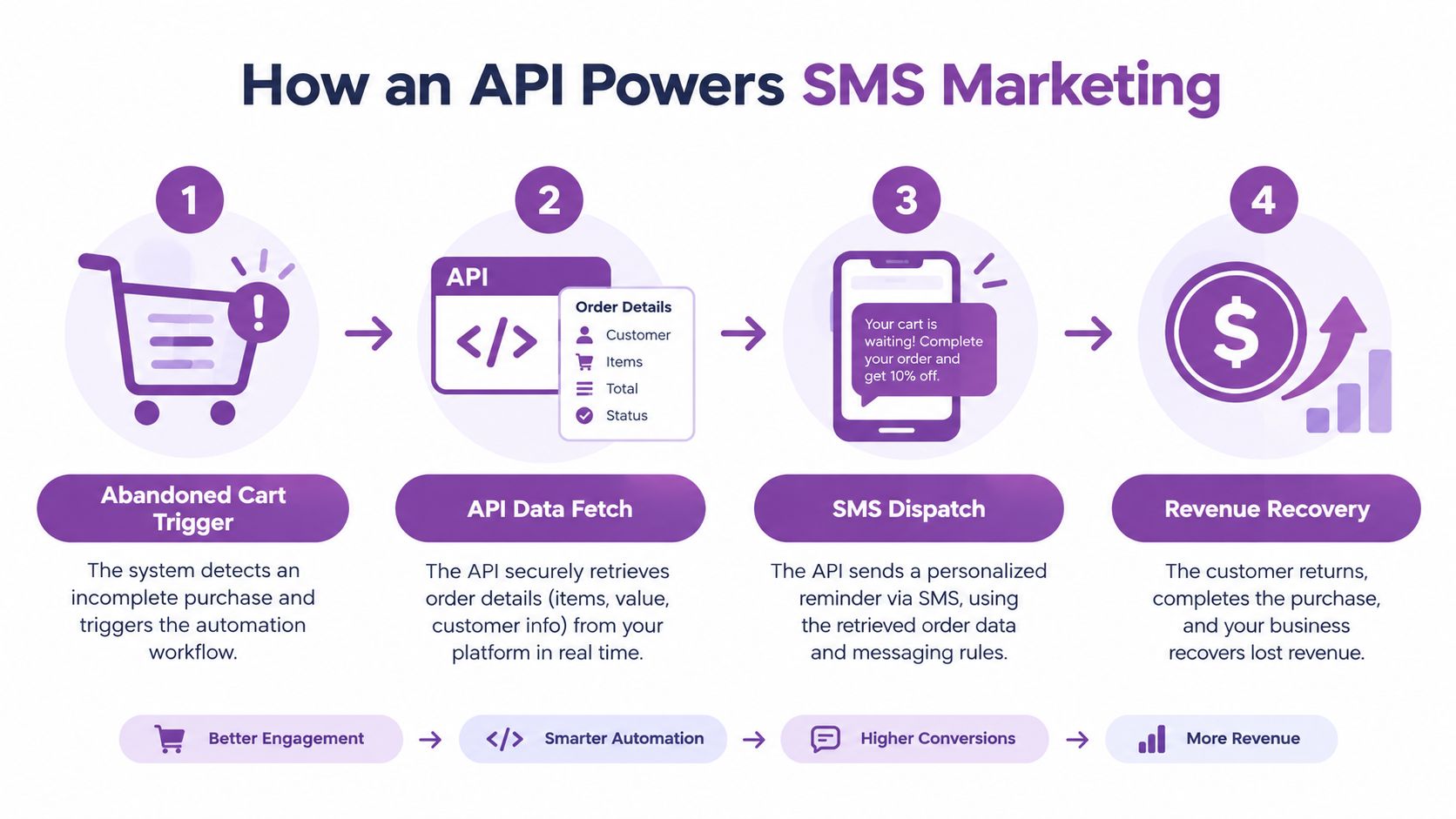
YipSMS fits this workflow as a Shopify-focused SMS application with one-click setup, a 14-day free trial, and rates starting at $0.015 per SMS. It supports cart and checkout abandonment, viewed-product follow-ups, shipping and delivery notifications, and personalized recommendations. The practical advantage is that a merchant can begin with a prebuilt trigger instead of designing every webhook and message state from scratch.
The message still needs discipline. Guidance for ecommerce SMS recommends a clear value proposition, a reason to act now, one direct trackable CTA, and the business name in each text, as explained by SMS message best practices. “Your cart is waiting” is weaker than a message that identifies the store, gives the customer a useful reason to return, and leads to one specific action.
For a more technical view of connecting Shopify events to messaging workflows, this SMS API integration guide is a useful reference. The key revenue connection is simple: the API moves the message closer to the customer's action while the intent is still fresh.
Here's what the flow looks like from the customer's perspective:
A shopper browses, leaves, receives a relevant reminder, and returns through a measured link. Your team doesn't copy a phone number, build a list manually, or check three dashboards before sending.
SMS also requires permission and restraint. In the United States, the TCPA requires prior express written consent for marketing texts, and reported penalties can reach $500 to $1,500 per message. CTIA guidance also covers opt-out handling, consent practices, and prohibited SHAFT categories, as summarized in SMS regulations for ecommerce. The API can automate delivery, but it can't make an unlawful consent record acceptable.
Real Shopify Workflows That Turn API Calls into Revenue
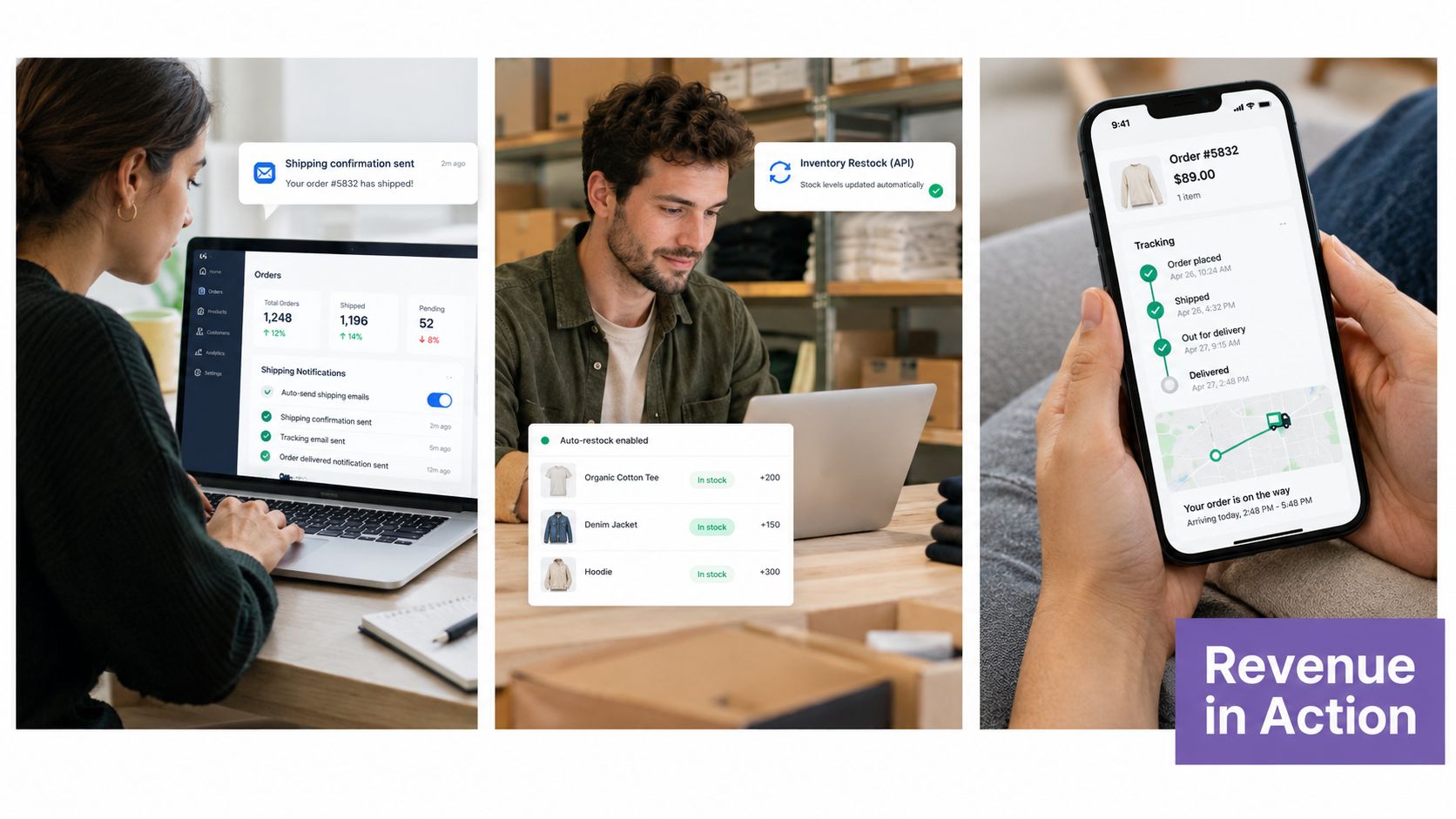
A clothing brand does not need to send a promo text every time an order changes. It does need to tell a buyer when the parcel has shipped, when delivery is close, and where to find tracking information. An API passes the fulfillment event to the messaging service, which sends a short update and cuts down on “Where is my order?” support tickets.
That same post-purchase touchpoint can support the next sale without turning service into a hard sell. A follow-up can recommend a related product after the delivery message has done its job. Operational clarity comes first, because a confusing delivery experience hurts the next conversion more than it helps it.
A DTC skincare store has a different use case. A shopper views a product, leaves without buying, and later gets a message that names the item and addresses a likely hesitation. The message should link to the product page, use one CTA, and stop if the shopper buys. That suppression rule matters. Without it, the automation can keep pushing an item the customer already purchased.
Win-back campaigns for lapsed subscribers need tighter coordination between channels. SMS works for immediate urgency and quick conversions, while email gives more room for product education, brand context, and slower nurture. Guidance on combining SMS and email shows why the two channels should work together instead of treating SMS as a replacement for email.
Cadence is part of the integration
Timing rules belong in the workflow, not in a last-minute manual check. Practical guidance recommends sending promotional texts between 8 AM and 9 PM, limiting promotional messages to about 2 to 4 per month, and waiting about 24 hours before sending a second message to reduce fatigue and complaints, according to SMS marketing best practices.
Use local time zones where the customer's location is known. Suppress messages after purchase, honor opt-outs immediately, and keep a delivery log that ties each text to the triggering event. Those controls protect the customer experience and make revenue results easier to read.
For mapped examples of these triggers, see the marketing automation workflows guide. The useful starting point is the flow with the clearest delay and the most direct customer action, not the one with the most branching logic.
REST versus GraphQL for Shopify API Calls
REST is usually the better starting point for a straightforward integration. It has predictable resources and request patterns, which makes it easier to inspect in logs and debug when a product update or order lookup fails. If your workflow retrieves one order, updates one status, or handles a simple webhook response, REST may be all you need.
GraphQL becomes more useful when the integration needs related data in a single workflow. Instead of requesting a fixed number of resources, Shopify's GraphQL Admin API uses calculated query cost. Standard stores receive 100 points per second, Advanced Shopify receives 200, Shopify Plus receives 1,000, and Commerce Components receives 2,000, according to Shopify's GraphQL rate limits.
The difference is not a free pass to request everything. GraphQL charges more for deep object graphs and wide selections, so ask only for the fields the workflow needs. Cursor pagination prevents a large catalog or order history from becoming one oversized response. Minimizing mutations reduces unnecessary writes and makes retries safer.
| Plan | REST API Requests/Second | GraphQL API Points/Second |
|---|---|---|
| Standard Shopify | 2 | 100 |
| Advanced Shopify | 4 | 200 |
| Shopify Plus | 20 | 1,000 |
| Commerce Components | 40 | 2,000 |
Large catalogs introduce another constraint. Once a store reaches 500,000 product variants, Shopify limits new variant creation to 10,000 per day across any API. That matters during migrations and variant-heavy merchandising projects, where a technically correct script can still take longer than the business expects.
Use this decision rule:
- Choose REST for simple reads, direct writes, and integrations where transparent debugging matters most.
- Choose GraphQL for complex reads, selective data retrieval, and workflows where reducing separate requests improves throughput.
- Use either carefully for mutations. Validate payloads, record identifiers, and make retries idempotent so a temporary failure doesn't create duplicate changes.
Start with the simplest protocol that solves the current job. Move to GraphQL when the data relationship or request volume justifies the added query discipline.
When API-First Commerce Pays Off and When It Is Overkill
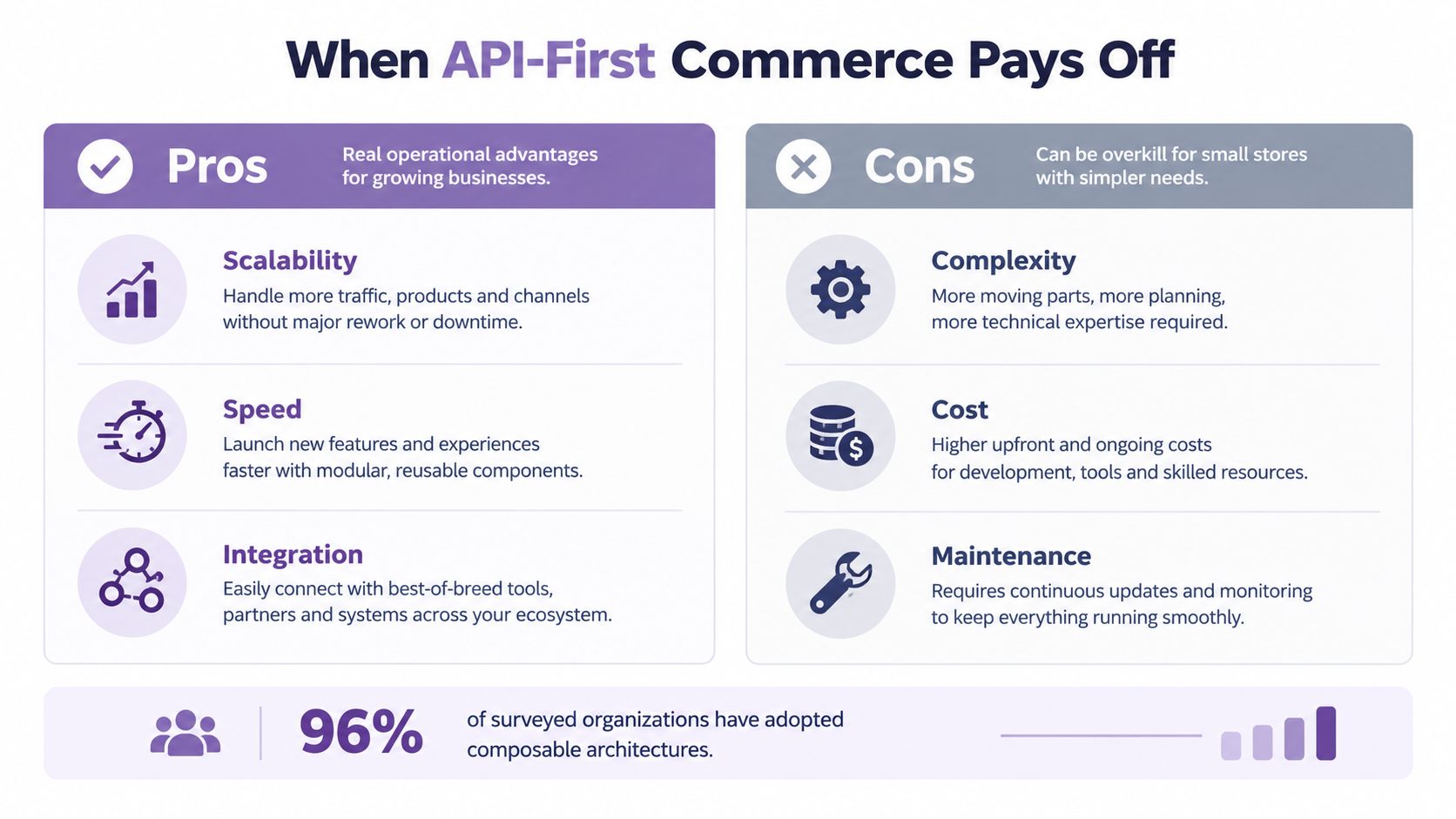
API-first commerce pays off when the store has several systems that must react to the same customer event. If abandoned checkout should trigger SMS, fulfillment should trigger delivery updates, and inventory should stay consistent across channels, event-driven connections can replace a meaningful amount of manual coordination.
It's less compelling when the business mainly needs a stable checkout, basic stock updates, and a small number of post-purchase messages. A custom headless frontend may add deployment, monitoring, and fallback work without improving the customer journey enough to justify it. More integrations also mean more places for field mappings, credentials, retries, and vendor changes to break.
An independent 2026 market report says 92% of surveyed organizations had implemented or were actively adopting composable technology. It projects the headless commerce market to grow from USD 2.04 billion in 2025 to USD 2.41 billion in 2026 and USD 6.17 billion by 2031, while identifying rate limits, broken field mapping, weak error handling, and peak-season workflow failures as recurring integration problems in its market coverage.
Use a decision test before rebuilding
API-first is a strong fit when:
- Customer timing matters: A delayed cart reminder or delivery update costs more than the integration effort.
- Data moves between systems: Your team repeatedly exports, cleans, and imports the same records.
- The storefront needs flexibility: You require a custom experience that the standard theme can't provide.
- The team can operate it: Someone owns monitoring, credentials, vendor updates, and incident response.
It's overkill when a native Shopify feature or stable app already handles the job and the custom connection would create another system to maintain. Before investing in a complex stack, consider vendor sunsets too. Google's Content API transition shows why catalog, reporting, and merchandising workflows need a migration plan rather than a permanent assumption that an endpoint will remain unchanged.
For larger teams comparing storefront architecture, this headless decision framework for Shopify Plus can help separate a genuine business requirement from architectural enthusiasm. The winning stack is the one your team can keep reliable during the busiest trading period, not the one with the most impressive diagram.
Your First API-Powered Ecommerce Integration Checklist
Start with one revenue or service problem and write the desired customer action beside it. Then use this checklist:
- Define the outcome: Choose cart recovery, delivery communication, inventory accuracy, or another specific goal.
- Map the event: Identify the Shopify trigger, required fields, receiving service, and customer-facing result.
- Choose the protocol: Use REST for a simple workflow and GraphQL when related data or query efficiency demands it.
- Secure access: Grant minimum permissions, protect credentials, and document who owns the integration.
- Plan for failure: Add webhook monitoring, retry backoff, queueing, duplicate protection, and a fallback customer experience.
- Respect consent: Store SMS permission, provide opt-out handling, and suppress messages after the relevant customer action.
- Measure the baseline: Track the current response, support burden, or recovery behavior before launching the automation.
- Review the result: Check delivery status, conversion behavior, errors, and customer complaints before adding more branches.
A practical first SMS option is the Shopify app described above, which provides drag-and-drop popup design, prebuilt cart and checkout abandonment flows, shipping and delivery notifications, real-time analytics, and transparent pricing. If the integration needs custom development, a specialist team such as Hire developers Mexico can help build and maintain the connection without making your store responsible for every technical task alone.
Keep the first workflow narrow. Once the event, permission model, monitoring, and measurement work reliably, the same foundation often enables additional automations for delivery, replenishment, recommendations, and win-back campaigns.
YipSMS Inc. provides Shopify-focused SMS marketing with automated cart recovery, viewed-product follow-ups, delivery notifications, subscriber capture, and campaign analytics. Visit YipSMS Inc. to connect your store's customer events to timely SMS workflows and start with an integration that can support measurable retention and recovery work.
How this article was made: the YIPSMS team drafts some articles with AI writing tools, then checks pricing, compliance and product details against how YIPSMS actually works before publishing. Spotted something wrong? Tell us through your YIPSMS account.