Third Party Integration for Shopify SMS Marketing
At 11:47 on a Tuesday, your Shopify flash sale is already moving. The discount code comes from one tool, the loyalty app triggers a push notification, and your SMS platform targets shoppers who left items in their carts. You scheduled each campaign separately, but customers experience one store, one brand, and one stream of messages.
That quiet handshake is third party integration. It works so smoothly that most merchants only notice it when something breaks: a discount fails to stack, a shipping update never arrives, or a review request reaches someone whose order was just returned. SMS exposes those failures quickly because the channel is personal, immediate, and difficult to ignore.
A useful way to understand the wider architecture is through practical guidance on connecting APIs and microservices. For a Shopify merchant, the central question isn't whether tools connect. It's whether they exchange the right data, with the right permission, at the right moment, and continue doing so after launch.
Table of Contents
- Why Your Shopify Store Quietly Runs on Connected Tools
- What Third Party Integration Actually Means
- APIs, Webhooks, and Native Apps Compared
- High-Impact SMS Use Cases You Can Wire Today
- Security, Compliance, and Consent Without Drama
- The Hidden Work After You Press Connect
- How YipSMS Fits Inside Your Stack
- Your Pre-Launch Integration Checklist
Why Your Shopify Store Quietly Runs on Connected Tools
A modern Shopify store rarely operates from one dashboard. Shopify holds the order and customer record, an email platform manages campaigns, a CRM builds segments, a helpdesk stores support conversations, and a shipping application receives carrier events. Your SMS provider sits among those systems, waiting for a signal that a customer should receive a message.
The owner in the flash-sale example didn't manually compare three audience lists. Each connected tool made its own decision from shared or synchronized data. That saves time when the records agree, but it creates risk when one system updates faster than another.
SMS makes coordination visible
An abandoned checkout can change status while several automations are running. A customer may complete payment, receive a fulfillment update, and still remain in an old abandoned-cart segment. If the suppression logic doesn't reach the SMS platform quickly, the store sends a recovery message after the purchase.
That isn't just an untidy workflow. It can create customer confusion, duplicate outreach, and support work. Third-party API research also shows why performance belongs in the conversation. Empirical work on API latency found that third-party calls increase overall latency, while monitoring guidance favors P90 and P95 measurements because averages can hide slow requests that customers feel.
Practical rule: Treat every SMS automation as a coordination contract. Define the event, the data required, the delay you can tolerate, and the condition that cancels the message.
The scale of this dependency is no longer unusual. One industry compilation places the global API economy at $8.3 billion in 2023 and projects $21.2 billion by 2028, implying an 18.7% CAGR. The same compilation cites $74 billion in enterprise API spending, reports that 80% of organizations use at least one API for digital transformation, and says 45% of SaaS applications connect with at least three external services through APIs. The compilation also reports that 92% of developers use APIs daily and 60% use five or more each day.
Your store is therefore not a website with add-ons. It's a small operating network. SMS succeeds when that network has clear ownership, reliable event handling, and a record of customer permission.
What Third Party Integration Actually Means
Think of your Shopify store as a wall outlet. Each external tool is an appliance, but it needs a compatible plug and the right amount of current. The plug is the API, app authorization, webhook, or connector. The current is the data and permission flowing between systems.
A third party integration connects an outside service to Shopify so one system can read, write, or react to information held by another. The important detail is scope. A tool that needs to send a cart reminder may require customer and checkout information, but that doesn't mean it should receive every administrative capability available in Shopify.
The connection types you'll encounter
A native Shopify app is installed from the Shopify App Store. During installation, Shopify shows the permissions the app requests, and the merchant approves the connection. The app typically handles authentication, event subscriptions, and user settings through its own interface.
The Admin API is the programmable outlet. A developer or connector can use it to retrieve orders, customers, products, inventory, and other resources that the approved permissions allow. This approach provides control, but your team becomes responsible for authentication, error handling, data mapping, and changes to the API.
Webhooks work differently. Instead of repeatedly asking Shopify whether something changed, your endpoint receives a notification when an event occurs, such as a checkout update or fulfillment change. That makes webhooks a natural fit for time-sensitive SMS, provided the receiving system verifies the request and handles retries safely.
Other connections include custom apps, private integrations, and connector services such as Zapier. A connector can reduce development work by sitting between Shopify and the SMS vendor, but it also adds another dependency, another credential, and another place where field mapping can fail.
Before approving any app, write down four answers:
- Connection method: Is it using an app installation, Admin API, webhook, connector, or a combination?
- Readable data: Can it access customers, checkouts, orders, products, or fulfillment records?
- Writable data: Can it update customer tags, segments, order notes, or subscription status?
- Revocation path: Who removes access when the vendor, employee, or workflow is no longer needed?
Historically, this model grew from platform ecosystems. Academic research describes platform owners opening selected core functions to outside developers so those developers can create complementary products while the platform captures value over time. A longitudinal study of SAP's cloud platform shows how that ecosystem approach matured through sustained development, and research on B2B digital platforms identifies controlled boundary resources as a foundation of enterprise integration architecture. The platform ecosystem study provides that historical context.
APIs, Webhooks, and Native Apps Compared
The three common patterns solve different SMS problems. Choosing between them isn't a matter of picking the most complex option. It depends on whether the workflow needs a scheduled read, an immediate event, or a packaged connection that a merchant can manage without custom code.
An API follows a request-response model. Your code asks Shopify for information, such as recent orders or customers who haven't purchased since a chosen date, then sends the result to the SMS platform. APIs work well for batch jobs, recurring segmentation, reconciliation, and back-office exports.
A webhook is event-driven. Shopify sends a payload to your endpoint when something happens. That reduces polling and can make cart recovery or shipping notifications more responsive, but the receiving system needs signature verification, retry handling, duplicate protection, and a queue for temporary outages.
A native app packages much of that plumbing. It can present settings inside the Shopify admin, request permissions during installation, and handle common consent or suppression workflows. The trade-off is flexibility. You may get a quicker launch, but unusual data transformations or custom routing can be harder to implement.
| Pattern | How it works | Best SMS use case | Watch out for |
|---|---|---|---|
| API | A system requests data and receives a response | Batch win-back segments, nightly reconciliation, recurring customer syncs | Polling delays, rate limits, stale records, failed pagination |
| Webhooks | Shopify pushes an event to a receiving endpoint | Cart abandonment, fulfillment alerts, delivery updates | Retries, duplicate events, signature verification, queue backlogs |
| Native apps | A prebuilt Shopify connection combines interface, permissions, and automation | First cart-abandonment setup, standard shipping flows, merchant-managed campaigns | Less customization, vendor dependency, unclear permission boundaries |
For a practical implementation reference, compare the workflow details in this SMS API integration guide. The same principle appears in other connected architectures too. If you're evaluating newer agent-based systems, an explanation of how MCP client-host-server works is useful because it highlights the importance of defined boundaries between the client, host, and server.
Match the pattern to the job
Use an API when the message depends on a segment that can tolerate scheduled processing. Use a webhook when timing affects the customer's decision. Use a native app when a standard workflow matters more than custom logic and your team needs an approachable admin experience.
For cart recovery, don't accept a setup that only checks abandoned checkouts on a slow polling cycle. Set a latency budget for each dependency, trace the request from Shopify to the SMS provider, and monitor tail latency rather than average response time. Third-party calls can add directly to request completion time, so a slow vendor can delay a message even when Shopify itself is operating normally.
High-Impact SMS Use Cases You Can Wire Today
The SMS flows that earn their place in a Shopify stack are tied to clear customer events. They don't begin with a broad list upload. They begin with a signal, a decision rule, and a message that still makes sense when it reaches the phone.
Cart recovery is usually the most timing-sensitive. A checkout update provides the trigger, but the automation must confirm that no purchase followed. The message should use the cart or checkout reference needed to return the shopper to the right destination, then stop immediately if an order is created.
Shipping notifications follow a different path. Shopify or a carrier application reports fulfillment and tracking information, and the SMS service sends a confirmation or tracking message. The customer expects operational clarity here, not a promotional pitch.
| Use Case | Trigger Event | Source | Delay | Goal |
|---|---|---|---|---|
| Cart recovery | Checkout updated without a completed purchase | Shopify checkout data and order status | Short, defined recovery window | Bring the shopper back before intent fades |
| Shipping alert | Fulfillment or carrier tracking update | Shopify fulfillment record or carrier app | Near the operational event | Reduce uncertainty and support contacts |
| Review request | Delivery confirmed | Carrier or fulfillment status | A settling period after delivery | Ask for feedback when the product has arrived |
| Win-back | Last-order-date segment reaches its campaign rule | CRM, Shopify customer data, or analytics layer | Scheduled batch timing | Re-engage dormant buyers with relevant context |
Build the trigger before the copy
A cart message shouldn't fire merely because a checkout record exists. The automation needs exclusion checks for completed orders, prior recovery messages, unsubscribed numbers, and customers already contacted by another campaign. A shipping message needs a valid fulfillment state and a tracking destination that matches the order.
Review requests should wait until delivery is confirmed and the customer has had time to receive the product. Win-back campaigns should use purchase history and suppression rules rather than sending the same offer to every customer.
Independent benchmark coverage reports abandoned-cart SMS recovery messages converting at roughly 15% to 20%, with click-through rates commonly in the 19% to 30% range and open rates around 98%. Those benchmarks are reported in Digital Applied's SMS coverage. They don't remove the need for clean event handling. A well-written message sent after the shopper has already purchased is still a failed integration.
For additional implementation context, this SMS integration guide is useful when mapping triggers, payloads, and downstream actions. Keep the first cart message fast, but don't sacrifice suppression checks to gain speed. The profitable balance is immediate relevance with reliable cancellation.
Security, Compliance, and Consent Without Drama
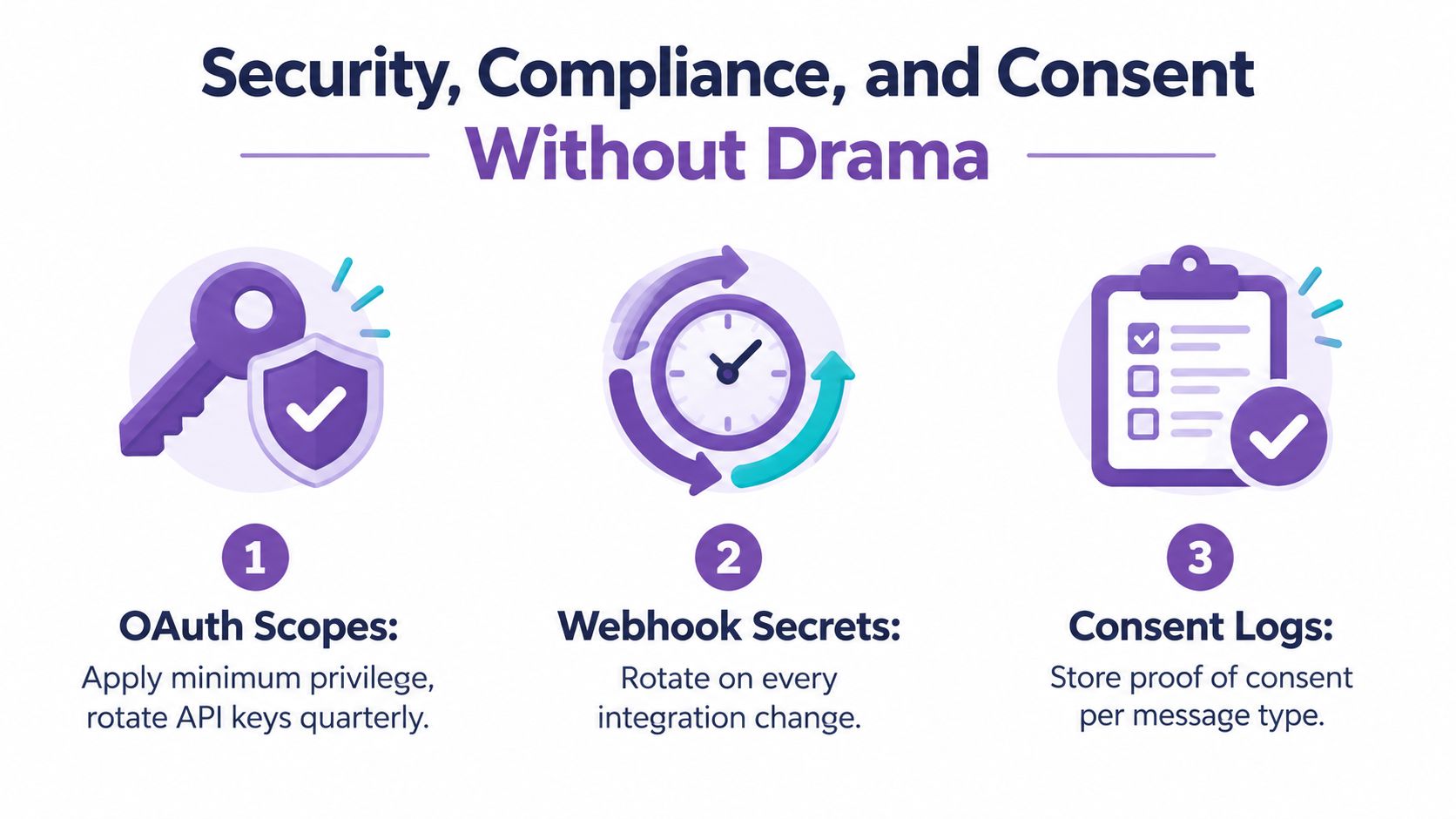
A customer checks out from one country, a staff member connects an SMS app, and a cart reminder goes out before anyone reviews the permission trail. That failure starts in the integration design. Set minimum-privilege OAuth scopes, restrict API credentials, rotate webhook secrets, and document how access is removed.
An SMS provider should not receive broad administrative access because the installation screen requests it. Confirm what the provider reads, what it writes, and whether each scope matches the workflow. Research on integration platforms has identified cross-app OAuth weaknesses involving permissive scopes and poor token handling. Recommended controls include narrower scopes, separate refresh-token management, revocation checks, logs for privileged vendor actions, and credential invalidation during offboarding. The USENIX Security research details these OAuth risks and controls.
Consent needs a durable record
For SMS, the permission record matters as much as the message itself. Shopify requires SMS marketing senders to follow applicable privacy and telecom laws, including GDPR, CPRA, and TCPA. Store policies should explain how phone numbers are collected, used, stored, and shared, along with message frequency, possible data rates, opt-out instructions, and a support contact. The compliance guidance summarized for Shopify stores supports placing these details in the checkout and policy flow before campaigns begin.
Save consent as structured data with a history that another system can audit. Capture:
- Country code: Apply the customer's market rules to consent and sender selection.
- Consent timestamp: Record when permission was granted.
- Collection source: Identify checkout, popup, keyword, or another acquisition path.
- Exact wording: Preserve the language the customer saw.
- Message category: Separate marketing, transactional, and service permissions.
- Suppression status: Propagate STOP requests and opt-outs across connected systems.
Shopify's deliverability guidance recommends clear opt-in methods, such as a checkout checkbox or keyword sign-up, rather than purchased or imported lists. It also advises setting expectations for content and frequency and removing numbers that repeatedly fail delivery. Shopify SMS deliverability practices are summarized in this implementation guidance.
Set quiet hours using the recipient's timezone. Process STOP requests immediately, then sync suppressions across the CRM, SMS platform, and support tools. Maintain country-aware lists because Shopify sends SMS marketing campaigns only to opted-in customers in supported countries. Shopify's deliverability documentation explains the country and opt-in requirement. Use this TCPA compliance checklist for reviewing consent and messaging controls before enabling automated sends.
The Hidden Work After You Press Connect
The first cart-recovery SMS fires correctly, then a webhook slows down and the message arrives after the customer has purchased elsewhere. Another workflow keeps sending because a former employee's token still works. Integration failures usually surface as operational drift, not a clear Shopify outage.
Review ownership first. Each connected app needs a named owner, current staff access, and documented OAuth scopes. Remove access when roles change, then check whether refresh tokens or downstream credentials remain valid. App removal alone may not close every connection.
Latency deserves its own budget. Cart recovery depends on timely events, so inspect webhook queues, retry behavior, and endpoint response times. A delayed poll can also leave inventory out of sync, allowing the storefront to promise stock that a warehouse has already allocated. Shopify's enterprise guidance identifies siloed systems, ERP complexity, real-time synchronization gaps, and inconsistent data quality as recurring integration challenges. Its data integration guidance applies particularly to orders moving across fulfillment partners, regions, or systems that update at different speeds.
Use a review cycle that matches the store's workload rather than treating maintenance as a launch task. During a weekly operations check, inspect failed webhook deliveries, retry queues, records that did not create or update, and SMS events that arrived late or duplicated. Compare Shopify inventory with the fulfillment or ERP source of truth.
Once a month, rotate keys according to your security policy, audit OAuth scopes, and test each important SMS flow from trigger through delivery. Reconcile subscriber counts with Shopify customer records, then run an offboarding test. A customer data integration framework can help assign ownership across marketing, engineering, and support when those records cross system boundaries.
Maintenance test: Create a controlled checkout, complete the purchase, trigger a fulfillment update, and confirm that each intended SMS fires once while canceled messages remain suppressed.
Watch customer signals as well. Rising bounces, unsubscribes, complaints, duplicate messages, missed shipping alerts, stale segments, and disputed inventory promises can reveal a failing connection before staff see an outage. Record the failure, owner, retry path, and customer impact, then retest the workflow after the fix. This routine turns integration from a one-time connection into an operating process.
How YipSMS Fits Inside Your Stack
A Shopify store rarely fails because one tool lacks a feature. It fails when ownership is unclear. Shopify Admin holds orders, customers, products, and fulfillment records. Klaviyo manages email audiences, while Gorgias gives support agents conversation history and customer context. YipSMS connects those records to permissioned mobile messages, so the team does not have to export lists or copy events between dashboards.
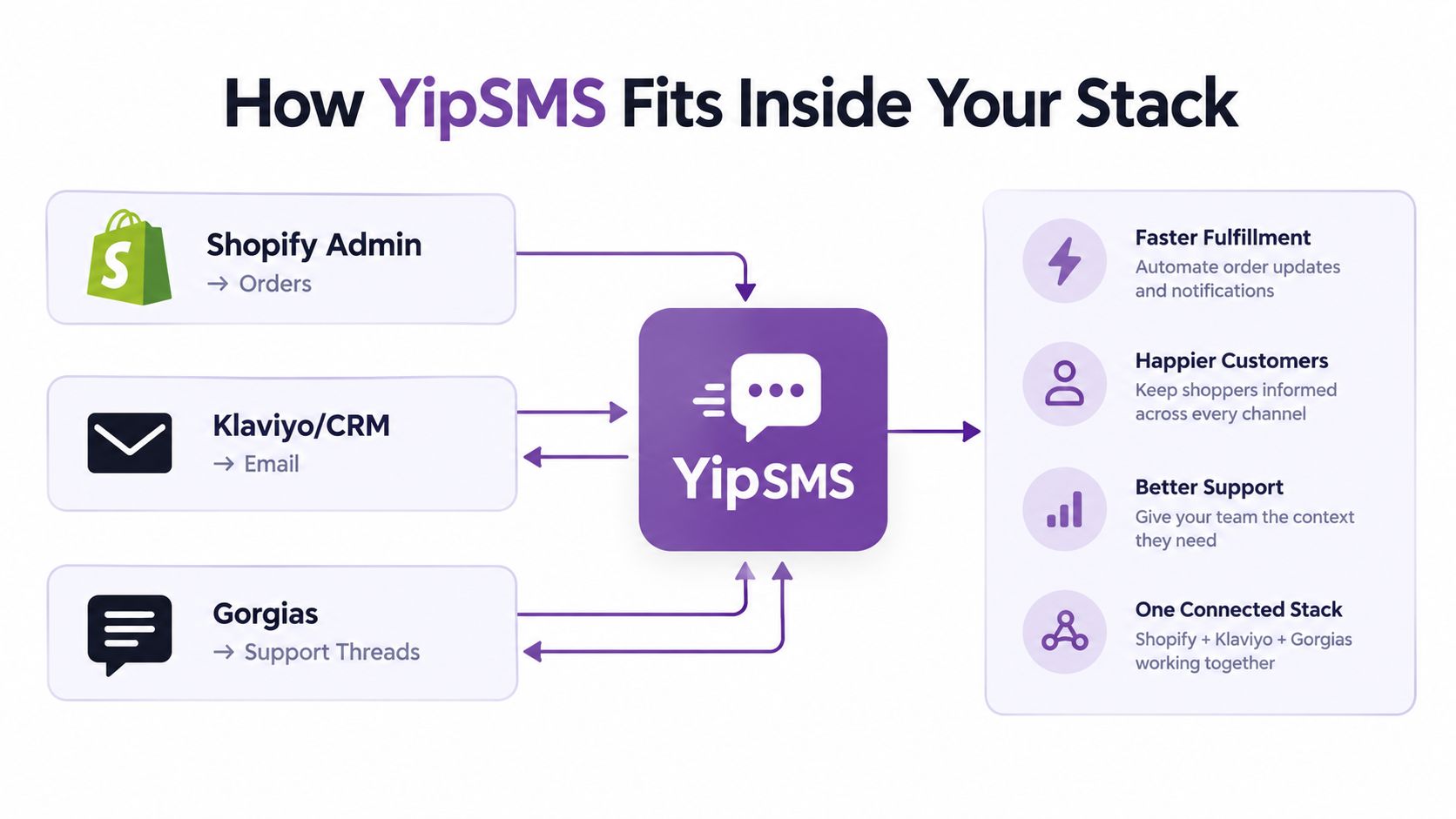
YipSMS Inc. can operate between these systems. Its Shopify connection follows the app installation flow. Its Webhooks and API capability supports a CRM, custom store workflow, or other application. Klaviyo integration can pass opt-ins into existing Klaviyo flows through Shopify ID. Shopify-related features also include theme blocks, customer and segment sync, and Web Pixel events.
The practical gain is less manual handling, but the trade-off is shared responsibility. The Shopify App Store installation can replace customer-list exports, copied opt-in checkboxes, and scripts that move data between dashboards. Before approving access, read the OAuth request, check that each scope supports an intended SMS workflow, and record the owner responsible for changes.
A merchant can connect common lifecycle events to these SMS actions:
- Cart abandonment: A checkout or cart event starts recovery, with the message returning the shopper to the unfinished purchase. Set a latency budget before launch, because a delayed event can arrive after the shopper has already completed checkout.
- Shipping confirmation: A fulfillment or tracking event sends an operational message with the order or tracking destination.
- Review request: A delivered-order event begins a post-purchase request after the selected settling period.
- Win-back: A purchase-history segment enters a scheduled re-engagement campaign.
Keep the boundary between systems visible. Shopify remains the source for store records and checkout behavior. YipSMS manages SMS audiences, consent handling, templates, campaign timing, and delivery settings. Sender IDs, API credentials, and country-specific sender numbers belong in the SMS configuration. The merchant still owns checkout wording, privacy language, and the decision about which country-aware list may receive each campaign.
Before enabling a live flow, use a test customer. Trigger the event, complete or cancel the purchase as appropriate, confirm suppression, check the country rule, and inspect the exact message on the phone. Prebuilt connections reduce implementation work, but they do not decide whether consent remains valid throughout the customer lifecycle. That decision belongs to the store team.
Your Pre-Launch Integration Checklist
Treat launch approval as a scorecard, not a feeling. The connection is ready only when the customer can give valid permission, receive the right message, and stop receiving it without manual intervention.
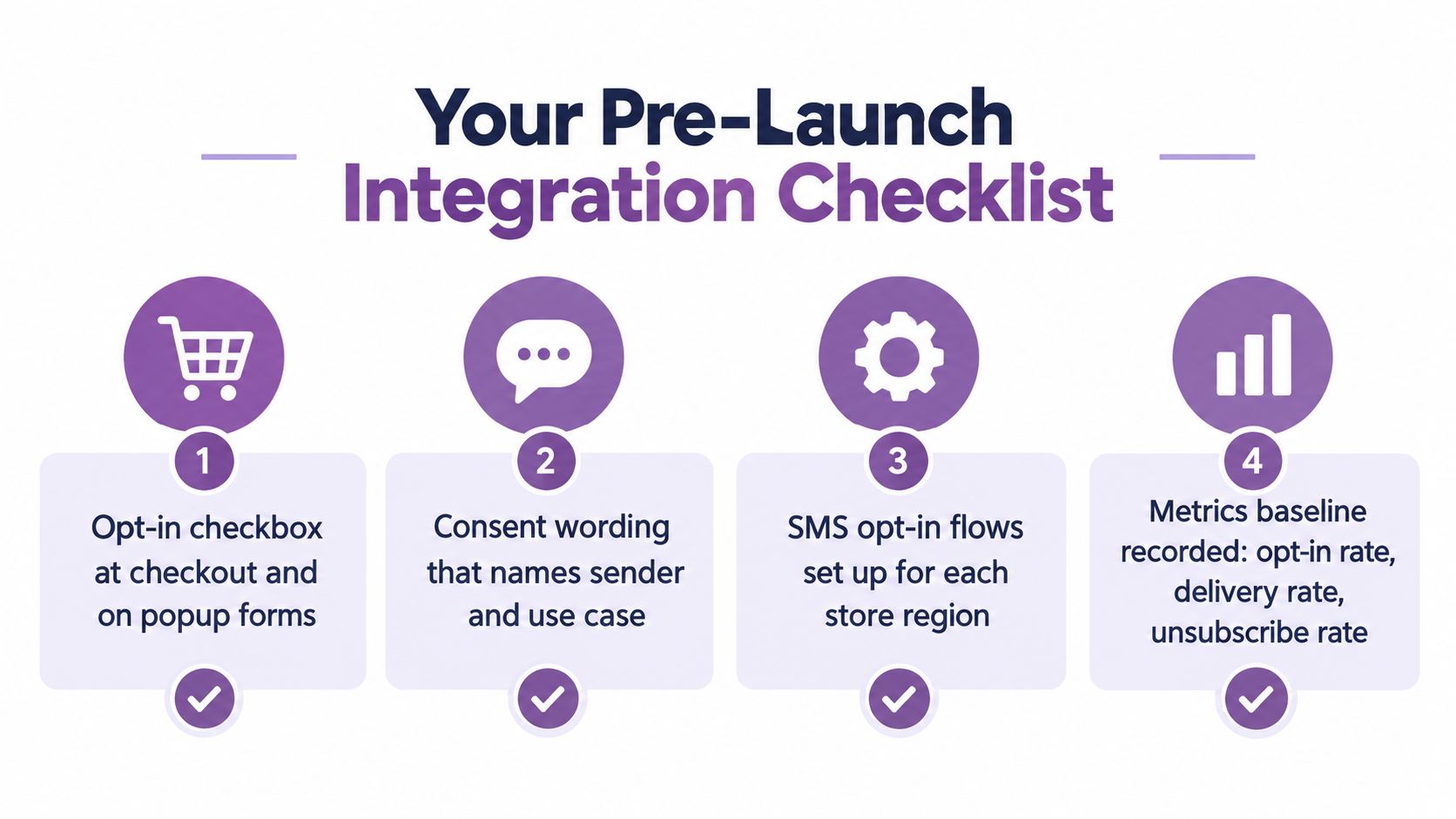
- Checkout consent: Confirm the SMS opt-in checkbox appears at checkout and on popup forms.
- Clear wording: Name the sender, use case, expected frequency, possible data rates, and opt-out method.
- Regional setup: Assign the correct sender number or sender identity for each supported country.
- Permission rules: Enable double opt-in wherever the applicable law or market practice requires it.
- Latency budget: Verify that cart-recovery webhook subscriptions respond within the delay your workflow can tolerate.
- Suppression sync: Push opt-outs, recent purchasers, and customer-service exclusions across connected systems.
- Template rendering: Test STOP instructions, links, personalization, and fallback text on every message.
- Quiet delivery test: Send to an internal permissioned list and confirm delivery and routing before using a customer audience.
Two items get missed on first runs more than they should. Update the privacy policy to name the SMS vendor, and confirm that the data processing agreement covers customer phone numbers and related event data.
The morning after launch, review delivery rates, look for bounce spikes, inspect unsubscribe activity, and sample the event logs. Re-check consent wording quarterly, especially after changing the SMS provider, checkout theme, campaign purpose, or regional targeting.
YipSMS Inc. provides Shopify SMS marketing tools with one-click setup, consent-aware subscriber collection, automation for cart abandonment, shipping, review, and win-back flows, plus Webhooks and API support for custom workflows. If you want to connect SMS without leaving token ownership, suppression logic, and event timing as afterthoughts, visit YipSMS Inc. and review how the integration fits your current stack.
How this article was made: the YIPSMS team drafts some articles with AI writing tools, then checks pricing, compliance and product details against how YIPSMS actually works before publishing. Spotted something wrong? Tell us through your YIPSMS account.