Single Customer View for Shopify SMS
It's a busy Shopify afternoon. A shopper gets a shipping update, an abandoned-cart reminder for the order they just placed, and a win-back discount. Your tools all report a successful send. Your customer sees a store that isn't paying attention.
Table of Contents
- One Shopper and Three Texts
- Fields That Belong on One Profile
- What Disconnected Apps Cost SMS
- How to Match the Same Person Safely
- Consent Rules Before Any Text Goes Out
- SMS Segments a Clean Profile Unlocks
- Maintain One Profile and Launch One Flow
One Shopper and Three Texts
Say that shopper subscribed through your popup, bought through guest checkout, and entered a different email for shipping. Your SMS app recognizes the subscriber. Shopify recognizes the order. The fulfillment tool recognizes the delivery phone.
Nobody recognizes the whole relationship.
A single customer view brings a shopper's information and interactions across every contact point into one complete profile, instead of keeping separate identities for checkout, email, support, and SMS. That includes purchase history, browsing activity, subscriptions, support notes, and message clicks, attached to the right person.
A shared database isn't enough
A UK study published by SAS and Henley Business School found that none of the interviewed companies had a fully complete single customer view at the time, and described the usual architecture as extracting dispersed customer information into a central database or warehouse.
That's an important distinction for a Shopify operator. Central storage solves the scattered-record problem. It doesn't automatically prove that the records belong to the same person, or that you're allowed to send that person a promotion.
Your shipping integration might have the freshest phone number. Your popup might hold the actual marketing permission. Your support tool might contain the reason a discount would be particularly badly timed.
The operating test: If two teammates can't agree whether this number may receive a promotion today, the profile isn't ready to send from.
Build around that decision, not around collecting every attribute you can find. A smaller profile with trustworthy identity and purpose-specific consent is more useful for SMS than a large profile assembled through confident guesses.
The practical work starts with the fields your team needs before a send: identity, commerce, permission, and engagement. Connected apps then need to keep those fields current, matching rules need to preserve uncertainty, and consent needs to stay specific to the message's purpose.
Only then should you activate segments. Otherwise, personalization just makes a wrong text more specific.
Fields That Belong on One Profile
Shopify sources that feed one SMS profile
| Source | Fields it adds | Can authorize promo SMS | Match key |
|---|---|---|---|
| Shopify customer account | Name, email, customer ID, order count, lifetime value | No | Customer ID or verified email |
| Checkout and orders | Order phone, items, spend, order dates | No, unless promo consent language was shown and accepted | Customer ID, then phone |
| Browse and abandoned cart | Viewed product, cart value, abandon time | No | Customer ID if logged in, else do not guess |
| SMS opt-in popup or keyword | Phone, consent source, timestamp, purpose, STOP history | Yes, for the stated purpose only | Verified phone |
| Shipping and delivery events | Fulfillment status, delivery date | No, transactional only | Order ID linked to customer ID |
| Support tickets | Open issue, last contact, complaint flag | No, and an open complaint should suppress promo | Email or customer ID |
| Imported CSV list | Phone and custom fields after dedupe | Only if a prior promo consent record exists | Phone, reject rows with no consent |
A profile is ready for SMS only when identity, commerce, consent, and engagement remain separate field groups. Don't flatten them into a subscriber row where every phone number looks equally usable.
In 2024, 43% of surveyed SMEs identified the lack of a single customer view as their primary challenge, according to a survey of 201 SMEs and corporations reported by TechCentral. Your response should be a minimum complete record, not an endless enrichment project.
Read each source according to its job
Start with the Shopify customer account. Its customer ID anchors commerce history; order count and lifetime value help distinguish a new buyer from a repeat customer. Neither field grants permission to text.
Next, attach checkout and order information. An order phone helps match the transaction, but don't promote it into a marketing subscription just because the customer supplied it during payment.
Browse and cart events add context, not authority. A viewed product or abandoned cart becomes actionable only after identity confidence and promotional permission pass. Leave anonymous browsing unattached when you can't establish the customer.
The SMS opt-in record is authoritative for SMS permission. Preserve its source, timestamp, purpose, status, and STOP history rather than replacing them with a newer checkout phone field.
Fulfillment answers whether the package shipped or arrived. Support answers whether a promotional interruption would be inappropriate. CSV imports need deduplication and a consent check before any historical subscriber becomes eligible.
Keep the minimum record explicit
Your sending profile needs:
- Verified phone: The destination associated with the opt-in.
- Shopify customer ID: The commerce record behind the message.
- Consent purpose and status: What the customer agreed to and whether it remains active.
- Consent timestamp: Evidence of when permission was recorded.
- Last order date: Purchase recency for targeting and exclusions.
- Last SMS click: Engagement history, or an explicit no-click-recorded value.
Label additional attributes known or inferred. A purchased size is known; a size guessed from household activity isn't.
A missing consent timestamp blocks promotional use, even when every commerce field is full.
What Disconnected Apps Cost SMS
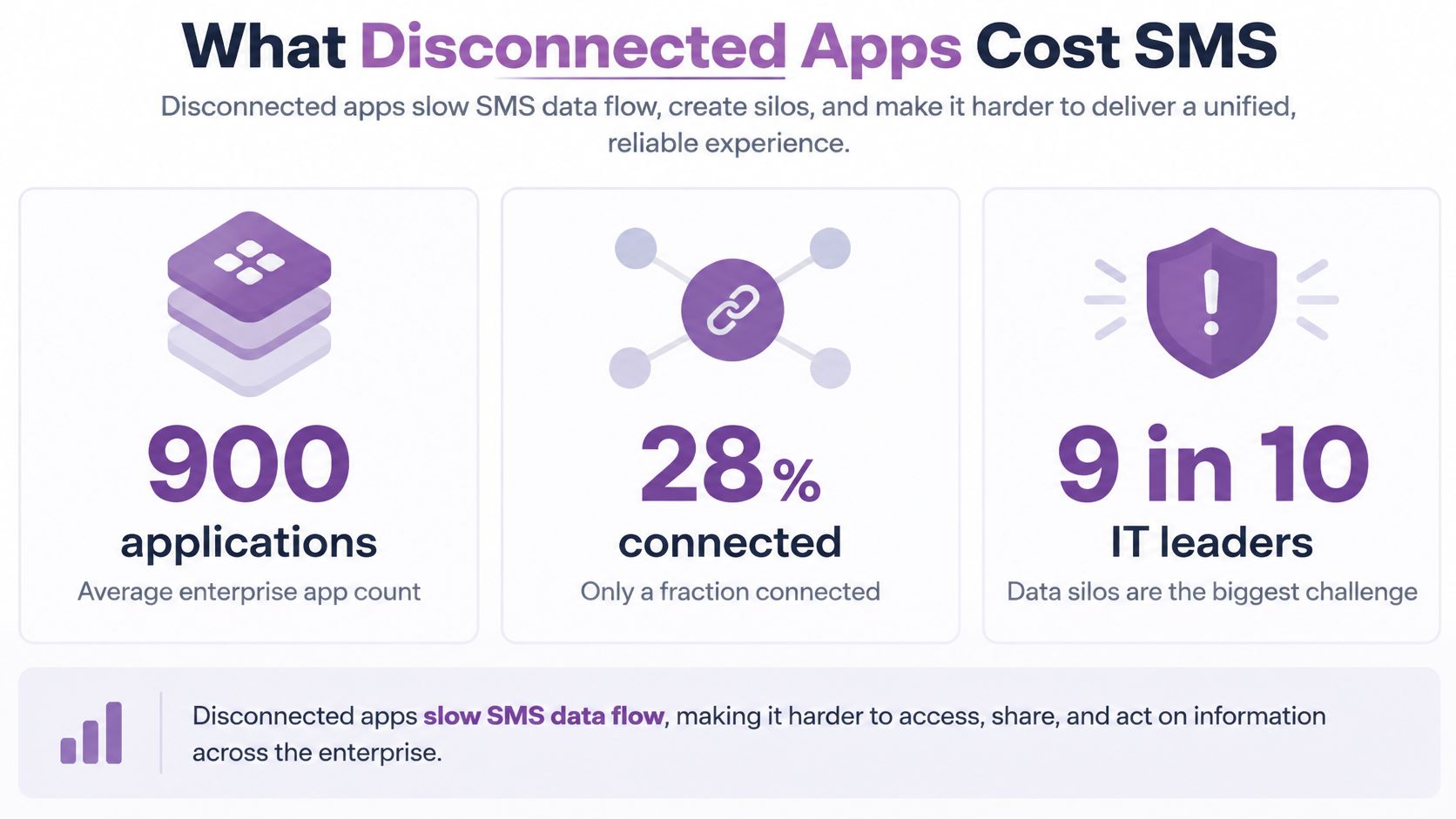
Salesforce's single-customer-view guide reports approximately 900 applications per enterprise, with only about 28% connected, and says 9 out of 10 IT leaders identify data silos as their greatest digital-transformation obstacle; it also reports customer-experience ratings of at least 8 out of 10 among 80% of businesses with well-integrated technologies versus 57% where technologies weren't well integrated with CRM, a 23-percentage-point gap.
Those are enterprise figures, not a description of your Shopify stack. But you don't need an enterprise-sized app collection to recreate the problem. A store, help desk, reviews app, and SMS tool can hold incompatible versions of the same customer.
The integration problem looks like this:
The bad texts are predictable
The cart reminder after purchase. A customer returns and completes checkout, but the SMS automation still sees the earlier abandonment. The missing connection isn't a better cart-message template. It's the completed-order event attached to the same identity.
The VIP offer to a first-time buyer. Shopify holds purchase history, while an imported subscriber tag says VIP. If nobody defines which source controls eligibility, an outdated label wins over actual orders.
The delivery notice beside a promotion. Fulfillment sends a package update while marketing launches an offer. Neither tool checks recent messaging activity, so the customer gets an unnecessary cluster of texts.
A profile isn't single while identity, orders, consent, and clicks remain isolated in apps that can't use each other's context.
The customer won't diagnose an integration issue. They'll reply that they already bought, ask why they received an irrelevant offer, or stop responding.
Set freshness by the decision
Cart suppression and shipping messages need current events. A recovery flow must notice a completed checkout before it sends, and a delivery-triggered message needs the actual fulfillment status.
Win-back tiers can often use a daily refresh because purchase-recency bands don't require the same event-by-event response. That doesn't make delayed consent acceptable. Permission must be checked independently at sending time.
Write down who owns each field and how failures are surfaced. If order updates stop arriving, pause cart recovery instead of assuming every unresolved cart remains abandoned.
Connect store events, consent, and SMS engagement before adding more campaign ideas. More flows on disconnected records give you more ways to interrupt the wrong shopper.
How to Match the Same Person Safely
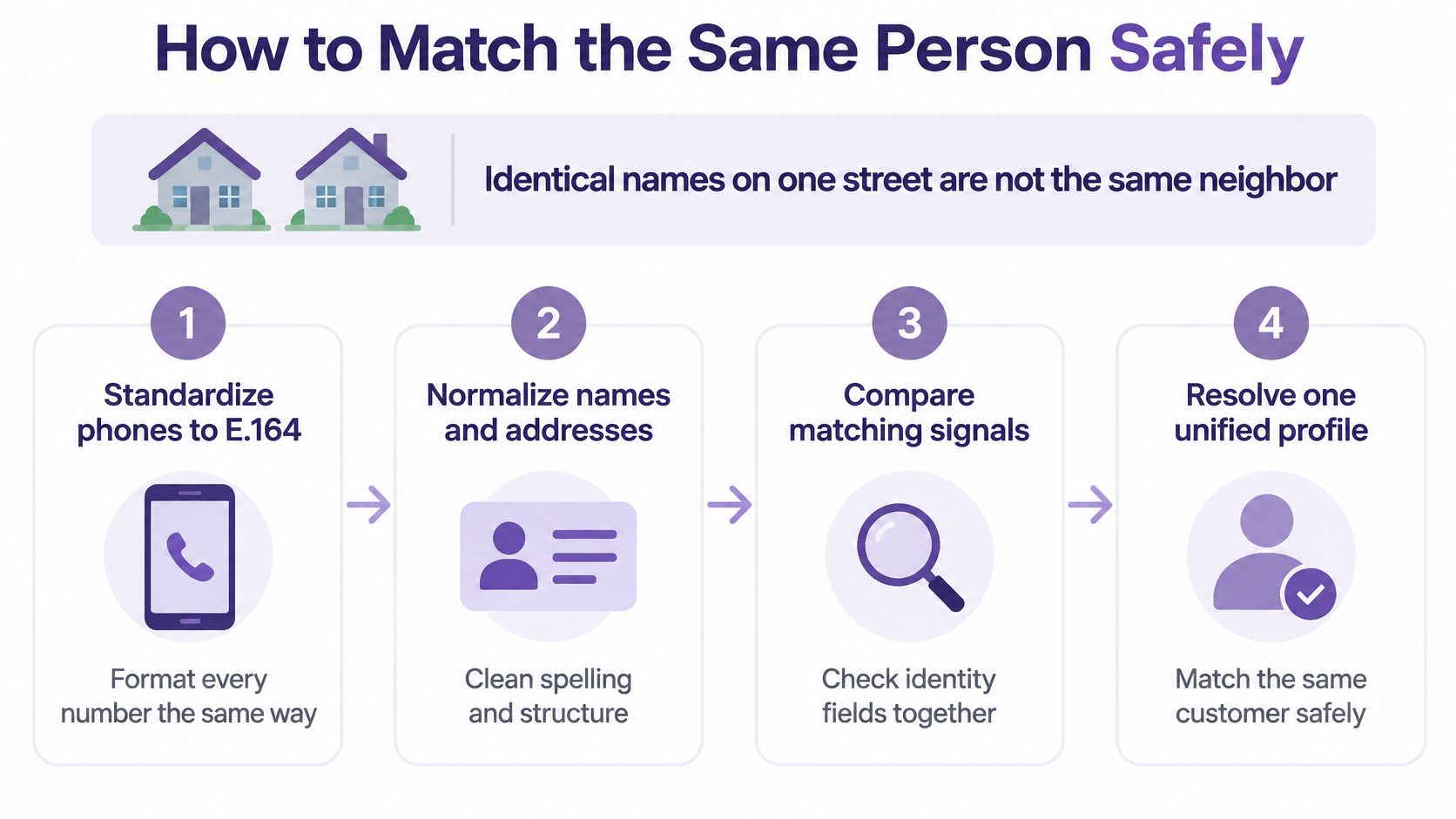
Treat identity resolution like a phone book: identical names on the same street aren't necessarily the same neighbor. A shared address, surname, or device gives you a clue, not permission to combine people.
Experian's guide to achieving a single customer view identifies identity resolution as the first step. For SMS, the useful question isn't how many records you can merge. It's which links you can defend.
Use this process as a starting point, with conservative activation rules.
Use a conservative matching routine
Standardize before comparing. Format phones as E.164, lowercase email matching keys, and trim names. Formatting differences shouldn't create duplicates, but cleaning a value doesn't verify ownership.
Auto-link only high-confidence identifiers. Use Shopify customer ID, verified email, or verified phone where there's no conflicting identity evidence. An exact shared number isn't enough when the records clearly represent different people.
Use probabilistic clues for review, never sending. Name, address, device, and behavior can flag a possible match. Don't let a similar surname and shipping address attach someone else's cart to a subscriber.
Preserve the evidence. Retain source-system keys, match confidence, the rule that fired, and a survivorship note explaining which value became authoritative. Don't erase the original record just because another value won.
Separate known from inferred attributes. Keep confirmed purchases apart from predicted interests or guessed household relationships. An inferred gender should never decide the wording of a text.
Block shared-phone and staff-device merges. Family phones and store devices need explicit exceptions. Otherwise, a staff-assisted checkout can attach unrelated shoppers to the same browsing history.
Quarantine uncertain pairs. Give a named teammate responsibility for review and correction, or leave the records separate. Don't turn an unresolved queue into automatic approval.
Test suppression before launch. Run sample records through purchase, STOP, duplicate, and shared-phone scenarios. Verify that an eligible-looking duplicate can't bypass a suppression attached to its destination.
Prefer an incomplete profile to a wrong identity
A bad merge can text the wrong person about another shopper's purchase. A missed merge can cause duplicate messages and split purchase history. Handle both, but don't solve duplication by merging aggressively.
Shopify describes spending four years redesigning its customer-data model in its account of rebuilding customer identity across channels. Putting records together doesn't make the identity true.
A smaller, demonstrably accurate view beats a larger profile built through aggressive matching. Build your customer data integration around reversible decisions, clear ownership, and a correction path when a customer reports a mistake.
For a visual companion to the matching workflow, use this walkthrough.
Keep the activation rule strict: promotional and cart flows run only on deterministic matches, with permission evaluated separately.
Consent Rules Before Any Text Goes Out
One profile must not become one blanket permission. A shopper can want shipping texts, refuse promotions, unsubscribe from email, and later request deletion while legally required transaction records remain.
What each Shopify message is allowed to use
| Message | Consent required | Order-update opt-in enough | Suppress when |
|---|---|---|---|
| Promotional campaign | Express written consent naming brand, purpose, frequency, rates, and opt-out | No | STOP, missing timestamp, or revoked status |
| Shipping and delivery update | Separate transactional disclosure | Yes | Customer asked not to receive that order notice |
| Abandoned cart or browse follow-up | Promo consent plus deterministic identity | No | Low match confidence or shared phone |
| Win-back after a lapse | Still-valid promo consent | No | Consent expired under applicable rules, revoked, or purpose was only order updates |
| Email offer | Email consent, which does not transfer to SMS | No | Never copy an email opt-in onto the phone field |
| Deletion request | Marketing profile removed; keep only required order records | No | Any attempt to re-import that phone |
Keep shipping permission out of marketing
For U.S. programs, treat marketing texts as calls under the TCPA: the FCC's unwanted-communications guidance describes restrictions on autodialed commercial advertising messages to cell phones and written-consent requirements for advertising calls using covered technologies. A checkout phone alone isn't marketing permission.
Use express written promotional consent as your operating standard. The CTIA Messaging Principles and Best Practices call for express written marketing consent tied to the stated purpose and a way to revoke it; make your signup disclosure identify the brand, promotional purpose, expected recurring frequency, possible message and data rates, and opt-out method.
Keep order-update permission on its own record. Adding a discount to a shipping notice isn't a workaround for missing promotional consent.
Make the permission check operational
Store consent source, timestamp, jurisdiction, purpose, status, and revocation history as first-class fields. Your consent documentation should let a teammate reconstruct the signup and every later preference change.
Macro Global's single-customer-view guidance describes a consistent, accurate, complete, and auditable view alongside obligations under regimes including GDPR, CCPA, and PIPEDA. Translate that into named attribute owners, limited staff access, an audit trail, retention limits, and automated propagation of customer requests.
For deletion, remove marketing attributes and prevent stale popups, CSVs, or connected tools from rebuilding the deleted marketing profile. Retain only legally necessary order records outside marketing activation, and have the responsible privacy owner define any minimal suppression record needed to prevent re-import.
Don't rely on the consent state captured when someone entered a flow. Check current permission immediately before sending. STOP and deletion should suppress future promotional sends immediately, including messages already queued.
SMS Segments a Clean Profile Unlocks
Say you sell skincare on Shopify. Your customer browses a cleanser, buys it later, receives the package, and eventually returns for a refill. A useful single customer view lets your team respond to those different moments without treating each event as a fresh prospect.
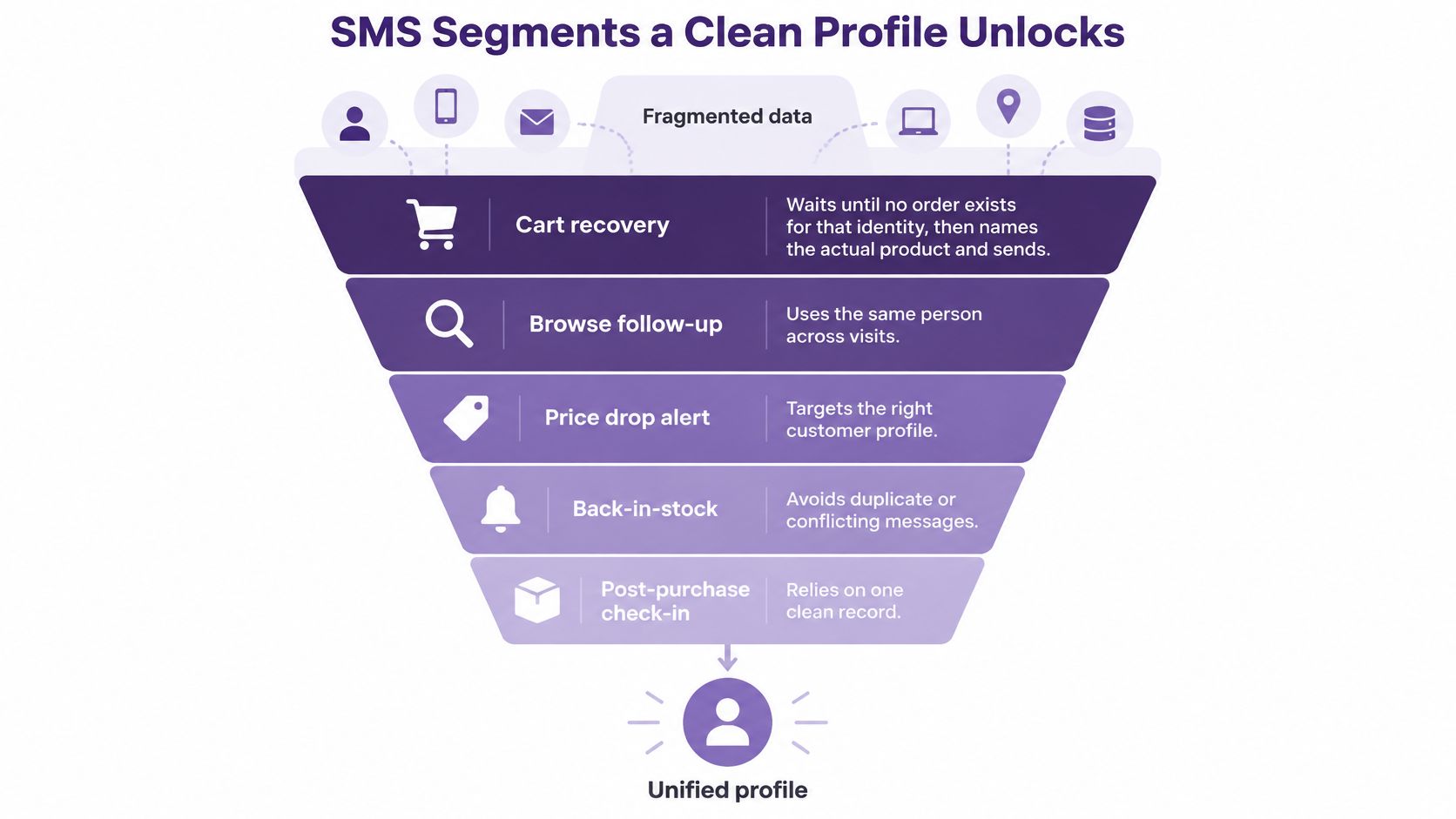
These segments depend on usable identity and context, not just a larger list.
Match the message to a confirmed event
Cart recovery: A shopper leaves cleanser in their cart. Send a focused follow-up such as Your cleanser is still in your cart. Pick up where you left off. The line needs cart items, abandon time, a deterministic identity, and a fresh check that no completed order exists.
Post-purchase timing: After confirmed delivery, try Your cleanser has arrived. Need help fitting it into your routine? Delivery status and purchased SKU make that honest. Don't start a review or refill sequence from the original product click.
Repeat-buyer tiers: A first purchase gets a how-to-use note; a third purchase can qualify for early access under your store's tier rules. Your early access is ready needs Shopify order count, qualifying spend, and recorded eligibility, not an old imported VIP tag.
Use interest without inventing it
For category interest, a clothing store might send The linen shirt in your saved size is back. That requires a known product-and-size preference plus current inventory. Don't infer the shopper's size from a weak household match or promise stock you haven't checked.
For quiet-subscriber win-back, try Ready to revisit your skincare routine? Explore what's new. Use last order date and last SMS click to select quiet subscribers, then exclude open support complaints. Someone waiting for a missing package doesn't belong in a cheerful comeback campaign.
Build customer data segmentation around fields that make each sentence true. Personalized copy without the permission gate is still a bad send.
Refresh according to the segment
In 2024, 51% of retail respondents reported a real-time single customer view, 27% had a view that wasn't real time, and 22% had neither, according to Retail Week's retail report.
Use real-time events for cart exclusions and shipping-triggered journeys. VIP eligibility and win-back tiers can refresh daily, provided sending-time exclusions remain current.
Tag each click and reconcile it with a completed Shopify checkout. Judge the segment on revenue, complaints, and wrong-person replies, not the number of messages your team managed to send.
Maintain One Profile and Launch One Flow
Assign a named owner to profile maintenance. Without that responsibility, the next CSV upload or popup change can undo your matching rules.
Keep a practical maintenance rhythm
- Weekly deduplication: Recheck new popup, keyword, and CSV opt-ins, linking only deterministic matches. Apply the matching gate at ingestion too; a weekly review isn't permission to send questionable records meanwhile.
- Immediate suppression: Apply STOP and deletion to pending promotional sends immediately, then propagate the change to connected tools within minutes rather than waiting for a batch.
- Monthly inspection: Audit a random sample of 50 profiles for wrong-person links, stale consent, and conflicting phone numbers. Treat this as a starting operating sample, not proof that every record is correct.
- Use-case refreshes: Keep cart and shipping events current in real time, and refresh win-back and VIP tiers daily.
Our collection setup supports that consolidation: every opt-in from a popup, scratch, keyword, AI chat, QR code, or CSV is dual-written into the master All Customers list. Imported Shopify segments stay live through webhooks, and our popup builder captures phone, email, and name in one tap, with TCPA-compliant consent and Privacy Policy links built in.
Launch cart recovery first
Start with abandoned cart because its required fields are limited and identity errors are easy to recognize. Confirm a verified phone or Shopify customer ID as the match key, preserve consent source and timestamp, and keep order-update subscribers off the promotional list.
Suppress uncertain matches and shared phones. Check for completed purchases immediately before the send, then compare clicks with completed checkouts.
Add win-back or VIP targeting only after you've reviewed the cart flow's replies and resolved any wrong-person complaints. Finish with one accurate list and one flow whose send log shows why each recipient was eligible, not a dashboard full of untested automations.
YipSMS Inc. offers Shopify-connected subscriber collection, synchronized segments, and abandoned-cart automation to help you put that first usable customer view to work. Visit YipSMS Inc. to build your list and launch a focused cart-recovery flow with documented consent and clear checkout attribution.
How this article was made: the YIPSMS team drafts some articles with AI writing tools, then checks pricing, compliance and product details against how YIPSMS actually works before publishing. Spotted something wrong? Tell us through your YIPSMS account.