Ecommerce CRM System: How to Choose in 2026
Buying a CRM doesn't make your marketing personal. In 2024, 37% of ecommerce shoppers said personalized product recommendations caused them to buy more often, according to Salsify and the Digital Shelf Institute's Ecommerce Pulse Report. The useful part isn't storing another customer attribute. It's recognizing what someone needs while you can still help them buy.
The ecommerce CRM system worth paying for turns a fresh storefront event into a relevant, consented message before the moment expires. For a Shopify merchant shipping campaigns this week, that means testing identity, timing, and suppression before buying a longer feature list.
Table of Contents
- Why an Ecommerce CRM System Is Operational Now
- Scorecard for Choosing an Ecommerce CRM System
- Shopify Sync Freshness and Profile Quality
- SMS and Email Rules That Protect Revenue
- Event Workflows Worth Automating First
- Store Situations and the Right CRM Emphasis
- Pick Your CRM Layer and Launch SMS
Why an Ecommerce CRM System Is Operational Now
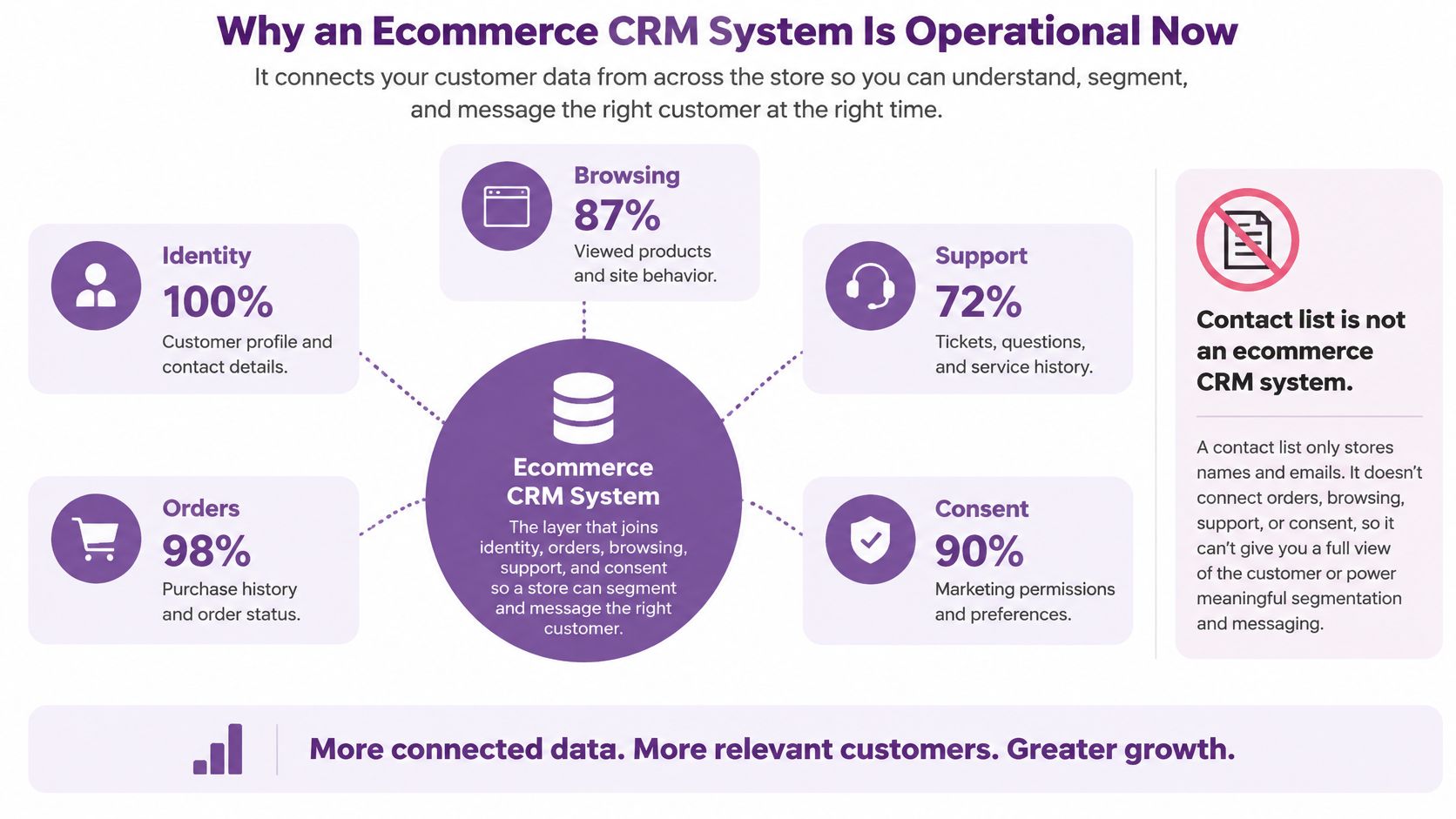
A contact list is not an ecommerce CRM system. A useful CRM joins identity, orders, browsing, support, and consent so your team can recognize a customer's current state and act on it.
Say a shopper views a jacket, starts checkout, then buys through an email. A static SMS list still calls that person a cart abandoner. An operational CRM recognizes the purchase, cancels the recovery message, and prepares the appropriate post-purchase communication.
The customer data needs to meet in the same profile before any channel decides what to send.
Scale makes stale lists expensive
For planning purposes, CartFlows' ecommerce statistics put projected U.S. retail ecommerce sales in Q2 2026 at $340.2 billion, up 3.8% from Q1, alongside global 2026 estimates of $6.88 trillion, 21.8% of retail sales, and approximately 2.86 billion online shoppers. Treat those forward-looking figures as planning estimates, not completed-period results.
For a store owner, the practical requirements are straightforward. Your database must handle customers across countries, currencies, devices, and storefronts without creating disconnected versions of the same person. Your workflows must distinguish a product view from a cart addition, a completed purchase, a delivery, or an unusually long quiet stretch.
Software ownership alone won't solve that problem. 74.5% of organizations worldwide reported using a CRM in 2024, according to Metrigy's Customer Experience MetriCast study.
Operational test: Can your team explain why a customer should receive this message now, using the profile that actually controls the send?
A product view signals interest. An open refund signals an unresolved obligation. Combining them into a generic engaged-customer audience creates the wrong campaign, even when every field technically synchronized.
Evaluate the system through Shopify integration, freshness, segmentation, automation, SMS and email blending, and pricing versus scale. Those tests tell you whether your team can use the CRM, not merely own it.
Scorecard for Choosing an Ecommerce CRM System
Score each buying criterion 1 for native capability, 0.5 for an external integration, and 0 when missing, following the comparison approach described by Voyado's ecommerce CRM guide. Record implementation dependencies beside the score, because native doesn't automatically mean reliable.
Ecommerce CRM system selection scorecard
| Criterion | Pass signal | Fail signal |
|---|---|---|
| Shopify identity and orders | Orders, returns, and profiles reconcile | Objects undocumented or one-way export |
| Event freshness | p95 event-to-segment latency recorded | Stale carts and duplicate offers |
| Segmentation | Segment updates from webhooks | Manual CSV rebuilds |
| Automation | Consent and recency gates | Every event sends a message |
| SMS and email blend | Cross-channel quiet hours | Same offer on both channels minutes apart |
| Pricing model | Cost per contact and per message stated | Price jumps hidden in add-ons |
| Scale | One profile across markets | Duplicate people per storefront |
Make the demonstration use your events
A polished customer timeline isn't an integration test. Bring representative Shopify orders, guest checkouts, returns, product views, and cart events into a controlled replay.
Require documentation showing which objects synchronize, which direction they travel, and which fields remain authoritative in Shopify. A connector that imports order totals but misses refunds can make customer-value segments look credible while misclassifying buyers.
Measure p95 event-to-segment latency, not just API response time. That means timing the full journey from the storefront action until the correct profile becomes eligible for the intended workflow. Record duplicate-profile rate, webhook failures, and the share of records reconciled without manual repair.
Live segmentation matters just as much. Change a customer's order or support status during the demonstration and watch the audience update. If someone must rebuild a CSV, the segment isn't operational.
Test sending decisions and the invoice
Automation should evaluate consent, purchase status, and event recency at send time, not only when someone enters a flow. Queue a cart reminder, complete the purchase, then check whether the pending reminder stops.
For channel coordination, send an email offer and inspect whether the SMS workflow recognizes it. Also test whether a service message prevents an unnecessary promotional interruption. A shared profile should support shared decisions.
Pricing deserves a replay of its own. Model your current audience and a doubled list as a purchasing scenario, including seats, contacts, message usage, connector charges, and maintenance. A cheap base subscription can become the expensive choice when your team needs middleware to make ordinary workflows function.
For multi-store operations, confirm that currency and storefront attributes sit on a coherent customer record. Don't accept duplicate people as an unavoidable consequence of expansion.
Reject a tool that can't produce latency and duplicate-rate results from your own events. A feature checklist can narrow the shortlist. It can't approve the purchase.
Shopify Sync Freshness and Profile Quality
Bad CRM data is a revenue risk, not an administrative inconvenience. In a 2024 survey of 631 CRM administrators and stakeholders across the United States, United Kingdom, and Australia, 24% said less than half their CRM data was accurate and complete, while 31% reported poor-quality data cost at least 20% of annual revenue, according to Validity's State of CRM Data Management report.
Those are practitioner-reported risk benchmarks, not guaranteed losses for your store. They're still a strong reason to approve data quality before approving automated sends.
Ecommerce CRM data-quality service levels
| Measure | Pass signal | Fail signal |
|---|---|---|
| Identity match | Precision and recall stated against Shopify | Guest checkout creates a second person |
| Duplicate rate | One profile per buyer across devices | A new profile for every storefront or device |
| Contact completeness | Email, phone, and consent stored with source and timestamp | Blank consent or a checkout phone treated as marketing opt-in |
| Stale-field age | Address and order status fresh inside the recovery window | Nightly export is the newest copy |
| Order reconciliation | Status matches Shopify, including returns and refunds | Silent overwrite and no exception queue |
Replay the messy customer journey
Use repeat buyers, guest checkouts, address changes, returns, and multiple devices in the acceptance dataset. Compare the resulting profiles with Shopify as the system of record for commerce events.
Precision asks whether merged records really belong to the same person. Recall asks whether records belonging to that person were successfully joined. Aggressive merging can look efficient while attaching someone else's order or permission to the wrong profile.
Record acceptable service levels before launch. Include missing contact fields, consent completeness, duplicate profiles, stale-field age, and order-to-customer reconciliation. Don't require every customer to provide every contact channel, but distinguish an intentionally absent phone number from a failed import.
Demand an exception queue and audit logs. When an address conflicts or an event fails, your operator needs to see what happened, which value won, and how to repair it. Our customer data integration guide can help structure that mapping work.
Prove activation with a live audience
The collection-to-action gap isn't unique to retail. Among surveyed mid-market and enterprise manufacturers in the UK, Europe, and the US, 72% had end-customer data but only 9.7% could act on it in real time, according to White Label Loyalty's first-party data guide.
For Shopify, prove usefulness with these live objects attached to the profile:
- Purchase history: Include line items, refunds, and current order status.
- Browsing behavior: Keep relevant product views with their event times.
- Consent: Preserve channel permission, source, timestamp, and revocation.
- Post-purchase outcomes: Include delivery, support issues, and open returns.
Build an audience of shipped-order buyers with valid SMS consent and no open refund. Trigger a product-use message, then change a qualifying record and verify the audience responds without an export.
Gate marketing audiences and flows on valid permission and relevant event age. If a completed order or abandoned checkout can't become usable inside your recovery window, the integration fails regardless of its feature page.
SMS and Email Rules That Protect Revenue
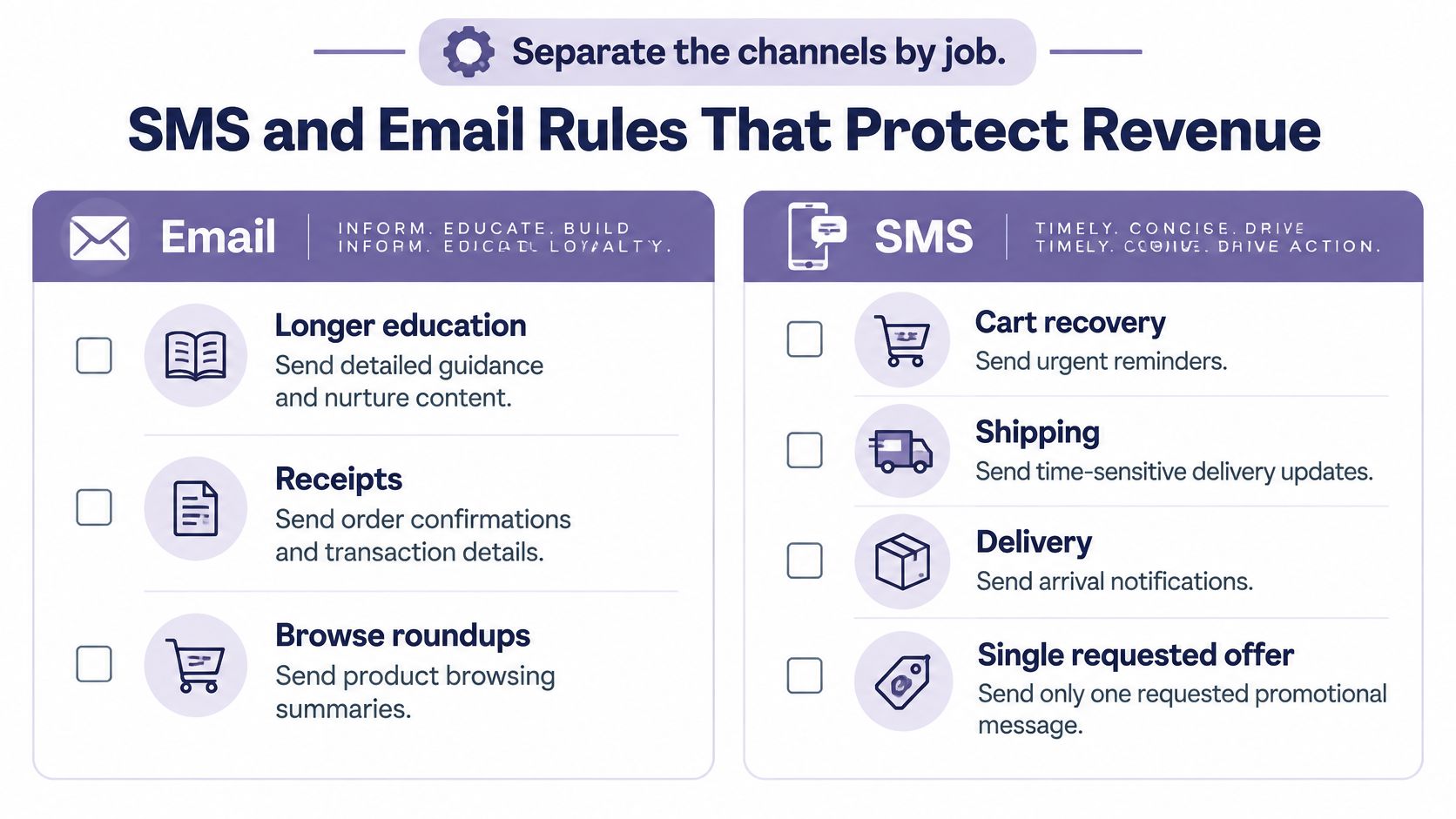
Separate channels by job. Email suits longer education, receipts, and browse roundups. Reserve SMS for moments where a short, timely message helps, such as checkout recovery, delivery information, or a specifically requested offer.
Use this division when assigning messages to channels.
Permission comes before personalization
A checkout phone number isn't marketing permission. For U.S. promotional texts sent using an autodialing system, Bloomreach's TCPA and CTIA guidance describes the general requirement for prior express written consent: a signed agreement that clearly authorizes marketing and identifies the seller.
Use a dedicated opt-in, state the advertising purpose, and retain its timestamp and source. Transactional order and shipping messages operate under a different consent standard, but don't insert a discount into them. Use the TCPA compliance checklist to review capture forms and flow logic with your compliance adviser.
Opt-out handling belongs inside every workflow. The FCC's consent-revocation guidance recognizes reasonable methods and terms including stop, quit, end, revoke, opt out, cancel, and unsubscribe; an opt-out confirmation must contain no marketing.
Suppress further marketing across the sender's campaigns and automations. Don't answer a revocation with a promotional save offer.
A requested coupon also isn't recurring enrollment. ZwillGen's explanation of the FCC order distinguishes an immediate, consented response containing only requested information from an ongoing promotional program, which needs separate affirmative permission.
Give each message a useful job
- Cart curiosity: Offer help with the unfinished checkout rather than assuming a discount is necessary.
- Viewed-product follow-up: Mention the shopper's size only when you know it and can substantiate availability.
- Delivery clarity: Confirm arrival without adding a coupon.
- Early access: Send a relevant launch invitation only to subscribers who opted into that program.
As an operating policy, suppress SMS when email covered the same offer during the previous day. Pause promotional messaging during open returns or refunds, not necessary service updates.
Before launching email, check SPF and DKIM records using MailGenius to identify authentication problems. For a practical SMS walkthrough, use the video below.
Measure clicks through to Shopify checkout completion, rather than awarding revenue to the last message sent. That establishes a traceable conversion path, though it doesn't alone prove incremental sales.
Event Workflows Worth Automating First
A small team should launch a narrow, testable journey before building elaborate branching campaigns. Give each automation a trigger, a message job, and a reason not to send.
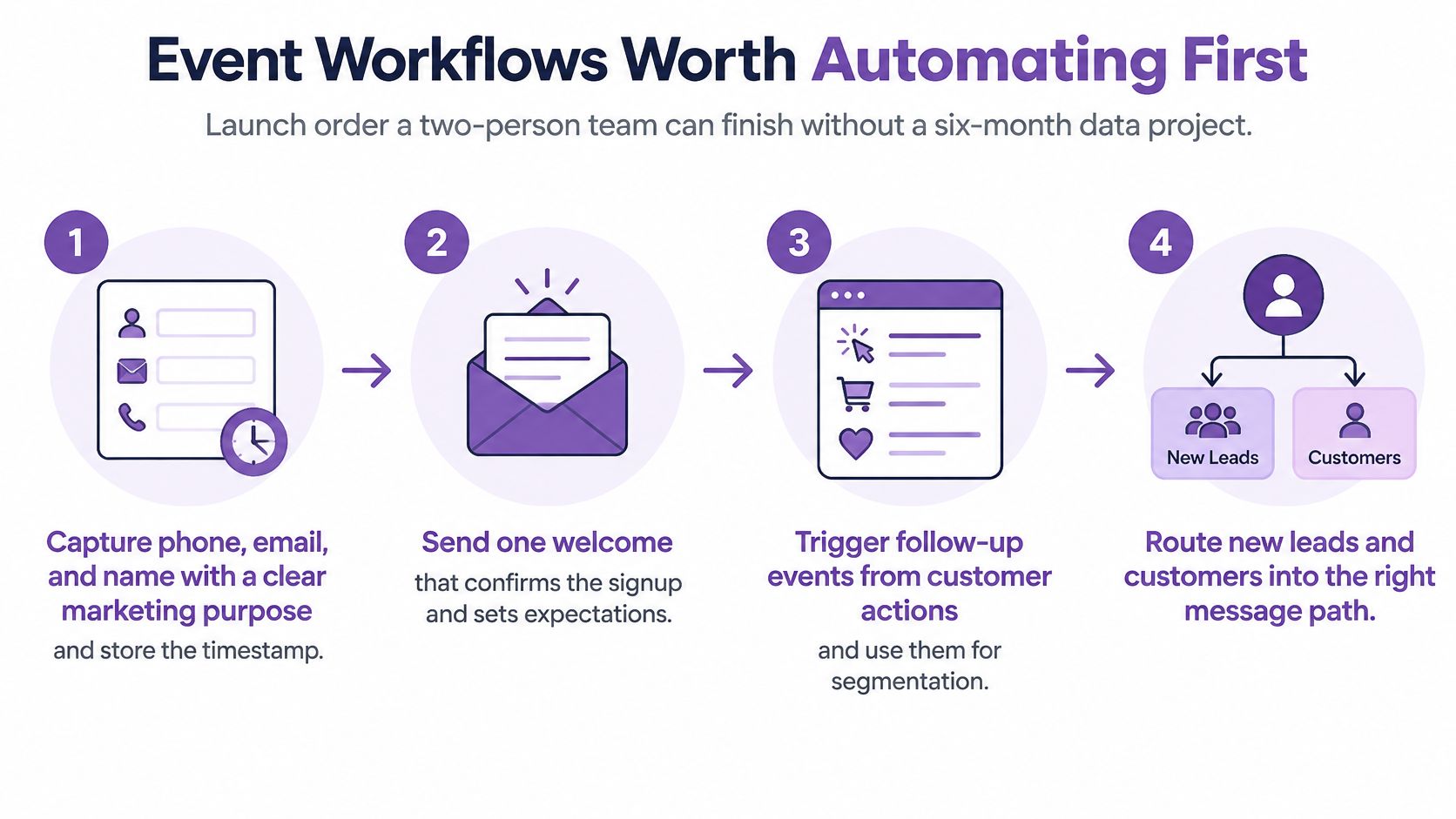
This launch sequence keeps capture, segmentation, and routing connected.
Build the foundation before the follow-ups
Capture with a stated purpose. On form submission, store phone, email, name, permission details, and timestamp. The job is creating a usable subscriber record. Suppress promotional enrollment when permission is missing or ambiguous.
Confirm the welcome. Trigger a welcome after valid signup. State what the person joined and what messages to expect. Prevent repeated welcomes when the same subscriber submits another form or enters through another capture source.
Recover unfinished checkout. Start with a short ladder, with an initial nudge within a few hours as a launch policy. Offer a direct route back to checkout. Stop later touches after purchase, revocation, an unresolved support issue, or an invalid cart.
Send fulfillment information. Shipping and delivery events should generate clear service updates. Remove promotional blocks and suppress duplicate notifications already sent by another connected tool.
Add lifecycle depth only when the basics work
Educate after the order settles. Send use, care, or setup guidance when the buyer can act on it. For consumables, schedule replenishment around the product and customer's purchase pattern. Don't push another purchase while that order is being refunded.
Follow known browsing intent. Use viewed-product events only for identifiable, appropriately consented profiles. A browse follow-up should lose priority when the shopper starts checkout or opens a support ticket. Don't let a lower-intent event interrupt a more important conversation.
Win back with a defined quiet period. Set inactivity relative to the catalog's buying cycle. Compare eligible buyers who receive the message with a suitable holdout group, and judge incremental orders rather than last-click revenue alone. Exclude customers whose unresolved issue explains their silence.
Service clarity beats another promo when the customer is waiting on a return.
More event triggers create more chances to make a bad decision. A refund reminder and a cross-sell can both be technically correct events, but sending them together tells the customer your teams aren't coordinating.
Use an SMTP connection test from mailX when diagnosing email transport problems before blaming the workflow itself. Connection testing is separate from audience eligibility, authentication, and inbox placement.
Document ownership, stopping conditions, and failure alerts in your ecommerce marketing automation plan. Start with welcome, checkout recovery, and shipping or delivery, then add complexity only after the event logs and customer experience agree.
Store Situations and the Right CRM Emphasis
Choose the constraint your store has. A replenishment business and a high-return fashion catalog shouldn't buy software using the same priorities.
CRM emphasis by store situation
| Situation | CRM priority | SMS role | Avoid |
|---|---|---|---|
| New Shopify brand, small team | Fast sync and three live flows | Welcome and cart recovery only | Enterprise seat bundles |
| Repeat consumables | Replenishment timing and identity | Timed refill reminder after delivery | Daily blasts |
| High return rate | Return, exchange, and refund events | Service status, promo only after close | Discount during an open refund |
| Multi-market | One profile, local consent | Market-specific quiet hours | Copied U.S. consent abroad |
| Agency, many stores | Per-brand suppression and logs | Client-separated sends | Shared lists across brands |
Returns change the retention decision
Across more than 13 million returns from 4,000 Shopify merchants, 70% of merchants charged return fees in 2025, up from 65% the previous year, while optimized returns reportedly retained $516 million in revenue, according to the Loop report announcement published by Morningstar.
That doesn't mean charging a fee improves retention. It means the returns experience deserves operational attention, including clear fee explanations, exchange options, and visible refund status.
Say a customer returns a jacket because the fit is wrong. A generic win-back code ignores the reason they're unhappy. A clear exchange path may help them get the right product, while a refund-status update removes uncertainty if they prefer to leave.
Keep operational updates factual. Treat recommendations and incentives as promotional where appropriate, rather than labeling every return-related message transactional.
Retention priority: Resolve the customer's outstanding obligation before asking for another purchase.
Accept the right trade-off
A new Shopify brand should buy speed and simplicity. Favor an easy installation, live audiences, and a manageable launch set instead of enterprise seats that require ongoing administration.
A repeat-consumables store needs reliable identity across devices and sensible refill timing. Broadcast tooling matters less than knowing whether the customer already reordered.
Multi-market stores should accept more setup work in exchange for coherent profiles, local permission rules, and market-specific sending windows. Don't assume U.S. consent wording travels unchanged into another jurisdiction.
Agencies need separate consent logs, sender identities, access permissions, and suppression records per brand. A request affecting a particular client must reach every relevant flow for that client without being indiscriminately copied across unrelated brands.
Pick the row matching this quarter's constraint. Ignore impressive features that don't help you resolve it.
Pick Your CRM Layer and Launch SMS
Keep a CRM that passes your replay. Replace one that can't support a trustworthy sending decision. Documented Shopify objects, acceptable duplicate rates, and event-to-segment latency inside your recovery window matter more than a redesigned dashboard.
A nightly-only sync, blank consent records, or profiles split by storefront are reasons to repair or replace the underlying system. Don't add another marketing suite merely to conceal a broken customer record.
Add execution to a working profile
Attach SMS only when the profile can stop a send after an email, a service message, or an opt-out. Test queued messages as well as immediate triggers. The important question is what happens when customer circumstances change between scheduling and delivery.
At YipSMS, our Shopify installation takes one click, and a first Scratch-to-Win popup and abandoned-cart automation can launch in under 10 minutes. Our 10 prebuilt revenue automations activate with one click, including abandoned-checkout follow-ups at 2 hours, 24 hours, and 48 hours. Message-based pricing and a 14-day free trial let a small team evaluate SMS execution without purchasing enterprise CRM seats.
Treat those follow-up times as configurable campaign decisions, not permission to contact every unfinished checkout. Limit marketing touches to shoppers with recorded SMS opt-in, apply appropriate suppression, and keep shipping texts free of offers.
Make the launch decision measurable
- Verify delivery: Inspect failures and resolve sending problems before expanding volume.
- Follow the purchase path: Review clicks alongside Shopify checkout completion.
- Inspect stopped sends: Confirm purchases and revocations prevent pending promotions.
- Delay broadcasts: Prove targeted flows work before contacting the wider list.
This week, run the replay, then launch a consented welcome and a checkout-recovery flow. Expand when the customer records, send logs, and completed orders support the decision.
YipSMS Inc. offers Shopify SMS capture, live segment syncing, and prebuilt automations for recovery and post-purchase communication. Visit YipSMS Inc. to start a trial, connect your store, and test a consented welcome and checkout-recovery flow against your own customer events.
How this article was made: the YIPSMS team drafts some articles with AI writing tools, then checks pricing, compliance and product details against how YIPSMS actually works before publishing. Spotted something wrong? Tell us through your YIPSMS account.