Pop Up Testing: Lift Shopify Sales with Smarter Offers
At a glance
Pop up testing for Shopify: learn how to compare offers and timing, measure which versions lift conversions, and grow revenue with confidence.
Most Shopify pop up testing advice gets the goal completely backwards. Standard playbooks tell you to swap button colors, tweak a verb in your headline, and crown whichever modal pulls the highest opt-in percentage after a busy weekend. That turns a revenue lever into a signup-rate beauty contest.
A shiny opt-in percentage can still lose you money. An aggressive discount modal shown two seconds after page load might collect plenty of phone numbers from bargain hunters who grab a code, buy once at a thin margin, and reply STOP before your second text ever lands. Real pop up testing measures incremental business value instead. You pit your popup against a clean holdout group, track revenue per exposed visitor, and let downstream profit decide which offer stays live on your store.
Table of Contents
- The Popup Variables Worth Testing
- Measuring Opt-ins, Revenue and Incremental Lift
- How to Run a Popup A/B Test Step by Step
- Testing Triggers Against the Customer Journey
- Keeping Consent and Accessibility Constant Across Variants
- Scaling Tests Across Stores, Markets and Low Traffic
- Pick Your Next Test and Roll Out the Winner
The Popup Variables Worth Testing
Button colors are the least interesting thing you can test on an SMS popup. Changing a submit button from blue to green rarely shifts buyer intent, especially on a mid-size Shopify storefront where traffic is too modest to detect tiny cosmetic lifts. When you collect phone numbers for SMS marketing, six structural levers do the heavy lifting, and each one carries a different level of upside and risk.
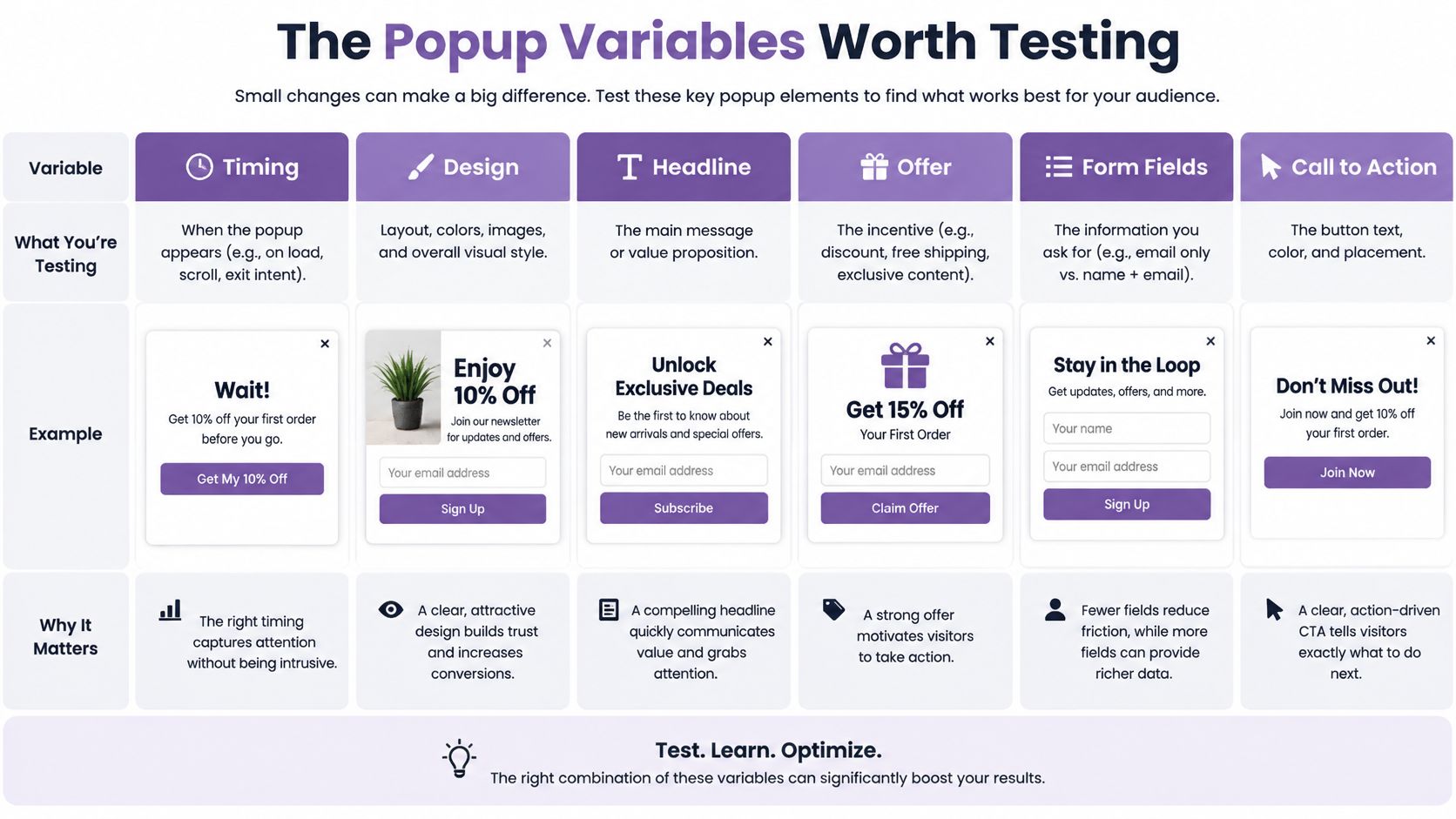
Mapping the Six Core Popup Levers
Before launching an experiment, map out what you're changing and what metric could suffer as a side effect. Shorter forms usually push completion rates up, yet they can pull down verified subscription quality if visitors type throwaway digits just to clear the screen. Likewise, switching from a blanket percentage discount to a shipping perk changes who raises their hand.
Look at how different brands frame value before the cart. Shoppers who balk at delivery fees often react better to clear fulfillment promises, like Rip Van's approach to claiming a shipping guarantee before checkout, than to yet another 10% coupon banner. Pairing the right incentive with the right page gives you a far cleaner test than polishing font weights.
| Variable | Variant A example | Variant B example | Primary metric moved | Watch out for |
|---|---|---|---|---|
| Offer type | 10% off first order | Free shipping on first order | Opt-in rate and 30-day revenue per subscriber | Discount variants can attract one-time bargain hunters |
| Headline | Get 10% off your first order | Unlock early access to new drops | Opt-in rate | Claim must be true or trust drops |
| Form length | Phone number only | Phone, email and first name | Completed opt-ins and verified subscription rate | More fields lower completion but raise list quality |
| Trigger | Appears after 5 seconds | Exit intent on product and collection pages | Opt-in rate and checkout conversion | Early popups can interrupt first-time browsers |
| Visual treatment | Standard modal with product image | Scratch-to-Win reveal with prize tiers | Opt-in rate and engagement | Novelty can spike results that do not repeat |
| Consent framing | Disclosure above the field | Disclosure below the field with unchecked box | Compliant opt-in rate | Legal wording itself must not vary between arms |
| Page placement | Home page popup | Cart and checkout-adjacent popup | Opt-ins per session by page type | Never interrupt payment entry |
Walking Through Practical Variant Choices
Each row in the matrix behaves differently once live traffic hits your store. Treat them as distinct hypotheses rather than a checklist to tweak all at once.
- Offer Type: Compare a percentage discount against free shipping, early access to product drops, or a Scratch-to-Win reveal with weighted prize tiers. Early access often collects fewer numbers than a coupon, yet those subscribers tend to buy at full margin.
- Headline and Value Copy: Keep the offer identical and test how you frame the benefit. A specific promise ("Get Friday's small-batch restock by text") usually beats generic "Join our VIP list" copy because shoppers know exactly what hits their phone next.
- Form Length: Test phone-only capture against phone plus email, or phone plus email and first name. Asking for one field lowers friction, while collecting email and name lets you personalize welcome flows across both channels.
- Trigger and Timing: Contrast a 5-second delay against a 20-second delay, scroll depth, or exit intent on product and collection pages. Exit intent can capture undecided browsers without blocking shoppers who are already moving toward checkout.
- Visual Treatment: Pit a clean standard modal against an interactive Scratch-to-Win foil reveal, or compare a product-led photo layout against a plain text-led card that loads faster on cellular connections.
- Consent Framing: Test whether placing the disclosure above or below the phone field improves readability, while keeping the opt-in control unchecked in both arms.
Variables You Must Never Alter Mid-Test
Not every piece of a popup belongs in an A/B test. You must hold your consent disclosure text and opt-out instructions completely identical between Variant A and Variant B.
Rule of thumb: Never put legal disclosure copy inside your test matrix. If one arm converts better because it buried the opt-out language, you didn't find a winner, you built a compliance liability.
Lock down one final discipline before touching your popup editor: test one major variable per experiment. If you swap from a 10% discount to free shipping and change the trigger from 5 seconds to exit intent in the same round, you won't know which change drove the lift or which one dragged down repeat orders.
Measuring Opt-ins, Revenue and Incremental Lift
Popup testing should answer one question: did this arm create incremental revenue per exposed visitor, against a holdout that never saw the popup? I rank variants on that number, not on whichever signup rate looks prettier in the dashboard.
Published averages still get used as a scoreboard, and they fail that job. Omnisend's 2025 email popup report puts email popups at a 2.1% conversion rate across 1.24 billion displays, collecting 26.4 million email addresses. WiserNotify's popup benchmark compilation cites a Wisepops set of 1 billion displays at a 4.82% average, and an older Sumo study of roughly 2 billion pop-ups at 3.09%. The spread inside one analysis is wider than the gap between those headlines: Luca Tagliaferro's 2026 popup statistics analysis reports a 0.83% median for lead-generation pop-ups and 3.87% for the top 10%.
Those studies mix industries, traffic quality, device mix, targeting rules, and what counts as a conversion (an email submit, a phone opt-in, or a button click). A popup on every page view can stack raw signups and crush its rate. A tight modal can post a high rate on thin volume. Compare your arms on the same denominator, the same exposure cap, and the same completed opt-in definition.
Building an Incremental Measurement Model
A phone number in the list is not profitable consent. A heavy discount can spike SMS signups, then show up as opt-outs and carts that never repeat. The arm with the best opt-in rate is the one that drained margin.
Before a free-shipping threshold or discount incentive is shown to every visitor, check it against average order value. The Cedar & Lily free shipping guide walks through how one clothing store sets that threshold against basket size. Run the same check on your own orders so the offer does not train shoppers to shrink the cart.
Track five metrics together on every test:
- Display-to-Lead Conversion: Verified SMS opt-ins divided by eligible sessions that triggered the popup, reported next to total subscriber count.
- Lead-to-Purchase Conversion: The share of new SMS subscribers who complete an order inside your attribution window.
- Revenue Per Exposed Visitor: Attributed revenue divided by every eligible visitor assigned to that arm. This is the score that combines rate and order value, including people who never opted in.
- Unsubscribe and Complaint Rates: The share of new subscribers who reply STOP or mark messages as spam in the first 30 days.
- 30-Day Repeat-Purchase View: Whether Variant B's subscribers place a second order, or leave after one discounted cart.
A variant can win display-to-lead and still lose revenue per exposed visitor if the orders are smaller or the opt-outs pile up. Read the five together. Do not crown a winner off the first row.
Why You Need a Holdout Group
A clean A/B between two popups still misses shoppers who would have bought with no popup at all. A holdout group withholds the popup from a small slice of eligible visitors so you can see orders that the popup did not create. In Recart's 2025 holdout experiment with Simple Modern, a live popup versus a no-popup holdout lifted overall order conversion by 10.4% at 99% statistical confidence.
On Shopify, reserve about 10% of eligible sessions with a visitor-level cookie or customer tag, suppress the popup for that group only, and count orders from both cohorts on the same attribution window. You give up a thin slice of signups. What you get is proof the popup added sales, rather than harvesting buyers already in motion.
Pre-Registering Your Test and Reporting Results
Write the rules before the first impression. Adobe Experience League's guide to common A/B testing pitfalls sets the bar: a two-arm randomized test, one primary endpoint, sample size planned at alpha = 0.05 and 80% power, a balanced traffic split checked before you read results, and no early stop on a temporary spike. Peeking inflates false positives. Name the secondary safeguards up front (checkout conversion, opt-out rate, revenue per exposed visitor) so a harmful arm cannot be talked into a win after the fact.
Log each finished test in a two-row sheet. Same columns, same definitions, quarter after quarter.
| Test arm | Impressions | Verified opt-ins | Opt-in rate | Revenue per exposed visitor | 30-day opt-out rate |
|---|---|---|---|---|---|
| Control (current popup) | Eligible popup views | Completed SMS opt-ins | Opt-ins / eligible sessions | Attributed sales / exposed visitors | STOP replies / new opt-ins |
| Variant (challenger) | Eligible popup views | Completed SMS opt-ins | Opt-ins / eligible sessions | Attributed sales / exposed visitors | STOP replies / new opt-ins |
The holdout row belongs in the same log even when it has no popup impressions: orders and revenue per exposed visitor for the suppressed slice. That is the baseline the challenger has to beat.
How to Run a Popup A/B Test Step by Step
A higher opt-in rate is not the win. I recommend scoring the popup as an incremental-value test: a holdout that never sees it, judged on revenue per exposed visitor, picks the variant. The taller signup bar can still lose.
You can launch a clean Shopify SMS popup experiment this afternoon. No enterprise analytics team required. These tests usually break in setup. One arm drifts onto a different offer, page, or audience, and the opt-in chart looks settled while the extra sale never appears. If you are still choosing a testing stack, compare features in our breakdown of conversion rate optimization tools for Shopify before you wire the split.
Run it in this order:
- Write the decision rule before any creative. The primary endpoint is revenue per exposed visitor versus the holdout. Use the current popup as the baseline only if you cannot suppress the popup. Count verified SMS subscriptions per eligible session as a diagnostic. Write down whether a signup counts only after double opt-in confirmation.
- Lock every non-test setting across both arms. Keep audience eligibility, traffic split, offer value, display timing, and attribution window identical. Change one factor: headline, incentive, or form length. If you isolate a themed campaign landing page, like a dedicated drop page where shoppers find the Gold Rush styles, restrict both arms to that exact URL so traffic intent matches.
- Check whether store traffic can detect the lift. Estimate the baseline opt-in rate and the smallest relative lift worth the sample. Use the table below for visitors per arm at 95% confidence and 80% power when the control converts at 2%.
- Pick the stopping rule before launch. Use a fixed end date that covers full weekly shopping cycles, and do not end mid-week. If traffic is thin, use a sequential rule you wrote down in advance. Stop opening the significance readout every hour.
- Audit the traffic split after 24 hours. Randomization should sit close to 50/50. A lopsided split usually means a broken tag, a caching conflict, or a script that fired on only one template. That run is invalid.
- Watch the metrics that can veto a signup win. Put unsubscribe rate, complaint rate, and checkout conversion next to signup rate. A variant that adds opt-ins and leaves revenue per exposed visitor flat against the holdout harvested demand you already had. That is a loss.
- Read on the fixed date, then segment. Report conversion percentage and absolute opt-ins. Slice mobile versus desktop and page type so one segment cannot hide a drop in another. Roll the variant out only if revenue per exposed visitor clears the holdout.
| Relative lift to detect | Visitors per variant | Realistic for |
|---|---|---|
| 10% (2.0% to 2.2%) | ~80,700 | Large stores with broad traffic |
| 20% (2.0% to 2.4%) | ~21,100 | Mid-size Shopify stores over several weeks |
| 30% (2.0% to 2.6%) | ~9,800 | Stores with 1,000+ eligible sessions per week |
The sample curve is steep. At a 2% baseline, a 10% relative lift needs over 80,000 visitors per arm. A bolder offer or layout change that can move results by 30% drops the requirement under 10,000 sessions per variant. If you cannot reach that count, test a bigger change, or accept that the opt-in chart will not prove incremental revenue.
Testing Triggers Against the Customer Journey
Copying a 5-second delay from a blog post ignores what your shopper is doing on the page. Timing is a test variable, and the right trigger depends on where hesitation shows up in your funnel.
Before you set a delay or exit trigger, think through why shoppers hesitate right before buying.
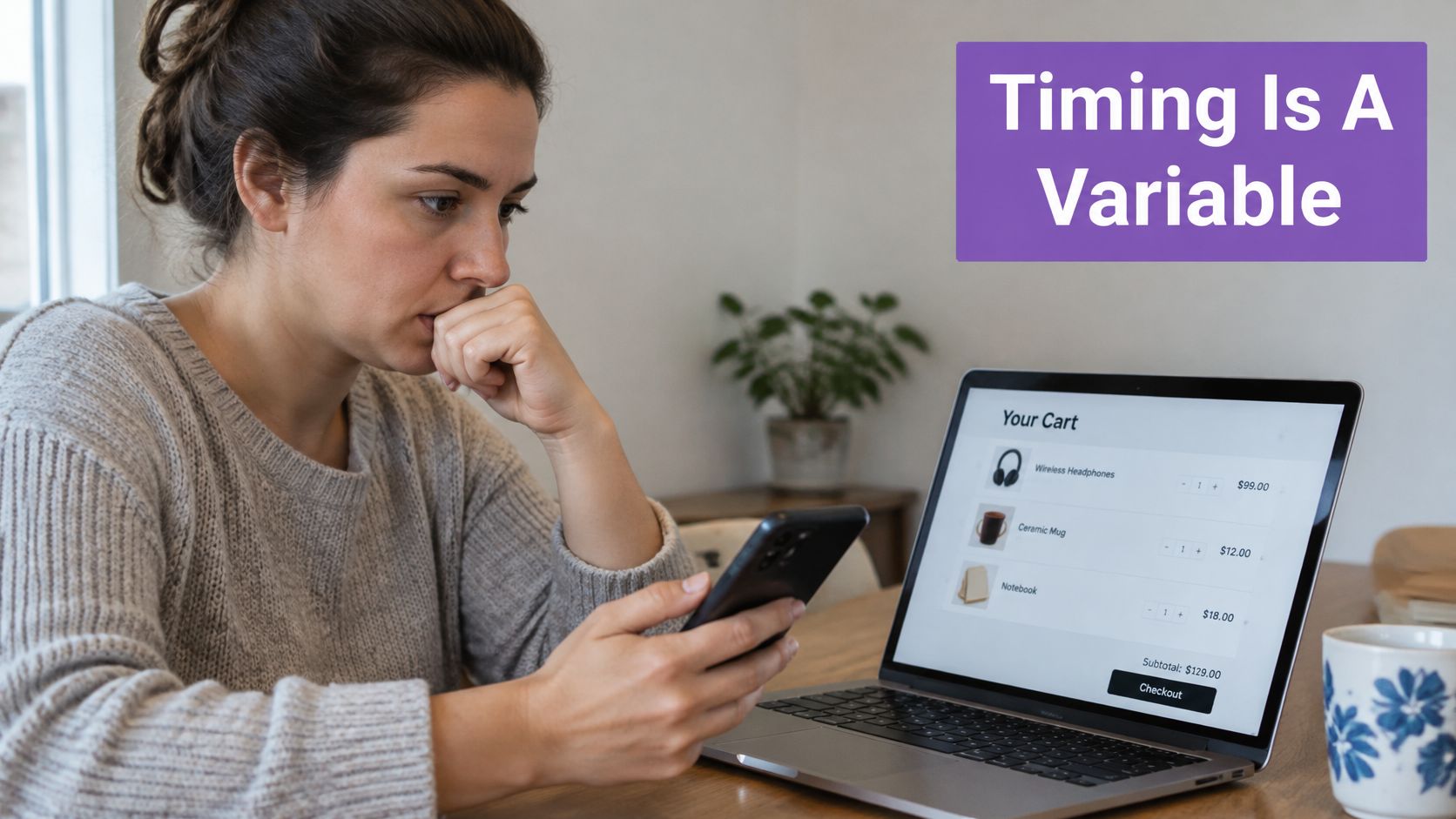
According to Baymard Institute's eCommerce UX statistics, roughly 70% of eCommerce visitors abandon their shopping carts. When shoppers explain why they walked away, 40% point to extra costs like shipping, tax, or fees, 20% cite slow delivery, 19% distrust payment security, and 17% blame a checkout process that feels too long or complicated.
Matching Trigger and Copy to Page Intent
Those friction points tell you exactly what your exit-intent popup should say on product and collection pages. Instead of throwing a generic discount at an undecided shopper, test an exit-intent message that reassures them on shipping costs, dispatch speed, or cart perks, while keeping payment entry completely free of interruptions.
Two popup structures deserve head-to-head testing across your storefront:
- Browsing Visitors (Home and Collection Pages): Test an early value-focused modal triggered after a short delay or scroll threshold, aimed at introducing your brand and offering a first-order perk.
- High-Intent Shoppers (Product Pages and Pre-Checkout): Test an exit-intent or cart-adjacent message focused on delivery clarity or shipping thresholds, and turn all capture popups off once a buyer enters payment details.
Always segment your test results by page type and device. Cart-adjacent pages behave nothing like home pages, and a store-wide conversion average blurs both signals into useless noise. Run mobile and desktop trigger experiments separately, too, because phones lack a hover cursor for classic exit intent and small viewports punish full-screen interruptions. For deeper trigger setups, review our guide to pop-up timing.
Fix the page placement and trigger timing first, then test the message. Changing both at once leaves you guessing which half moved the needle.
See how timing and friction fit together in this short breakdown of popup UX trade-offs.
Keeping Consent and Accessibility Constant Across Variants
Popup testing only counts as an incremental-value test when consent copy and accessibility stay identical across arms. A holdout group and revenue per exposed visitor pick the winner. Signup rate alone does not.
Email popups can bend design conventions with relatively light legal friction. SMS popups cannot. Shrink the disclosure, hide the checkbox, or rewrite the opt-out line on one arm only, and you stop comparing offers. You start comparing who trapped more people, and you also raise the chance of carrier blocks or complaints. Those failures show up later as weak delivery and lost revenue, not as a pretty opt-in chart.
Locking Down SMS Consent Requirements
Under U.S. rules detailed in SignalMash's 2026 TCPA SMS compliance guide, marketing text messages require prior express written consent. A prechecked box or implied permission is not enough. Put the disclosure beside the phone field, leave the opt-in control unchecked, and carry the same six elements in every test arm:
- Business Identity: State the brand name sending the texts.
- Message Types: Say whether subscribers get promotional alerts, cart reminders, or restock notifications.
- Frequency Disclosure: Note that message frequency varies.
- Carrier Rates: State that message and data rates may apply.
- Opt-Out Instructions: Give clear STOP instructions so subscribers know how to leave.
- No Purchase Condition: Confirm that agreeing to texts is not a condition of buying.
Keep the submission record, the exact timestamp, and the disclosure version for every opt-in. That is the proof of what each subscriber agreed to. Wire the operational guardrails before test traffic starts. As summarized in MessageIQ's breakdown of SMS marketing laws, opt-out requests must be honored within 10 business days, marketing texts should only go out between 8 a.m. and 9 p.m. in the recipient's local time, and a STOP reply must land on a suppression list with the opt-out event logged. Use the TCPA compliance checklist for Shopify stores to check every field before a new variant goes live.
YipSMS's popup builder captures phone, email, and name in one tap with TCPA-compliant consent and Privacy Policy links built in, while its compliance setup covers automatic opt-out language, double opt-in flows, and consent logs. Change headlines, offers, and layouts. Leave the consent block alone. That parity is what makes revenue per exposed visitor comparable between the variant and the holdout.
Accessibility Guardrails That Visual Tests Often Break
Creative variants break usability in ways a headline opt-in percentage hides. A Scratch-to-Win modal or custom overlay can lift desktop taps and still trap keyboard users, or cut the close button off a compact phone screen. Those shoppers never had a fair chance to accept or refuse, so their "no" never enters the revenue math.
Check four basics on both Variant A and Variant B before you open traffic:
- Visible Close Control: Place a high-contrast dismiss icon in a predictable corner so shoppers are not stuck.
- Keyboard Focus Management: Keep Tab focus inside the open dialog, allow Escape to dismiss it, and return focus to the page when it closes.
- Small-Screen Legibility: Keep body copy and disclosure text large enough to read on a phone without pinching.
- Balanced Choice: Make saying no as clear and easy as accepting the offer. Do not bury the dismiss control.
Compliance insight: Fewer, clearer prompts often bring in fewer raw phone numbers on day one, yet beat aggressive modals on deliverability, opt-out rate, and later revenue.
I scale the cleaner variant when revenue per exposed visitor beats the holdout, even if the immediate signup rate is a bit lower. A higher opt-in number that also raises opt-outs or blocks delivery is not a win. It is a test that never held the conditions constant.
Scaling Tests Across Stores, Markets and Low Traffic
The textbook two-arm A/B test breaks down fast once you step outside a single high-traffic U.S. storefront. Low session volume, international privacy laws, agency portfolios, and repeat visitors each force a specific adjustment to how you design and read experiments.
Adjusting for Low Traffic Without Guessing
Small Shopify stores rarely reach 20,000 eligible sessions per variant inside two weeks. Testing two nearly identical headlines on modest traffic guarantees inconclusive noise, and declaring victory after 35 signups bakes random luck into your store default.
Test bold structural swings instead of micro-tweaks: a 10% coupon versus a free-shipping perk, or a standard modal versus an interactive Scratch-to-Win game. Bigger creative gaps produce measurable separation on fewer sessions, which is exactly what a low-traffic store needs. Pair those larger changes with a pre-planned sequential stopping rule, and pool evidence across comparable non-holiday traffic periods so seasonal spikes don't warp your baseline.
Patience is the trade-off here. A low-traffic test may run a month or longer before revenue per exposed visitor separates cleanly, and cutting it early because opt-ins "looked good" is how losing variants end up as store defaults.
Separating Multi-Store and Agency Portfolios
If you manage pop up testing across five client stores or multiple sister brands, standardize the test template (same hypothesis, same safeguard metrics, same holdout rule) while keeping every store's results strictly isolated. Never pool conversion data across separate Shopify storefronts. Paid social traffic on a streetwear drop behaves nothing like organic search traffic on a specialty coffee store, so blended numbers hide what worked for each audience.
A shared template still pays off. When every store runs the same holdout percentage and the same measurement window, you can compare relative lift across clients without merging the raw data that would contaminate each readout.
Handling Multi-Market Consent and Language
Translating a U.S. popup word-for-word for European or Canadian shoppers creates both legal risk and messy data. According to Henkan Partners' e-commerce user consent analysis, consent requests across jurisdictions increasingly require a clear, affirmative choice where refusal is just as easy as acceptance, and closing a pop-up doesn't necessarily count as valid consent in some regions. Segment tests by country and test regional consent layouts separately so one market's compliance rules don't distort global readouts.
Segmenting Returning Visitors and Devices
First-time browsers and loyal repeat buyers respond to completely different prompts. Suppress your acquisition popup for anyone already subscribed, cap impressions for visitors who dismiss it, and split first-time versus returning visitors in your final analysis.
Run the same discipline across devices. Conversion benchmarks disagree sharply by screen size, and mobile pop-ups frequently convert at a different rate than their desktop counterparts in the same store. Evaluate mobile and desktop separately so a mobile layout win doesn't mask a desktop checkout drop. This matters most for interactive formats: a Scratch-to-Win modal that feels natural on a phone touchscreen can behave very differently behind a mouse and keyboard.
Keeping Multi-Channel Attribution Clean
Scaling tests across devices, stores, and entry points gets messy fast when popup leads, QR signups, and keyword opt-ins live in disconnected silos. In YipSMS, every subscriber opt-in collected from a popup is timestamped and logged, and every opt-in from popup, scratch, keyword, AI chat, QR code, or CSV is dual-written into a master 'All Customers' list. Clean, unified logging stops double-counting and makes cross-channel revenue attribution trustworthy when you expand your testing calendar.
That unified record is what makes the incremental-value frame workable at scale. Without it, a holdout comparison tells you nothing, because you can't verify whether the buyer in your exposed group already existed in your list from a keyword opt-in last month.
Pick Your Next Test and Roll Out the Winner
Once your experiment hits its pre-registered end date and beats control on both opt-in performance and revenue per exposed visitor, act on the data immediately.
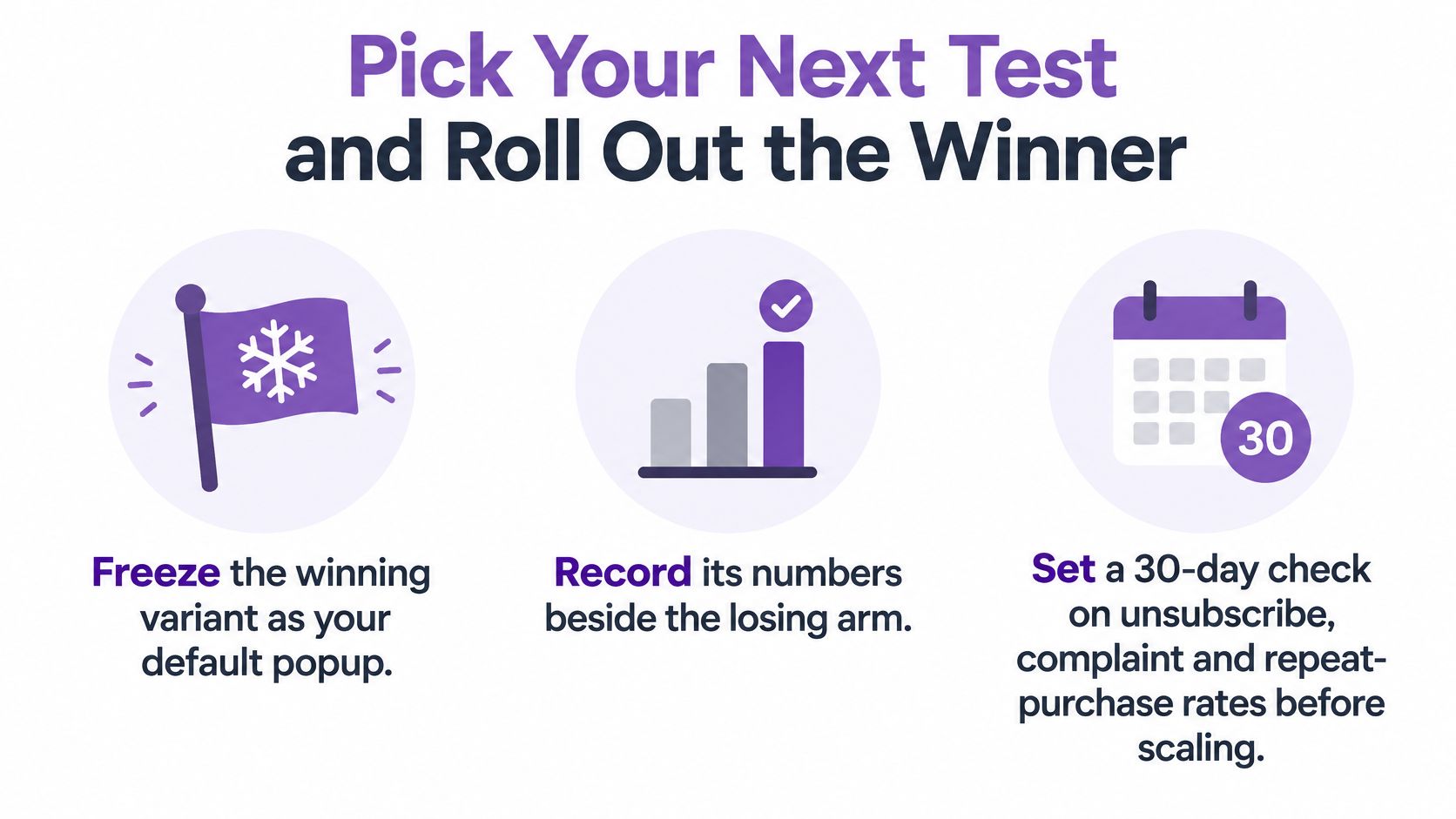
Freeze the winning variant as your store's default popup, archive its metrics right beside the losing arm in your testing log, and calendar a 30-day review of unsubscribe, complaint, and repeat-purchase rates before calling the lift permanent. Keep your holdout group active during rollout so you can confirm the incremental revenue holds up under everyday traffic.
If the challenger boosted raw signups yet failed to beat control on revenue per exposed visitor or list health, keep your control live. A clean loss that protects your margin is a good outcome, not wasted effort. Set realistic expectations for your roadmap, too: at a 2% baseline, a strong real-world win is a clean 20% to 30% relative lift in opt-in rate, not an overnight doubling.
From there, queue your next test on the variable sitting directly next to the one you just settled. Once you lock in your winning offer type, test form length; once you nail page trigger timing, test the headline. If you want to put this framework to work quickly on Shopify, YipSMS installs in one click, lets you launch your first Scratch-to-Win popup and abandoned cart automation in under 10 minutes, and backs your capture flow with prebuilt automations including Popup Subscriber Welcome, Shipped Notification, Delivered Notification, AI Chat Response, Keyword Opt-in Reply, and Shopify Segment Entry, all available to test on a 14-day free trial. Pick one variable, lock your holdout, and start the clock.
Ready to turn your Shopify popup tests into measurable SMS revenue instead of vanity opt-in counts? YipSMS Inc. gives eCommerce brands a drag-and-drop popup builder, compliant consent logging, prebuilt cart recovery and post-purchase automations, and real-time analytics starting with a 14-day free trial. Start running smarter SMS popup experiments on your store today at YipSMS Inc..
Links referenced in this article
- claiming a shipping guarantee before checkout
- Omnisend's 2025 email popup report
- WiserNotify's popup benchmark compilation
- Luca Tagliaferro's 2026 popup statistics analysis
- Cedar & Lily free shipping guide
- Recart's 2025 holdout experiment with Simple Modern
- Adobe Experience League's guide to common A/B testing pitfalls
- find the Gold Rush styles
- Baymard Institute's eCommerce UX statistics
- SignalMash's 2026 TCPA SMS compliance guide
- MessageIQ's breakdown of SMS marketing laws
- Henkan Partners' e-commerce user consent analysis
YIPSMS publishes educational articles, including AI-assisted content supplied through Outrank. Our internal team reviews Outrank articles for accuracy before publication. Pricing and requirements can change; check current YIPSMS pricing and official guidance before acting. Compliance content is general information, not legal advice. Spotted something wrong? Tell us through your YIPSMS account.