Pop Up Timing for SMS Signups: How to Test Smarter
A popup shown after visitors had viewed two pages collected 173% more email addresses than the immediate version in an analysis of 50 major retailers. That result should change how you think about pop up timing. Timing isn't a cosmetic setting you pick once in a builder. It's the moment you ask a stranger for a phone number, and the quality of that consent depends on whether they've seen enough value to trust you with it.
For SMS, the margin for error is smaller than with email. A phone number feels personal, a bad first text gets a STOP reply fast, and a subscriber who joined only for a discount can cost you more than they're worth. That's why I would judge every timing decision by revenue per visitor, unsubscribe rate and downstream purchases, not by raw signups. The benchmarks below give you sensible starting windows. Your own test, segmented by device and traffic source, gives you the answer for your store.
Table of Contents
- Starting Delay Windows to Test First
- Metrics That Reveal the Real Winner
- Set Up and Launch a Timing Test
- Mobile Timing That Keeps Products Visible
- Consent Wording That Protects Your Signups
- Sending Windows and Quiet Hours for Welcome Texts
Starting Delay Windows to Test First
Start with 6 to 10 seconds as your default challenger. In Omnisend's analysis of 1.24 billion popup displays, popups shown 6-10 seconds after page load converted at 2.4%, compared with 1.9% for popups displayed within the first second, a relative improvement of approximately 26%. Performance then faded, with popups shown after 31-60 seconds converting at 1.8%.
A separate benchmark covering approximately 1 billion displays in that same summary reported its highest conversion rate, 6.45%, for popups appearing after 11-15 seconds. Its corresponding rates were 4.16% for immediate popups, 5.93% after 1-5 seconds, and 5.98% after 6-10 seconds. The absolute percentages differ sharply between the two datasets, almost certainly because each one defines conversion, traffic mix and popup format differently. Don't average them. Read the pattern they share instead.
How to Read the Two Benchmarks
Reported popup conversion by delay window
| Delay window | Omnisend conversion | Second benchmark conversion | What it means |
|---|---|---|---|
| Immediate, 0-1 seconds | 1.9% | 4.16% | Baseline most stores start with |
| 1-5 seconds | Not reported for this window | 5.93% | Modest gain over immediate in the second benchmark |
| 6-10 seconds | 2.4% | 5.98% | Best default window in Omnisend data |
| 11-15 seconds | Not reported for this window | 6.45% | Highest in the second benchmark, so test as challenger |
| 31-60 seconds | 1.8% | Not reported for this window | Performance declines at longer delays |
Both datasets rank the immediate popup last or near last, and both put a short delay ahead of it. That's the usable finding. 6-10 seconds is the sensible default because it's the peak in the larger dataset and nearly tied for the lead in the second one. 11-15 seconds is the challenger worth testing against it, since it's where the second benchmark peaked.
Practical rule: Avoid interrupting visitors at the instant of arrival, but don't assume waiting longer always improves results.
The immediate popup is the most common setting in practice, which makes it the baseline to beat, not a safe choice. Common doesn't mean effective, and merchants copy each other's defaults constantly. If your current popup fires on page load, you haven't made a timing decision. You've inherited one.
For a Shopify store collecting SMS subscribers, test 5, 10 and 15 seconds as clean, settable variants rather than trying to replicate benchmark windows exactly. Confirm the winner against your own traffic, device mix, acquisition channels and page type before you commit. A paid social visitor on a product page and an organic visitor on your homepage arrive with different intent, so a single storewide number may not survive segmentation. Use these windows as starting points, then let your data settle it.
Metrics That Reveal the Real Winner
A popup timing variant can collect more phone numbers and still produce less value. Judge each trigger by what happens after the signup: purchases, revenue per visitor, unsubscribes and signs of interruption.

The Reach Versus Satisfaction Trade-off
Early popups can reach more visitors before they leave, but some shoppers dismiss them without reading. Retailer research summarized in Convert's guide to A/B testing popups found that popups shown within 15 seconds were closed at roughly an 86% rate and were associated with higher bounce. Delaying them to 15-45 seconds reduced closure to 61% and lowered bounce by 14%. These figures come from a particular research summary, so treat them as context, not a forecast for your store.
A high opt-in rate can hide a poor trade-off. Check purchases and revenue alongside signup volume.
Metrics to Record for Every Variant
- Opt-in rate: Submissions divided by popup impressions. Use the same impression and submission definitions for every variant.
- Unsubscribe rate in the first 30 days: Unsubscribes divided by new subscribers in that period. A higher rate can signal lower-intent signups.
- Downstream purchase rate and revenue per subscriber: Purchases and revenue from subscribers, measured over the same follow-up period for each variant.
- Revenue per visitor: Revenue attributed to the tested audience divided by its visitors. This shows whether extra signups are translating into store revenue.
- Dismissal rate and bounce rate: Dismissals divided by popup impressions, and bounced visits divided by visits. Compare both across variants as signs of interruption.
Suppose a challenger produces 20% more signups in a hypothetical test, but its unsubscribe rate is 40% higher and revenue per visitor stays flat. Keep the control: the extra phone numbers did not generate more value, and the higher unsubscribe rate points to a worse subscriber experience.
Timing test results log
| Variant | Opt-in rate | Revenue per visitor | Unsubscribe rate |
|---|---|---|---|
| Control, 0-1 seconds | Submissions ÷ popup impressions | Revenue ÷ visitors | Unsubscribes within 30 days ÷ new subscribers |
| Challenger, 6-10 seconds | Submissions ÷ popup impressions | Revenue ÷ visitors | Unsubscribes within 30 days ÷ new subscribers |
Use the same attribution window and calculation for both rows. Review your SMS campaign analytics alongside Shopify revenue, then apply one decision rule consistently: a timing change wins when it improves subscriber quality and revenue per visitor without worsening dismissal or bounce signals. A larger signup count alone is not enough.
Set Up and Launch a Timing Test
A useful timing test changes one variable: when the popup appears. Keep the audience, offer, copy, design and form fields consistent so any difference in results has a clear explanation.
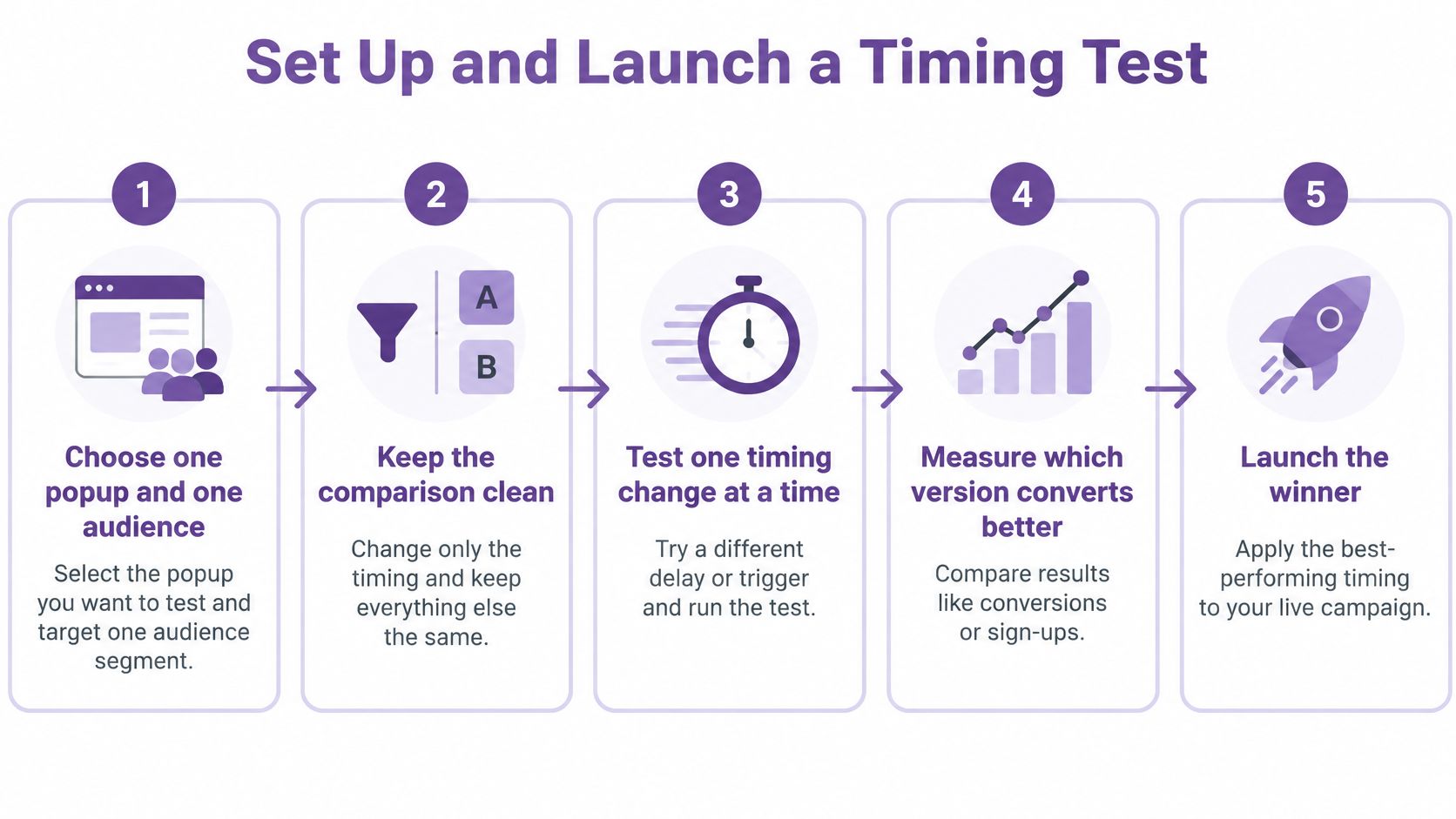
The Seven Setup Steps
- Choose one popup and one audience. Start with a single signup popup shown to a defined group, such as visitors who have not subscribed. Include the same device types in each variant unless device behavior is the specific question you're testing.
- Build the variants. Set an immediate control at 0–1 seconds, then test 6–10 seconds, 10–15 seconds, 20–30 seconds, and an engagement trigger such as 50% scroll or exit intent. Omnisend's analysis of 1.24 billion popup displays reported a 2.4% conversion rate for popups shown after 6–10 seconds, compared with 1.9% for immediate popups. Treat those figures as a starting point, not a promise for your store.
- Suppress the wrong people. Exclude existing subscribers, recent purchasers and visitors who have already dismissed the popup. Otherwise, repeat exposure can skew the comparison and frustrate shoppers.
- Split traffic randomly and change nothing else. Keep the offer, copy, design, discount and form fields identical. Use conversion rate optimization tools for clean split tests rather than swapping settings by day, which can confound timing with weekday effects.
- Set your measurement rules before launch. Record impressions, form completion rate, dismissal rate, bounce rate, downstream purchase rate and revenue per visitor. Decide in advance how you'll judge the results, rather than choosing a success metric after seeing which variant it favors.
- Run a full cycle and don't call it early. Include weekdays and a weekend, and wait until each variant has enough impressions for your chosen statistical test or confidence interval to assess the difference. An early lead may be noise.
- Segment before you decide. Compare results by device and acquisition source. A timing variant can perform well overall while losing among the shoppers or traffic sources that matter most to your store.
Timing variants to test against the control
| Variant | Trigger | What It Tests |
|---|---|---|
| Control | Immediate, 0–1 seconds | Baseline opt-in rate |
| Short delay | 6–10 seconds | Whether a brief pause lifts signups |
| Mid delay | 10–15 seconds | Whether waiting longer attracts more engaged subscribers |
| Late delay | 20–30 seconds | Whether waiting too long loses visitors |
| Engagement trigger | 50% scroll or exit intent | Whether visitor behavior beats a fixed timer |
Checks Before You Press Launch
Confirm that the consent wording is final and each opt-in will be timestamped and logged. YipSMS's popup builder captures phone, email and name in one tap, with TCPA-compliant consent and Privacy Policy links built in. Then check the mobile layout and confirm welcome texts are scheduled for the appropriate sending window.
Choose a winner based on purchase outcomes and subscriber quality, not signup rate alone.
After launch, use real-time analytics to monitor delivery, failures, clicks and conversions as they happen. Set a review date about a month out, then revisit unsubscribe rate and revenue per subscriber. Changes in traffic mix can change how a timing variant performs, so reassess before treating a past winner as permanent.
Mobile Timing That Keeps Products Visible
Delaying a full-screen overlay doesn't make it friendly. If the popup still covers the product image, price and add to cart button when it lands, you've only postponed the interruption. On a phone, the screen is the whole store, so format matters as much as the timer.
This checklist shows the visibility standards your mobile popup has to meet.
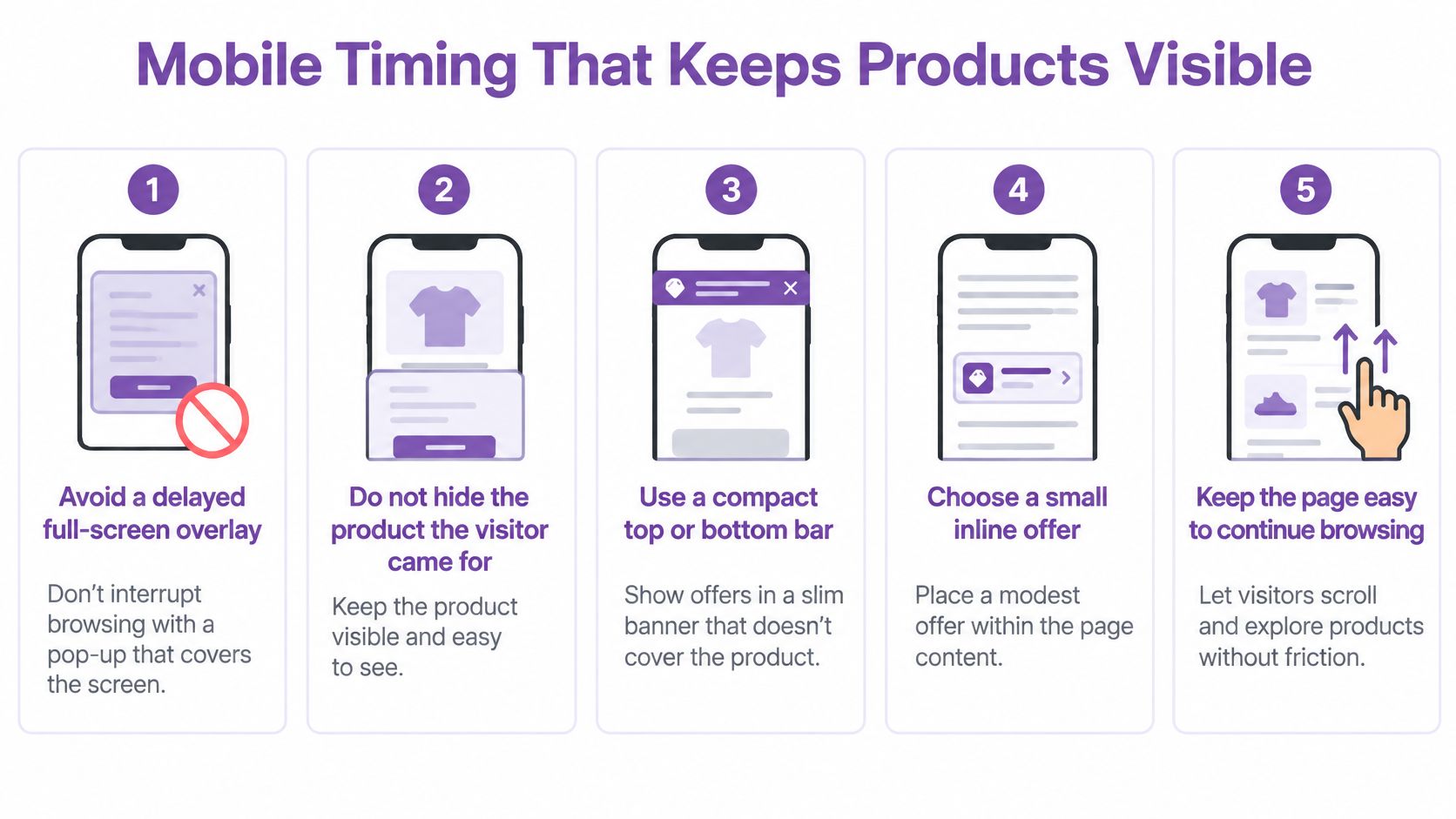
Format Comes Before the Timer
Google's interstitial guidance targets overlays that obscure the main content immediately after a user arrives from search, as explained in Scratcher's mobile popup best practices. The safer implementation is a compact top or bottom bar, a small slide-in, or a user-initiated modal that leaves product content visible. A teaser a visitor taps to open earns the full form. A full-screen block they have to escape does not.
There's no published universal delay or scroll threshold that makes an overlay safe. Treat timing as a guardrail, not a guarantee, because an engagement delayed overlay can still harm the experience if it hides what the visitor came for.
The Mobile Build Checklist
- Reserve layout space or animate cleanly. The popup shouldn't shove page content around when it appears. Layout shift makes people tap the wrong thing and hurts your page experience signals.
- Trigger after meaningful engagement. Use scroll depth or time on page so the visitor has seen the product before you ask for anything. On product pages, a scroll trigger usually reflects interest better than a raw timer.
- Make the close control obvious. Give it a touch target of at least 44x44 pixels and place it where a thumb expects it. A close button people can't find converts annoyance into abandonment.
- Test on real iOS and Android devices. Check accidental taps, what happens when the keyboard opens over the form, and whether the phone number field triggers the numeric keypad. Emulators miss most of this.
- Track mobile separately. Measure mobile conversion, abandonment after display, close latency, Core Web Vitals and organic landing page performance alongside signup rate.
A rise in opt-ins is a failure if it reduces product interaction, checkout progression or search traffic.
Apply the short rule when you review results. If the popup covers the product, fix the format before you adjust the timer. Shrink it to a bar, move it to a slide-in, or make it user initiated. Only then fine tune whether it appears at 8 seconds or 12. Merchants often spend weeks arguing about two seconds while shipping a form that hides the buy button. Solve the bigger problem first.
Also give cart and checkout a non-interruptive alternative or nothing at all. A visitor entering payment details has already converted. Interrupting that moment to ask for a phone number risks the sale you already have for a subscriber you might get.
Consent Wording That Protects Your Signups
SMS consent is its own consent. The UK Information Commissioner's Office guidance on electronic marketing says valid consent requires a clear positive action, such as ticking an opt-in box, and must identify both the organization and the communication type. Consent to email, phone calls or general marketing does not automatically cover text messages. Bundling SMS into a vague marketing checkbox leaves you with numbers you can't safely text.
Wording the Popup Must Carry
- An unchecked SMS specific checkbox or an equivalent affirmative action, never pre-ticked.
- A clear statement that the visitor agrees to receive marketing texts from your store, named on the form.
- Message frequency and automation disclosure, so subscribers know messages recur and automated technology may send them.
- A statement that consent is not required to buy, placed where the visitor can read it.
- Opt-out instructions, including how to stop messages with STOP, plus how their information will be used.
Our TCPA compliance checklist walks through how these elements fit together for US campaigns. Whatever jurisdiction you sell into, the principle holds. The subscriber should be able to tell, from the popup alone, exactly what they agreed to.
The discount needs care too. A 10% offer is a legitimate incentive, but it must never make marketing consent look mandatory for completing a purchase. If a shopper believes they can't check out without joining your text list, that consent is compromised and the complaints will follow.
Keep the Proof and Separate the Purposes
Store a record for every subscriber covering the exact wording shown, the timestamp, the phone number and the submission source. When a subscriber disputes a text six months later, that record is your answer. A signup count without a consent log is a number you can't defend.
Then draw a hard line between channels. The ICO guidance for small organisations on direct marketing distinguishes marketing consent from transactional contact details, and its limited soft opt-in requires details collected directly during a sale or expression of interest, only similar products promoted, marketing use explained at collection, and an opt-out offered at collection and in every message. So a phone number typed into checkout for delivery updates does not join your promotional list automatically.
Build separate copy and separate controls for shipping notifications and marketing texts. Your popup timing then targets only visitors who actively opted in to marketing messages, while operational messages keep their own purpose. That separation also protects deliverability, because people who expected a delivery update and received a flash sale are the ones who report spam.
Sending Windows and Quiet Hours for Welcome Texts
Say your popup captures a signup at 11:30 p.m. The visitor expects their discount code, and your automation wants to send it instantly. Don't. Signup capture and message delivery are separate compliance events, and conflating them is how stores text people at midnight.
The Window That Governs the Send
For US SMS campaigns, EZ Texting's summary of SMS marketing regulations puts the practical sending window at 8 a.m. through 9 p.m. in the recipient's local time zone, with messages outside that period creating telephone solicitation compliance risk. So the welcome text waits until the subscriber's morning. The signup is captured, consented and logged tonight. The code arrives when they're awake and able to shop, which is better commercially anyway.
Apply the same rule to abandoned cart reminders, promotional broadcasts and scheduled campaigns. Use the recipient's stored time zone or a reliable location signal, not your headquarters time. A store based in New York sending at 8 a.m. Eastern is texting California subscribers at 5 a.m., and headquarters convenience isn't a defense.
When the Time Zone Is Unknown
Default to a conservative daytime window. If you can't place the subscriber, hold the message until a time that's daytime across the regions you serve. A few hours of delay on a welcome code costs you little. A 3 a.m. text costs you the subscriber and possibly a complaint.
- Queue late night signups for the next allowed window instead of sending on capture.
- Suppress scheduled sends during quiet hours at the campaign level, not by manual checking.
- Confirm the time zone field is filled at signup, and backfill it from the shipping address at first purchase.
- Keep the consent record alongside each queued message, so the audit trail covers both events.
Pop up timing and sending timing meet here. You optimized the moment of the ask so the visitor felt respected enough to say yes. Honoring quiet hours protects that yes. A subscriber acquired at the right second and texted at the wrong hour is still a subscriber you've annoyed, and they'll judge your program by the text, not the popup.
Set your popup delay, capture consent you can prove, and queue the welcome text for the right local hour, then measure revenue per visitor instead of chasing signup counts. YipSMS Inc. gives Shopify stores a popup builder with configurable timing, timestamped opt-in records and timezone aware campaign delivery, so you can run the test above and act on the result. Start your first timing variant today and let your own traffic pick the winner.
How this article was made: the YIPSMS team drafts some articles with AI writing tools, then checks pricing, compliance and product details against how YIPSMS actually works before publishing. Spotted something wrong? Tell us through your YIPSMS account.