Real Time Data: What It Is and How Stores Use It
Most Shopify merchants know exactly how the night went by 9 a.m. You open the dashboard, see 34 abandoned checkouts from the last 12 hours, and start building a recovery campaign for people who already bought the same thing somewhere else at 10 p.m. The numbers are accurate. They're just too late to change anything.
That gap between what happens in your store and what your tools can act on is what real time data is about. Not dashboards that refresh faster, and not a bigger analytics stack. It's the difference between a message that arrives while a shopper is still deciding and one that arrives after the decision is made. The idea is simple once you see it from a single cart event, and the hard part is deciding where speed is worth paying for, how to measure whether you got it, and when a text stops being helpful and starts feeling like surveillance.
Table of Contents
- What Real Time Data Means in Plain Terms
- How Real Time Data Moves From Event to Action
- Measuring Latency and Freshness Without Fooling Yourself
- Which Store Events Deserve Real Time
- Consent and Opt-Out Rules Before You Send
- Turning Real Time Signals Into SMS Triggers
- Where Real Time Personalization Loses Trust
- Prove One Trigger Over Two Weeks
What Real Time Data Means in Plain Terms
At 11:04 p.m. a shopper adds a linen shirt to her cart, opens checkout, sees a $9 shipping charge, and closes the tab. Whether your store ever speaks to her again depends on how quickly that checkout event reaches the tool that can send a text. If it arrives at 11:06, you can mention free shipping over $75 while she's still holding her phone. If it arrives at 8 a.m. tomorrow, you're writing to someone who solved her problem hours ago.
Real time data is information that is captured, processed and made usable while the event it describes still matters. Freshness is part of it, but only part. An event log nobody can query in time isn't real time data, it's a diary.
The analogy that makes this click is a scoreboard. A live scoreboard updates as the game happens, and the coach changes the line-up because of what it shows. A newspaper printed Sunday morning reports the same facts with the same accuracy, and it's useless for a decision you have to make in the third quarter. Both are data. Only one is real time. The same shopper who left at 11:04 is your third quarter.
You'll meet four timing types in practice, and merchants usually blur the middle two together. The delay ranges below are planning estimates rather than promises from any vendor, so treat them as a starting point for your own measurements.
Data timing types compared
| Timing type | Typical delay | Online store example | Best used for |
|---|---|---|---|
| Batch data | hours to one day | Yesterday's sales report | Monthly planning and budgets |
| Near-real-time data | 1 to 15 minutes | Hourly campaign performance | Pacing and inventory checks |
| Real-time data | 1 to 5 seconds | Cart and checkout events | Triggered SMS and alerts |
| Ultra real-time data | milliseconds | Live price or bid changes | Automated pricing decisions |
Each row up costs more than the one above it, in infrastructure, in monitoring, and in the number of places a message can go wrong. That's why the useful question is never "how do I get real time data" but "which events earn it."
Scale explains why this stopped being a niche topic. IDC estimated that real-time data was about 15% of the global datasphere in 2017 and projected that share would approach 30% by 2025, while the total datasphere was forecast to grow from roughly 23 zettabytes to 175 zettabytes. Applied to those shares, that implies real time data rising from about 3.45 zettabytes to roughly 52.5 zettabytes. IDC also forecast more than 150 billion connected devices worldwide by 2025, most of them generating data in real time (IDC Data Age whitepaper). Volume isn't the point. The point is that cart events, delivery scans and product views are now cheap to produce, and the only open question is which ones your store is built to use.
The one-day test: would a delay of one day make this signal worthless? If hearing about the event tomorrow morning changes nothing about what you'd do, it doesn't need real time. If tomorrow morning is too late to act, it does.
How Real Time Data Moves From Event to Action
Every text a shopper receives from a store, good or annoying, traveled the same six stages. Each one adds delay, and the shopper experiences only the total, not your internal architecture.
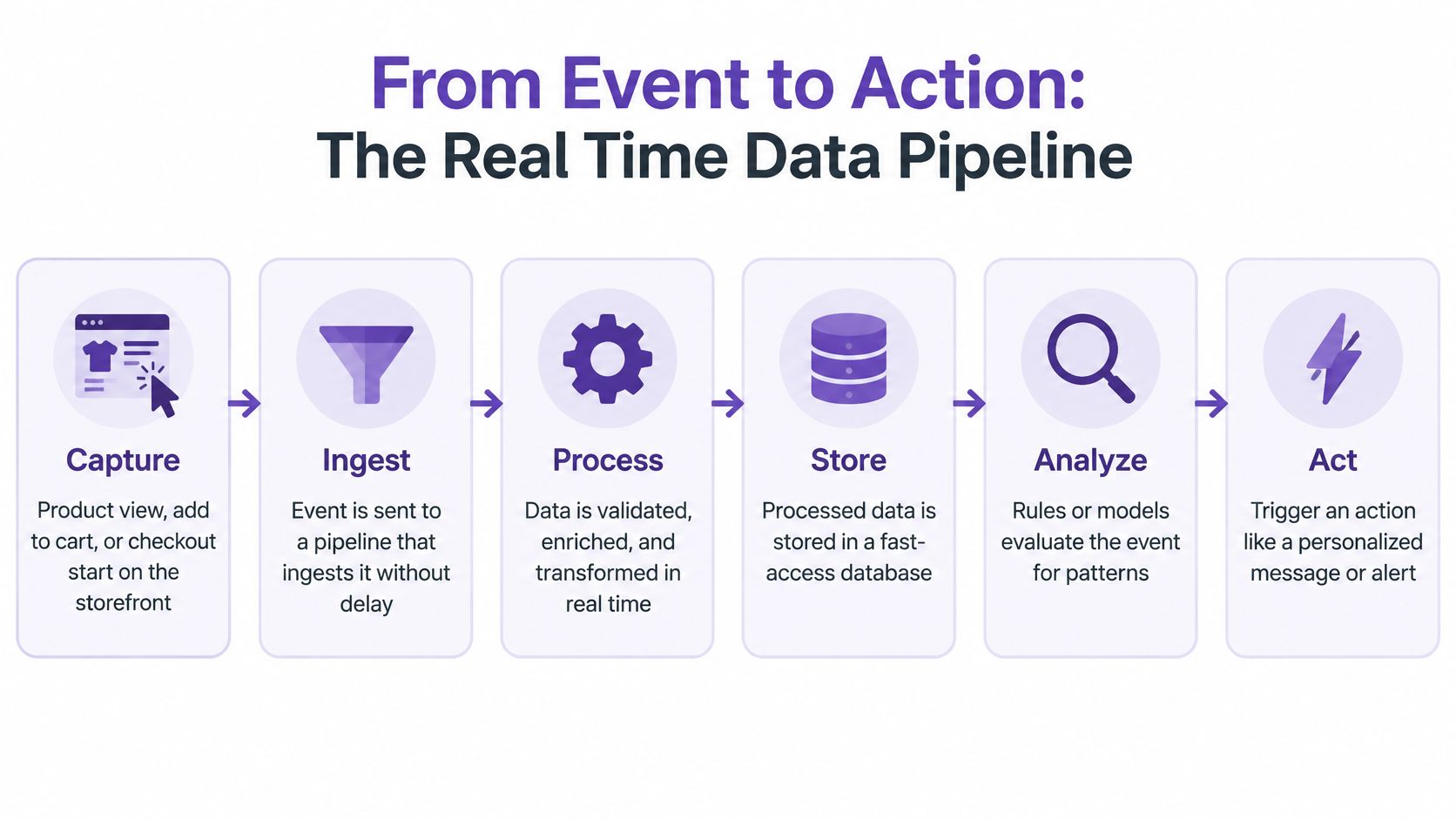
Knowing the stages matters because it tells you where to look when a message arrives late or twice.
- Capture. A product view, add to cart or checkout start fires on the storefront. The usual slip is a theme or an app that batches these into a nightly export, so the event is born old.
- Ingest. The event goes into a pipeline built to accept it immediately. The slip here is a retry that sends the same event twice, which is how one abandoned cart becomes three reminder texts.
- Process. The pipeline attaches a customer identity and checks which segment the event belongs to. Events arriving without a customer ID are the most common failure, and they're the ones that produce a cheerful text to "Guest."
- Decide. Rules fire, for example cart value above a threshold and checkout not completed. The slip is a rule reading a stale copy of the order table and texting someone who already paid.
- Act. The message is queued or the on-site change is applied. Here the slip is a queue that drains in strict order, so a spike at 8 p.m. delays every message behind it.
- Measure. Delivery, click and order attribution get written back onto the trigger. Skip this stage and you're guessing.
Getting customer identity to survive the journey across several Shopify apps is its own project, and customer data integration covers how the pieces connect. A healthy path is one where you can name the owner and the expected delay of every stage above, without opening a ticket.
If you'd rather watch the flow than read it, this walkthrough covers the same ground.
Measuring Latency and Freshness Without Fooling Yourself
Latency and throughput answer different questions
Latency is the time between an event happening and an output being produced. Throughput is how many events a system handles each second. Vendors quote whichever one flatters them, because a system can be fast at one and still be your bottleneck at the other.
The arXiv research on distributed stream processing makes the distinction concrete. Across comparable cluster configurations, Apache Flink reached roughly 1.2 million events per second on two-, four- and eight-node tests, while Apache Spark ranged from 0.36 to 0.94 million events per second and Apache Storm from 0.4 to 0.99 million. Flink barely moved as nodes were added, which suggests its ceiling sat somewhere other than raw cluster size. Read benchmarks as a question about your peak, not as a scoreboard: Black Friday traffic doesn't arrive evenly, and the tools that hold up are the ones that stay predictable when the graph spikes.
Averages hide the minutes that hurt
An average latency of 400 milliseconds sounds fine until you learn that one in twenty events took nine seconds, and those were the ones queued behind a traffic spike or a retry storm. Queue build-up, duplicate sends and provider throttling all land in the tail, not the middle.
Track p95 and p99 latency separately from the average, and do it for the whole path rather than the dashboard. The numbers you want are the slow ones.
Freshness starts at the event timestamp
Define freshness as the gap between the source event's timestamp and the moment that event becomes queryable or actionable. A dashboard refreshing every second against an hour-old table is a fast view of stale data, and plenty of "real-time analytics" products work exactly that way.
A documented production case on customer-facing analytics reported transactional freshness improving from about one hour to around five seconds, with most dashboards responding in under one second, which let teams catch conversion drops and change routing rules within the same session (Phoenix Data case study on Yuno). That's the shift that matters for SMS. A text describing a cart state the shopper left forty minutes ago reads as broken.
Instrument five timestamps: event creation, ingestion, processing, API submission and provider acceptance. Then run this test once. Trigger a cart event on your own store, log each timestamp, and see which stage eats the most time. You'll usually find it inside a single hop, and it's rarely the one you suspected.
Which Store Events Deserve Real Time
Sort every event by the decision window
A busy store emits dozens of event types, and only a handful lose value before an overnight export. Sort them by how long the shopper stays in the decision, not by how interesting the data looks.
Decision check by store event
| Store event | Where it originates | Decision window | Real time needed? |
|---|---|---|---|
| Product view | Storefront | Hours | Sometimes |
| Add to cart | Storefront cart | Minutes to hours | Yes |
| Checkout started | Checkout | 1 to 2 hours | Yes |
| Payment failed | Payment gateway | Minutes | Yes |
| Inventory change | Stock system | Hours | Sometimes |
| Order fulfilled | Shipping platform | Tied to the order | Separate transactional flow |
| Delivery exception | Carrier feed | Minutes to hours | Yes |
| Loyalty tier update | Customer history | Days | No |
| Weekly newsletter segment | Audience data | Days | No |
A shopper who just failed a payment can use a retry link minutes later, and that's a different message from a cart reminder. A restock alert usually fits an hourly check. A loyalty tier update or a weekly segment stays valid for days, so an overnight batch does the job with fewer moving parts and fewer places to introduce an error.
Why so few stores personalize in the moment
Adobe's 2025 research on AI and digital trends puts a number on the gap. 76% of practitioners say siloed data prevents real-time personalization, 64% of senior executives cite privacy, security or governance concerns as barriers to connecting customer data, only 39% of organizations personalize web experiences as customers browse, and just 31% can update offers in real time based on browsing or purchase behavior (Adobe 2025 AI and digital trends report). The blockers are plumbing and governance, not processing power.
Real time is a budget line, not a personality trait. Spend it on the events where the shopper is still deciding.
Three questions before you fund a stream
- How long does the shopper stay in the decision? A cart recovery message needs minutes. A win-back offer for someone who bought once in March can wait until Monday.
- Are identity and event quality clean enough to act on? If a third of your checkout events arrive without a customer ID, faster delivery just means faster mistakes.
- Does consent cover this specific message? A number collected for shipping updates isn't a marketing list, and no amount of latency fixes that.
Write down your top five store events and mark each one minutes, hours or days. Anything marked days goes on a batch and stays there until something changes. A correct daily batch beats a broken real-time flow every week.
Consent and Opt-Out Rules Before You Send
A real-time trigger is only usable if the customer agreed to the type of message being sent. Three message types show up in almost every store, and they don't share the same consent basis.
Consent and opt-out requirements by message type
| Message type | Consent basis | Disclosure at signup | Opt-out handling |
|---|---|---|---|
| Promotional texts | Prior express written consent | Brand name, marketing texts, links to terms and privacy policy | Honor all standard reply words automatically |
| Abandoned-checkout reminder | Treat as promotional unless legal review says otherwise | Same disclosure as promotional texts | Exclude opted-out numbers before each send |
| Shipping and delivery updates | Tied to the order the customer placed | Order-related purpose stated at checkout | Keep separate from promotional lists |
What the FCC requires before a marketing text
For U.S. campaigns, marketers should get prior express written consent before sending advertising texts. The FCC order on robotext consent and revocation sets out the shape of it: consent has to be tied to a clear and conspicuous disclosure explaining that the consumer will receive marketing texts from that specific seller, and under the one-to-one consent framework it's seller-specific rather than covering a group of businesses. Later messages must stay logically and topically related to the website or context where consent was collected.
That last clause is where real-time triggers get stores into trouble. If someone agreed to hear about new arrivals, a text about a specific product they viewed is a reasonable extension. A text about a clearance event they never opted into isn't.
The reply words you have to honor
Recipients can revoke consent by any reasonable method, and the sender carries the responsibility for acting on it. The FCC's rules recognize standardized terms including STOP, QUIT, END, REVOKE, OPT OUT, CANCEL and UNSUBSCRIBE (Nelson Mullins analysis of the FCC revocation rules). Once consent is revoked, the sender generally may not send further texts that require consent.
Someone who types "END" and gets another promotion three days later isn't just annoyed. That's a complaint waiting to happen, and it's avoidable with keyword automation that suppresses the number across every promotional segment, not just the campaign that received the reply.
Set it up in Shopify without guessing
Shopify's own guidance says stores collecting phone numbers at checkout should set up a terms-of-service page and a privacy policy in the admin, and describes checkout email and SMS marketing settings as a way to confirm marketing preferences during checkout (Shopify customer contact information guide).
So: name the brand in the signup field, say plainly that promotional texts are coming, link the terms and privacy policy, and store the signup source and timestamp next to the number. Add the number to the promotional list only when the shopper agrees, and keep separate consent states for email, promotional SMS and service notifications. Consent documentation is the record you'll want if a complaint ever arrives.
Practical rule: store the consent, not just the number. A phone number without a timestamp, a source and a disclosure is a liability with excellent deliverability.
Turning Real Time Signals Into SMS Triggers
The abandoned-checkout timeline
Treat cart recovery as a targeted automation, not a broadcast. Shopify's marketing-automation documentation lists Abandoned checkout as a specific automation and lets you configure the recipient field in the email editor, including an option for All customers (Shopify marketing automation documentation). Check that setting before you switch anything on, because a broad default will message far more people than you intended.
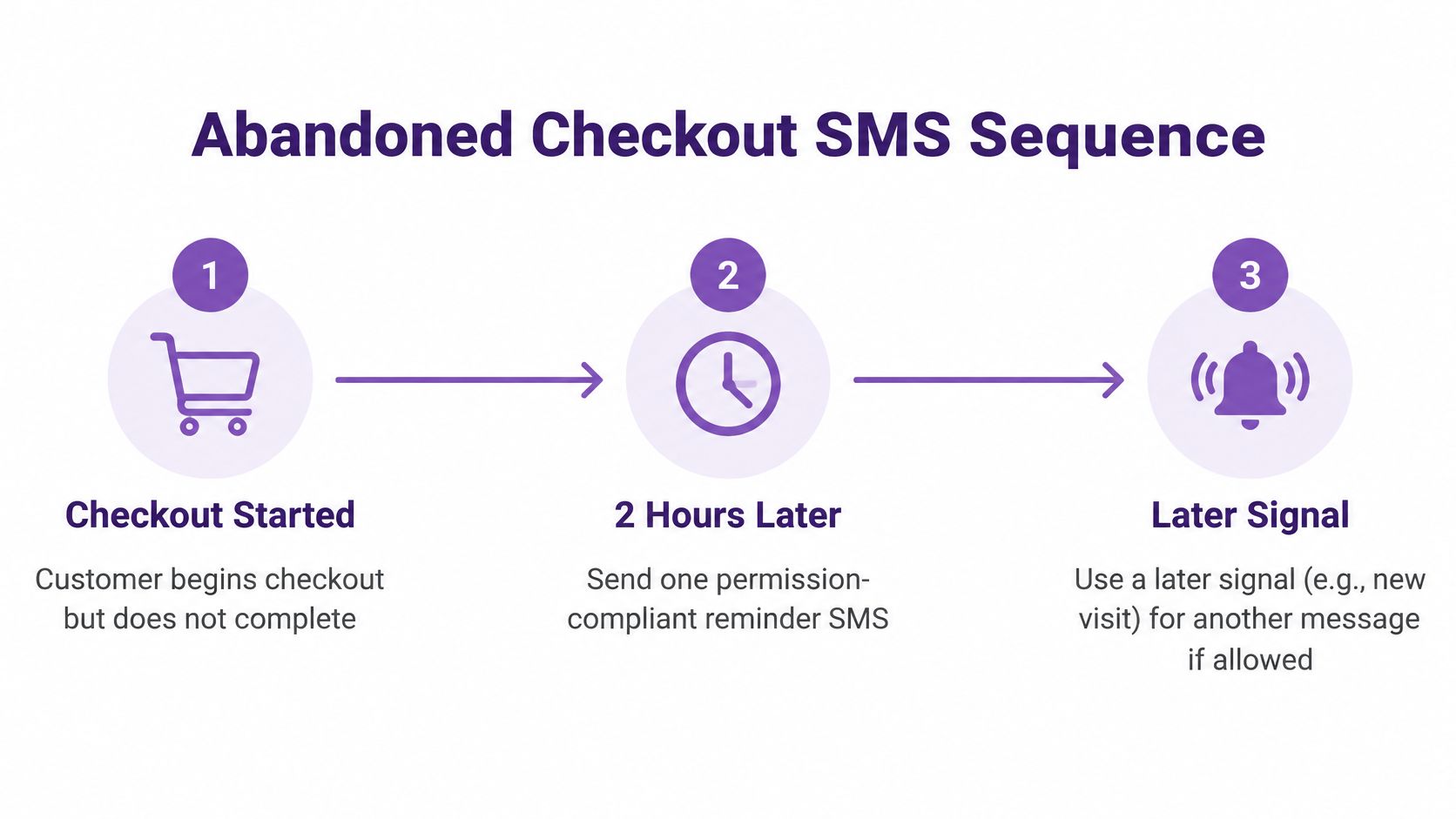
Here's the sequence that holds up in practice:
- Trigger on the event, not the record. The clock starts when checkout begins and no order exists, not when a customer record is updated.
- Run exclusions before every send. Remove anyone who completed an order since the trigger fired, anyone who opted out, and anyone already messaged in the last 24 hours. Order completion is the one that gets missed, because the cart event and the order event race each other.
- Send one permission-compliant reminder at about two hours. Long enough to be a reminder rather than a nudge, short enough to land the same evening.
- Only send a second message if the first was delivered and the order is still unpaid. Two sends is the ceiling for most stores. A third rarely pays for itself and it's the one people report.
- Log the outcome onto the trigger. Delivered, clicked, ordered. If you can't see it, you can't judge it.
Two more triggers that earn their keep
A viewed-product follow-up works within hours for shoppers who browsed a specific item and didn't add it to the cart. Keep the message tied to the product they looked at, and skip anyone who already bought it. A delivery notification belongs in a separate transactional flow, because it answers a question the customer asked by ordering rather than a question you're trying to start.
Timezone handling is the detail that undoes otherwise good automations. Promotional texts should go out inside the customer's local hours, while delivery updates run outside the promotional queue entirely so an evening shipping scan doesn't collide with a marketing cap. If you're mapping triggers onto a bigger system, what an automation workflow is is a useful reference for how the pieces connect.
Then measure the thing that pays: recovered revenue per recipient. Clicks tell you the message was read. Revenue per recipient tells you whether the message should exist.
Where Real Time Personalization Loses Trust
Shoppers want the timely offer and reject the text that feels like being watched, and both reactions come from the same person. Qualtrics' 2025 global study of more than 23,000 consumers found that 64% prefer companies that tailor experiences to their needs, yet 53% are extremely or very concerned about personal-data privacy and only 33% trust companies to use their information responsibly (Qualtrics XM Institute consumer preference study). Only 49% of consumers feel reassured that brands handle their data responsibly, while 70% want AI-driven support and 71% want offers that anticipate their needs. Comfort runs highest for personalization based on purchase history at 45% and website visits at 42%.
Speed has a trust ceiling, and five rules keep you under it:
- Prefer cart, checkout and past-purchase events over quiet browsing stitched together across devices and sessions.
- Name the message topic in the disclosure and keep later texts on that topic.
- Don't text a product view within seconds when the only gain is showing the shopper you were watching.
- Put a stop path in the same message, not one screen away.
- Suppress, don't guess, when an event is late, conflicting or missing an identity.
Watch STOP replies after launch. A sudden rise means the timing feels invasive even when every consent record is technically clean.
Prove One Trigger Over Two Weeks
Configure the abandoned-checkout flow, then spend two weeks trying to disprove it before you add a second real-time text. Send the first message to your own phone and write down the gap between checkout start and delivery. That's the experience your customers get, and it's the number you hold the whole flow to.
Split new eligible abandoners into a send group and a holdout that receives no recovery SMS. Judge the result on recovered orders and revenue per recipient, because a trigger can look healthy on clicks and still lose money once opt-outs are counted. Log suppression misses in the same place: completed orders that still received a text, and numbers messaged again after an opt-out. Both are the failures that cost you more than a slow send.
YipSMS Inc. sends abandoned cart follow-ups at 2, 24 and 48 hours and timestamps every popup opt-in, so the delay is a setting you can change rather than a build. Run one delay for the full two weeks instead of testing all three at once, or you won't know which one moved the number.
At day fourteen, three outcomes are all useful. Keep the trigger if revenue per recipient beats the holdout after opt-outs. Lengthen the window if texts are landing before shoppers have finished deciding. Pause it if STOP replies climb or identity matching stays messy, then fix the plumbing before the message goes back on.
YipSMS Inc. covers the store side of this: real-time analytics that show delivery, failures, clicks and conversions as they happen, so you can see whether a trigger fired when you designed it to. Opt-ins from popups are timestamped and logged, automatic STOP and HELP handling keeps the opt-out side honest, and campaigns can be scheduled across time zones. Start with one trigger, prove it against a holdout for two weeks, and take the 14-day free trial at YipSMS Inc. before you add a second.
How this article was made: the YIPSMS team drafts some articles with AI writing tools, then checks pricing, compliance and product details against how YIPSMS actually works before publishing. Spotted something wrong? Tell us through your YIPSMS account.