Text Message to Customers: 7 Adaptable Examples for 2026
At a glance
Discover 7 adaptable Text Message to Customers examples for promotions, order updates, support and retention, plus timing, tactics and compliance tips.
A shopper leaves a cart at 9 p.m. Two hours later, a text names the exact product and links back to the saved cart. They finish the order the next morning. It looks like an easy recovery, but there's a catch: if that message arrived late at night in the shopper's time zone, the same automation could just as easily earn an opt-out.
The difference between a text that converts and one that irritates usually isn't a bigger discount. It's timing, relevance, and restraint. A useful reminder removes work for the customer. An unnecessary reminder makes them wonder why they gave you their number.
That distinction matters when you're running a Shopify store with overlapping campaigns, order updates, and support conversations. A customer might welcome a delivery alert while ignoring a sale announcement. They might also appreciate help completing checkout but dislike a message about every product they browse.
Before sending a text message to customers, decide what action it should help them complete and why that moment makes sense.
Practical rule: If you can't explain why this customer needs this message now, don't schedule it yet.
The examples below cover promotions, order updates, support, and retention. Treat each template as a starting point, not finished copy. Replace the placeholders, adapt the tone to your products, and build the trigger, timing, and consent checks before switching the automation on.
Table of Contents
- 1. Abandoned Cart Recovery SMS
- 2. Checkout Abandonment Reminder
- 3. Browse Abandonment and Viewed Product Follow-Up
- 4. Welcome and Signup Incentive SMS
- 5. Order Confirmation, Shipping, and Delivery Notifications
- 6. Back-in-Stock Alert SMS
- 7. Post-Purchase Review and Feedback Request
- 8. Replenishment and Win-Back SMS
- How the eight customer text message types compare by trigger, timing, and goal
- Start With Two Flows, Test Relentlessly, and Scale What Converts
1. Abandoned Cart Recovery SMS
A saved-cart reminder should restore purchase intent, not manufacture urgency. Start with the product the shopper wanted and a direct route back to it.
Use the comparison below to distinguish a behavior-triggered reminder from a broad promotional send.
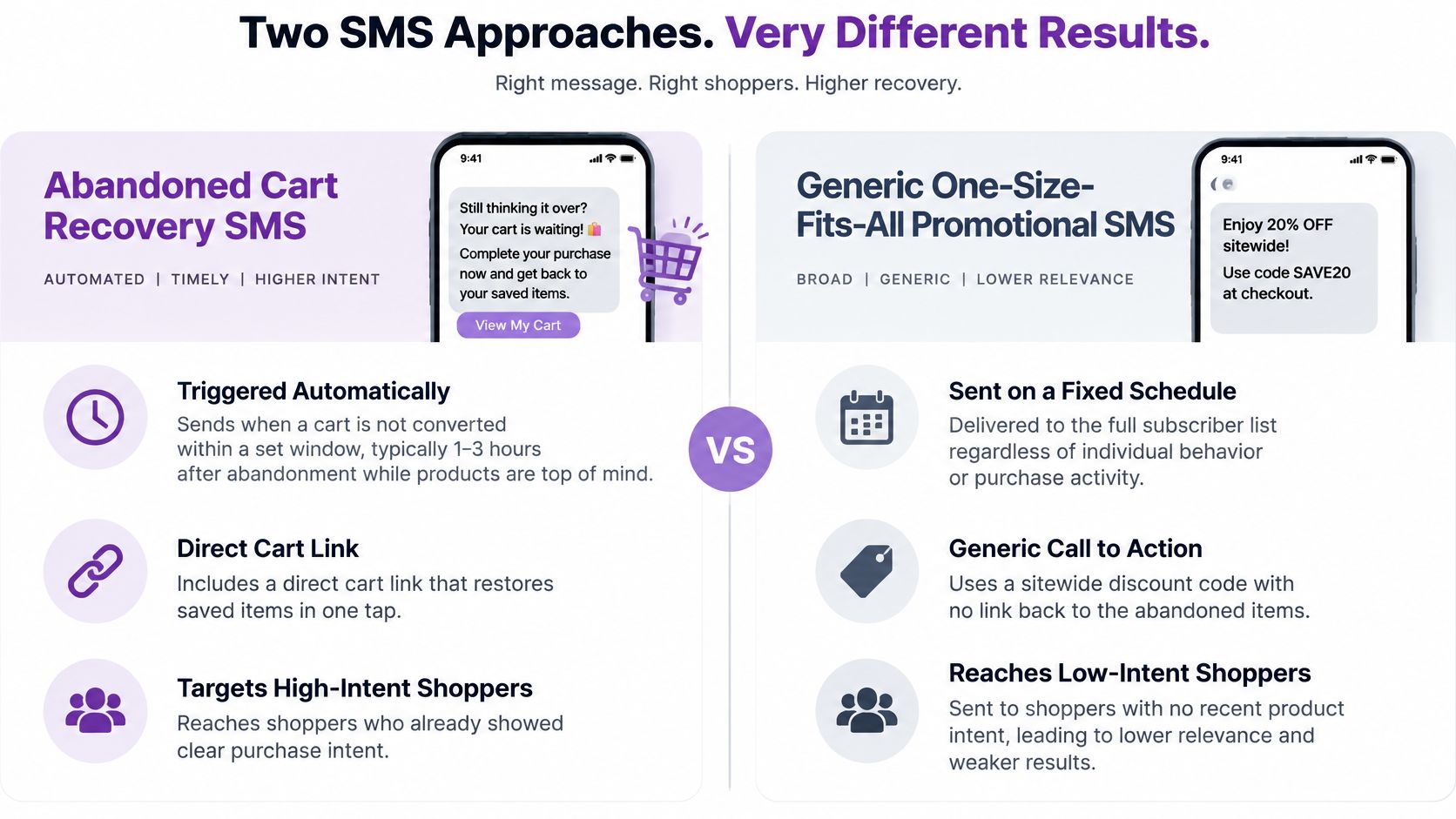
Adaptable message
{brand_name}: Hi {first_name}, still considering the {product_name}? Your saved cart is ready: {cart_link} Reply STOP to opt out.
For a skincare store, that link should reopen the selected moisturizer and quantity, not send the shopper to the homepage. Test it on a phone, including what happens when a variant sells out.
Build the recovery around intent
- Trigger: The shopper adds a product but leaves without ordering, and has valid marketing permission.
- Timing: Test an initial delay of one to three hours, subject to local sending restrictions and your quiet-hours policy. Consider a follow-up around the next day only if the customer remains eligible.
- Single job: Return the shopper to the saved cart.
- Compliance guardrail: Recheck consent, opt-out status, and purchase completion immediately before sending.
Lead with convenience. Reserve an incentive for a later reminder, and only mention cart expiration when the cart expires.
In CartBoss's published abandoned-cart dataset, 3.3% of delivered messages resulted in recovered orders, compared with a 26.8% click-through rate. That gap is why clicks alone aren't a recovery metric.
When evaluating a Shopify SMS app, test saved-cart links and purchase suppression before polishing copy.
Use this walkthrough alongside your own mobile checkout test.
2. Checkout Abandonment Reminder
A checkout reminder addresses a different problem from a cart reminder. The shopper has started entering order details, so your message should help them finish, not restart the sales pitch.
Adaptable message
{brand_name}: Almost there, {first_name}. Finish your checkout for {product_name}: {checkout_link} Questions about delivery? Reply for help. Reply STOP to opt out.
This is useful when a shopper gets distracted during payment. If shipping costs caused the exit, however, repeating the checkout link won't resolve the objection.
The customer should land on the checkout they recognize, without rebuilding their order.
Address the actual checkout objection
Trigger: Checkout starts but payment doesn't complete. Timing: Send after a deliberate pause that gives the shopper time to finish independently, within permitted local sending hours.
Single job: Resume checkout or resolve the obstacle preventing completion. Compliance guardrail: Entering a phone number for delivery isn't blanket marketing permission.
CTIA's Messaging Principles and Best Practices calls for express written consent for marketing messages and a way to revoke consent. Store the signup timestamp, source, disclosure wording, and purpose alongside the number.
For a footwear store, verified return terms might be more useful than a discount. For furniture, delivery information may matter more. Only offer reply-based help if someone monitors the inbox.
Keep this flow separate from cart recovery in reporting, but prevent both from messaging the same shopper about the same purchase. The deeper checkout event should take priority.
3. Browse Abandonment and Viewed Product Follow-Up
Browsing is weaker intent than adding to cart. A casual product-page visit doesn't justify an immediate sales text, particularly when the message reveals more tracking than the customer expected.
Adaptable message
{brand_name}: Need help choosing your {product_name}? Check the fit guide and available sizes: {product_link} Reply STOP to opt out.
For a denim store, a fit guide can answer a real purchase question. For a technical backpack, dimensions and laptop compatibility may be more helpful than generic praise.
- Trigger: An identified, opted-in subscriber shows meaningful product interest, such as repeat visits or sustained browsing.
- Timing: Allow a cooling-off period, and cancel the message if the shopper adds to cart or purchases.
- Single job: Answer the next likely product question.
- Compliance guardrail: Confirm permission for promotional messaging and review the privacy requirements governing behavioral targeting.
Make the detail useful, not intrusive
Set a deliberate engagement threshold rather than triggering on every page load. Apply a weekly customer-level cap, and suppress browse reminders when a higher-intent flow is active.
Don't insert a star rating unless it matches the current product's genuine review record. Don't claim a size is available unless the linked variant is purchasable.
A helpful browse reminder answers a question. An intrusive one announces that you've been watching.
For agencies managing several stores, keep permissions separate. CTIA guidance reproduced by Telebroad explains that consent is specific to the sender and purpose, not something to transfer between unrelated brands.
Evaluate this flow conservatively. Track downstream purchases and opt-outs, and keep a holdout audience so you can tell whether the reminder adds value rather than claiming sales from shoppers already returning.
4. Welcome and Signup Incentive SMS
Your welcome text is a promise about the relationship. Deliver what the signup form offered, identify the store, and make leaving straightforward.
Adaptable message
Welcome to {brand_name}! Your welcome offer is {offer_details}. Shop: {shop_link} Msg frequency varies. Reply STOP to opt out, HELP for help.
If you promised a discount code, include the code and relevant restrictions. Don't make subscribers search their email for the benefit that persuaded them to join.
Make the permission understandable
In Infobip's shopping-season survey of consumers across multiple markets, 72% preferred a clear, unticked checkout checkbox for marketing consent. Use plain language that identifies your brand and distinguishes promotional texts from order communications.
- Trigger: A subscriber completes a valid marketing opt-in.
- Timing: Deliver the welcome message promptly after any required confirmation.
- Single job: Confirm the subscription and provide the promised benefit.
- Compliance guardrail: Preserve the consent wording and record, explain withdrawal, and don't bundle unrelated permissions.
Consider double opt-in to confirm control of the number and improve list quality. It doesn't repair unclear signup language, and it isn't a substitute for reviewing the requirements in each market.
Use a TCPA compliance checklist when reviewing your U.S. signup process, then have the actual disclosures and automation settings checked for your circumstances.
For a homeware store, test a welcome offer against a useful non-discount benefit, such as early collection access. Judge the result by first-purchase contribution margin, not subscriber count alone.
If someone opts in during checkout and immediately purchases, acknowledge their purchase rather than sending a welcome message that tells them to place their first order.
5. Order Confirmation, Shipping, and Delivery Notifications
Customers shouldn't need to contact support to find out whether an order shipped. Transactional texts work best when they communicate a verified change and provide the next useful action.
Adaptable messages
{brand_name}: Thanks, {first_name}. We've received order #{order_number}. View your order: {order_link}
{brand_name}: Order #{order_number} has shipped. Follow its progress: {tracking_link}
{brand_name}: Order #{order_number} is out for delivery today. Reply HELP for support.
Keep the sequence tied to real order and carrier events, not estimated delays in an automation builder.
Keep service information separate from selling
Trigger: A confirmed order-status or carrier-status change. Timing: After the event is verified, with delivery-day alerts based on current carrier information.
Single job: Explain what happened and where the customer can get details. Compliance guardrail: Confirm the permission and withdrawal rules for transactional messages in the customer's region, and don't assume an order update authorizes advertising.
In SimpleTexting's brand-texting preferences survey, 73% preferred order and shipping notifications, while 38% avoided business texts because they didn't want more notifications. Utility matters, but so does restraint.
For a split shipment, identify which items shipped rather than implying the whole order is arriving. If the carrier reports a delay, replace a scheduled delivery celebration with accurate support information.
Don't attach a cross-sell to every tracking message. Measure delivery-related support contacts per order, tracking-link use, and customer complaints to assess whether the sequence makes fulfillment easier to understand.
6. Back-in-Stock Alert SMS
A restock request is specific intent, not permission to send every future promotion. Match the alert to the exact product variant the shopper requested.
Adaptable message
{brand_name}: Good news, {first_name}. The {product_name} in {size_or_color} is available again: {variant_link} Reply STOP to opt out.
For a clothing store, a customer waiting for a particular size shouldn't land on a product page with a different size selected. For a refill business, match the requested scent and pack format.
The alert should take the customer straight to the available option.
Match the sending queue to inventory
- Trigger: Sellable inventory becomes available for the requested variant.
- Timing: Send promptly after inventory is confirmed, subject to sending restrictions.
- Single job: Let the customer purchase the item they asked about.
- Compliance guardrail: Record what the customer requested and whether they separately accepted ongoing marketing.
Prioritize subscribers by request order within each variant queue. If stock is limited, release alerts in controlled batches and check availability between sends instead of notifying the entire list simultaneously.
Don't promise that an item is reserved unless your inventory system actually reserves it.
Avoid “selling fast” or “last chance” unless you can substantiate the claim. Availability is enough reason to send the message.
Measure purchases against delivered alerts and examine conversion by variant. Combine those results with outstanding requests when planning reorders, but don't treat every notification request as a guaranteed sale. Suppress the alert if the customer has already bought the requested item.
7. Post-Purchase Review and Feedback Request
Ask for feedback after the customer has had a fair chance to use the product. A delivery scan confirms arrival, not satisfaction.
Adaptable message
{brand_name}: Hi {first_name}, how is your {product_name} working out? We'd appreciate your honest feedback: {review_link} Reply STOP to opt out.
For a coffee subscription, the customer may be ready to comment after trying the beans. For a treatment product or durable item, wait longer so the review can address actual use rather than packaging.
Ask for an honest assessment
Trigger: Confirmed delivery followed by an appropriate product-use period. Timing: Test roughly one to two weeks after delivery as a starting point, then adjust by category.
Single job: Collect useful, honest feedback. Compliance guardrail: Review the permission requirements for your message and check platform rules before offering any incentive.
Don't make a reward conditional on a positive rating. If incentives are permitted, handle the required disclosures and offer the same opportunity regardless of sentiment.
- Reduce friction: Link directly to the relevant product's review form, preferably with order details already associated.
- Respect unresolved issues: Pause automated requests while a return, missing delivery, or support complaint remains open.
- Separate feedback from promotion: Don't turn a review request into a crowded reorder campaign.
A review form should accept criticism, not filter unhappy customers away from public review opportunities. Give customers a visible support route without using it to suppress negative feedback.
Track review completion, useful product insights, and support issues discovered. If you reuse positive reviews in future marketing, obtain any necessary permissions and preserve the reviewer's meaning. The point is credible customer feedback, not a collection of uniformly flattering messages.
8. Replenishment and Win-Back SMS
Replenishment and win-back messages both encourage repeat purchases, but they need different logic. Replenishment anticipates product usage; win-back responds to a customer buying less often than expected.
Adaptable replenishment message
{brand_name}: Hi {first_name}, running low on {product_name}? Reorder your usual here: {reorder_link} Reply STOP to opt out.
Adaptable win-back message
{brand_name}: Ready to revisit your favorites, {first_name}? Explore what's available: {shop_link} Reply STOP to opt out.
For pet food, use pack size and the customer's reorder pattern to estimate timing. For clothing, don't pretend there's a predictable consumption cycle.
Separate need from inactivity
- Trigger: An approaching usage window, or inactivity beyond the customer segment's normal purchase pattern.
- Timing: Use actual reorder intervals where available; adjust when customers change quantities or buy again.
- Single job: Make the next relevant purchase easier.
- Compliance guardrail: Confirm current marketing permission, honor opt-outs across flows, and suppress messages during unresolved support issues.
A Forrester Total Economic Impact study modeling a composite retailer estimated conversion increasing from 2.5% to 3.0% after improvements including triggered messaging and personalization. Treat that as a case for better relevance, not a forecast for your store.
A practical retail SMS marketing strategy should distinguish routine reorders from customers who need a reason to return. Start with convenience before offering a discount.
Use a prefilled cart where supported, but don't describe it as one-click ordering if payment still requires several steps. Measure incremental repeat purchases, contribution margin, and customer lifetime value, with a holdout group to avoid crediting SMS for orders customers would have placed anyway.
How the eight customer text message types compare by trigger, timing, and goal
The right message depends on what the customer did and what the message needs to accomplish. Use the trigger to determine eligibility, timing to keep the message relevant, and the primary goal to keep its content focused. Treat incentive levels as options, not default settings.
| Item | Primary Trigger | Typical Timing | Primary Goal | Incentive Level |
|---|---|---|---|---|
| Abandoned Cart Recovery SMS | Cart created but purchase not completed | Within 1–3 hours; optional follow-up around 24 hours | Recover an intended purchase | Optional; often reserved for follow-up |
| Checkout Abandonment Reminder | Checkout started but payment not completed | After checkout is abandoned | Recover a near-complete order | Usually low; may address objections |
| Browse Abandonment and Viewed Product Follow-Up | Product viewed without adding it to cart | After a qualifying product view | Encourage further consideration | Low; typically helpful content rather than discounts |
| Welcome and Signup Incentive SMS | SMS marketing opt-in | Immediately after opt-in | Build trust and encourage a first purchase | Often high; commonly includes a welcome offer |
| Order Confirmation, Shipping, and Delivery Notifications | Order or fulfillment status update | After purchase, shipment, or delivery milestone | Keep customers informed and reduce support requests | None; transactional information |
| Back-in-Stock Alert SMS | Requested product or variant becomes available | Soon after restock | Convert expressed product interest into a purchase | Low; may use urgency, usually no discount |
| Post-Purchase Review and Feedback Request | Product delivery confirmed | Usually 1–2 weeks after delivery | Generate reviews and gather feedback | Optional; may include a loyalty reward |
| Replenishment and Win-Back SMS | Estimated product usage cycle or customer inactivity | Near expected replenishment or after a period of inactivity | Drive repeat purchases and re-engage lapsed customers | Moderate; targeted win-back offers may be used |
For each flow, set four rules before writing copy: the qualifying trigger, the send window, the single action the message should prompt, and the compliance guardrail. For example, a welcome text should follow a marketing opt-in, arrive promptly, and focus on the signup offer or next step. Keep the opt-in record and honor STOP requests.
Keep the comparison practical. A cart reminder addresses unfinished purchase intent, while a checkout reminder applies after checkout begins. Browse follow-ups should support consideration; they should not read like a discount is required. Order updates serve a service purpose, while review requests and win-back messages need a relevant reason to contact the customer. Match the incentive to the goal, and avoid sending overlapping messages for the same action.
Start With Two Flows, Test Relentlessly, and Scale What Converts
Launch the welcome flow and abandoned cart recovery first. They respond to explicit signup interest and demonstrated shopping intent, and they're easier to diagnose than a large collection of overlapping automations.
Before activating them, complete the customer journey yourself. Opt in, inspect the welcome message, abandon a cart, finish checkout, and verify that the recovery message no longer sends. Test STOP handling and confirm that a suppressed customer can't re-enter through another workflow.
Expand in a deliberate order
Add order notifications and review requests to support the experience after purchase. Then introduce browse reminders, back-in-stock alerts, and replenishment flows as your event tracking, inventory accuracy, and customer history become reliable enough to support them.
Keep checkout recovery distinct from general cart recovery, but give it priority when both could apply. A shopper shouldn't receive competing reminders because they qualified for several segments.
- Track each flow separately: Record deliveries, clicks, completed actions, attributed revenue, message costs, and opt-outs.
- Apply shared frequency controls: Count promotional messages across automations and campaigns, not just within individual flows.
- Keep permission legible: Preserve consent records and give subscribers clear choices about the messages they receive.
- Test meaningful changes: Compare timing, destination, and message purpose before repeatedly increasing discounts.
Use a consistent attribution window and retain a holdout audience where practical. A sale after a text isn't automatically a sale caused by that text, especially when the customer also received email or was already returning to checkout.
Scale the customer benefit
Judge service messages differently from promotions. Shipping notifications should improve order visibility; review requests should collect credible feedback; recovery texts should produce profitable incremental orders. Don't force every message into the same revenue report.
YipSMS, a Shopify SMS app, offers prebuilt automations for customer journeys, with free signup, no contracts, and pay-per-message pricing. That lets store owners test these examples without a large upfront commitment, while adapting each flow to their consent records and store operations.
The strongest program isn't the one with the most active automations. It's the one where every message has a clear purpose, accurate information, and a sensible stopping point. Start small enough that you can inspect what customers receive, then expand only when the results justify another interruption.
YipSMS Inc. offers Shopify SMS tools with prebuilt automations, personalization, trackable links, and automatic STOP/HELP handling. Visit YipSMS Inc. to sign up free and start testing a welcome or cart-recovery flow, paying only for the messages you send.
Links referenced in this article
- CartBoss's published abandoned-cart dataset
- CTIA's Messaging Principles and Best Practices
- CTIA guidance reproduced by Telebroad
- Infobip's shopping-season survey of consumers across multiple markets
- SimpleTexting's brand-texting preferences survey
- Forrester Total Economic Impact study modeling a composite retailer
YIPSMS publishes educational articles, including AI-assisted content supplied through Outrank. Our internal team reviews Outrank articles for accuracy before publication. Pricing and requirements can change; check current YIPSMS pricing and official guidance before acting. Compliance content is general information, not legal advice. Spotted something wrong? Tell us through your YIPSMS account.