Cart Abandonment Recovery: How to Win Back Sales with SMS
A coupon is often the wrong first move in cart abandonment recovery. Shoppers leave because the total changed, delivery looks slow, or checkout demanded an account. A text that ignores the cause spends margin on friction a clearer page would have removed.
Cart abandonment recovery is the work of noticing an unfinished purchase and deciding whether a message can truthfully finish it. On Shopify, that decision sits between checkout analytics and SMS. Text can remind a shopper who already opted in. It cannot repair a surprise fee, a forced login, or a payment page that fails.
I would start with the cheapest fix, which is usually the checkout itself, then send one consented reminder only to people the fix did not already convert. Clicks are easy to celebrate and easy to misread. Incremental profit, after the discount and the cost of the message, is what tells you the flow earned its place.
The sequence below is the one I recommend for Shopify stores. Define the event, tag the cause, keep the text legal, build a single reminder, match the copy to the exit, and judge the result against shoppers who received nothing.
Table of Contents
- What Cart Abandonment Recovery Means for Your Revenue
- Diagnose Causes and Segment Recovery Journeys
- Consent Rules That Keep Your Cart SMS Legal
- What to Do When No SMS Consent Exists
- How to Build an SMS Recovery Flow Step by Step
- Message Examples for Each Recovery Scenario
- KPIs, Benchmarks and Holdout Testing
What Cart Abandonment Recovery Means for Your Revenue
A shopper adds a sage linen throw, starts checkout, sees the shipping line, and closes the tab. The products stay in the cart. No order exists. Cart abandonment recovery is the process of spotting that unfinished purchase and reaching the shopper in time to finish it, with the detail that matches why they left.
Think of the cart as a table reserved at a busy restaurant. The kitchen has already planned for that guest. If they walk out, a quick, polite call can still fill the seat. A late, pushy call only confirms they were right to leave. Recovery works the same way. You notice the empty seat, you guess why they stood up, and you make one useful contact.
The pool is large enough to treat this as a revenue process, not a weekend promo. Baymard Institute's running average, based on 50 studies of online shopping behavior, is approximately 70.22%, meaning roughly seven in ten shopping carts do not become completed orders, as summarized in SQ Magazine's ecommerce conversion statistics. Say a store starts 1,000 checkouts in a month. About 700 of those purchases are unfinished before any reminder goes out. A small recovery rate still touches intent you already paid to acquire.
Four stages, in order
Detect the event. A cart add, a checkout start, or a payment error is the trigger. A vague site visit is not.
Name the cause. Fees, delivery timing, an account wall, a long form, payment distrust, and a broken page need different replies.
Reach them once. Product name, a delivery date, a trust line, or a rare incentive, matched to that cause and only if they opted in.
Measure the result. Recovery rate, recovered revenue, device, and hours from abandonment to order. Clicks alone do not close the books.
Practical rule: Pull your own abandonment rate for the last 90 days and use that as the baseline. Roughly 70% is an average across many studies, not a target for your Shopify store. Product type, traffic source, mobile share, geography, price, and checkout design all move the number.
A store at 62% with no recovery can still leave more money behind than a store at 74% with a clean, consented flow. Compare yourself with the average, then track recovery on its own.
Diagnose Causes and Segment Recovery Journeys
The common assumption is that every abandoned cart wants a nudge and a code. The causes say otherwise. Checkout guidance based on Baymard identifies unexpected shipping, tax, and fee costs as the leading reason shoppers abandon, followed by slow delivery, account-creation requirements, distrust of payment security, and checkout complexity. A reminder that skips that list is a guess.
Baymard's quantitative research reports that 17% of U.S. online shoppers abandoned because checkout was too long or complicated, 19% because they were required to create an account, and 21% because delivery was too slow, in the Baymard checkout usability benchmark. Tag each recent abandonment with a cause before you pick a message. The diagnosis picks the reminder, not the other way around.
Abandonment causes and the fix that comes first
| Cause | Reported signal | Fix before messaging | Reminder angle |
|---|---|---|---|
| Unexpected shipping, tax, and fees | Leading cause in Baymard-based reporting | Show landed cost before checkout | Cost clarity, discount only if margin allows |
| Slow delivery | 21% of U.S. shoppers | Show delivery dates early | Delivery-date reminder |
| Forced account creation | 19% of U.S. shoppers | Offer guest checkout | Direct link to guest checkout |
| Complicated checkout | 17% of U.S. shoppers | Remove unnecessary form fields | Link to the shortened checkout |
| Payment security distrust | Named with the main friction drivers | Display trust signals at payment | Reassurance about secure payment |
| Technical error or unresponsive page | 8 of 9 observed instances led to immediate abandonment | Fix the error and monitor it | Retry or alternative payment message |
| Low purchase intent (browsing) | Browse or cart with no payment attempt | None | Back-in-stock, price-drop, or education message |
The discount trap
A 15% code can win a price-sensitive shopper and still be the wrong tool. It does nothing for someone who left because guest checkout was missing, and it cuts margin on a buyer who would have returned for a delivery date alone. Send a non-discount reminder when the cart is intact and inventory is stable. Put delivery timing and the full total where they can see them. Route people back to guest checkout instead of a forced account.
Separate conversion by cause or by message variant. A discount variant and a clarity variant are not the same test. The metric that matters is incremental recovered gross profit against a holdout, after discount cost, message cost, and orders that would have happened anyway.
Three groups to start with
Build segments from tags you can read in Shopify, then stop. More slices only earn a place when a holdout shows a real gap. A practical map of customer data segmentation keeps those tags from turning into a pile of one-off flows.
- Abandonment cause: Fees get a cost-clarity text. Slow delivery gets a date. A forced account gets a guest-checkout link. A broken payment gets a retry note only after the error is fixed.
- Customer history: First-time shoppers need trust and a delivery line. Repeat buyers often need a short reminder and no offer.
- Cart value: Above the threshold you set, send a personal note with the item name. Below it, send a short generic line. Either way, include the item, one cart link, and a location-based delivery estimate, and keep the send inside the recipient's daytime hours.
Exclude anyone who purchased after the cart was created. Park low-intent browsers on price-drop, back-in-stock, or education messages instead of an instant coupon. Start with three to five segments. Add another only when the holdout says the split pays for itself.
Most “recovered” orders from a blanket code were never lost to price. They were lost to a fee, a date, or a login wall you could have shown earlier.
Consent Rules That Keep Your Cart SMS Legal
Treat an abandoned-cart text as marketing in the United States. Its purpose is to encourage a purchase, so it is not an order update. Automated marketing texts require prior express written consent under the Telephone Consumer Protection Act. A phone number entered at checkout, an abandoned cart, or an email opt-in does not provide that consent. Review this abandoned-cart SMS consent guide before setting up a cart trigger.
Violations can expose senders to statutory damages of $500 per negligent violation and up to $1,500 per willful or knowing violation, as described in this abandoned-cart SMS consent guide. Collect a clear opt-in before a cart message can be sent, retain evidence of consent, and suppress numbers without it. Broader reach is not worth sending to people who did not agree to receive marketing texts.
What the opt-in has to say
A paper or on-screen form needs to make four points clear:
- Identify the number. Consent applies to the phone number that will receive the messages.
- Authorize the automation. The opt-in covers automated or prerecorded marketing messages, not just a one-time reply from a person.
- Separate consent from the sale. State that consent is not a condition of purchase. Put an unticked box beside the phone field, not inside the terms.
- Keep the proof. Store where consent came from, the exact wording shown, and the timestamp. If you cannot show what the shopper agreed to, do not treat the number as consented.
Before launch, use this TCPA compliance checklist, particularly when multiple apps can message the same list. A single opt-in record and a shared suppression process make it easier to prevent one app from texting a number another app has excluded.
How an opt-out has to travel
A consumer can revoke permission through any reasonable method that clearly communicates the request, not only by replying STOP, according to Fracto Solutions' notes on cart SMS. Covered revocation requests must be honored within a reasonable period, no longer than 10 business days. For a cart flow, stop queued messages the same day rather than waiting for that limit.
- Treat the words as a stop. “Unsubscribe,” a support email, a phone call, or a website form can signal an opt-out.
- Apply it everywhere. Suppress the number from every campaign and automation, not just the cart flow.
- Stamp the record. Keep the request time in a central opt-out list, and block promotional texts unless the person opts in again.
- Split the tracks. Keep transactional shipping updates separate from promotional cart messages. A delivery notice should not carry cart marketing.
Rules outside the United States can differ on consent wording, quiet hours, sender identification, record retention, and revocation. Check the requirements that apply to your buyers with qualified counsel before using a U.S. flow in another country.
What to Do When No SMS Consent Exists
A shopper types a mobile number for shipping, then leaves without ticking an SMS box. That record is not permission. No cart reminder goes out by text. Using the number for a delivery notice is fine. Using it to sell the cart is not.
Run this fallback for every abandoned checkout where SMS consent is missing.
- Confirm the gap. Open the profile and check that there is no written or electronic SMS consent for that number. No wording and no timestamp means no send.
- Move the recovery off text. Route the shopper to email or an on-site prompt, using the same cause tags you would have used for SMS. A fee problem still gets cost clarity. A slow-delivery problem still gets a date.
- Ask later, on a separate form. If you want a future text, offer an unticked opt-in on the order-confirmation or thank-you page. Store the proof with the timestamp and the exact sentence they saw. A pre-checked box does not count.
- Keep order updates on their own track. Shipping and delivery notices are not cart reminders. Do not attach an offer to them to sneak past the missing opt-in.
- Honor any stop across SMS. If they reply STOP, or they unsubscribe by email, phone, or a form, suppress all SMS across campaigns and automations. Do not leave the cart flow as a loophole.
Stricter consent rules in other markets raise the bar rather than lower it. The same fallback applies. When the record is empty, email and the site do the recovery, and text waits for a real yes.
How to Build an SMS Recovery Flow Step by Step
A recovery flow should address the checkout problem, not just send another reminder. Start with one consented message per abandonment event as a practical sending limit, not a legal requirement. Set delays that suit the trigger, check the shopper's local time, and cancel the message if they purchase before it goes out.
SMS recovery timing by trigger
| Trigger | Send delay | Permitted window | Message purpose |
|---|---|---|---|
| Cart abandoned, SMS consent confirmed | 60 minutes | 8 a.m.–9 p.m. recipient local time | Cart reminder, no discount |
| Checkout started, no payment | 60 minutes | 8 a.m.–9 p.m. recipient local time | Delivery and total-cost reassurance |
| Payment failed or error event | 15 minutes | 8 a.m.–9 p.m. recipient local time | Retry or alternative payment |
| Any follow-up for the same event | Not sent | Within 48 hours of trigger | Avoid repeated reminders for one event |
| Consent missing | Never sent | No text window applies | Email or on-site recovery only |
| Shopper purchased or recovered before send | Cancelled | Queue cleared before send | Suppress queued message |
The picture below maps triggers, delays, and sending windows. Use the table as a starting setup, then test whether the timing fits your checkout behavior.
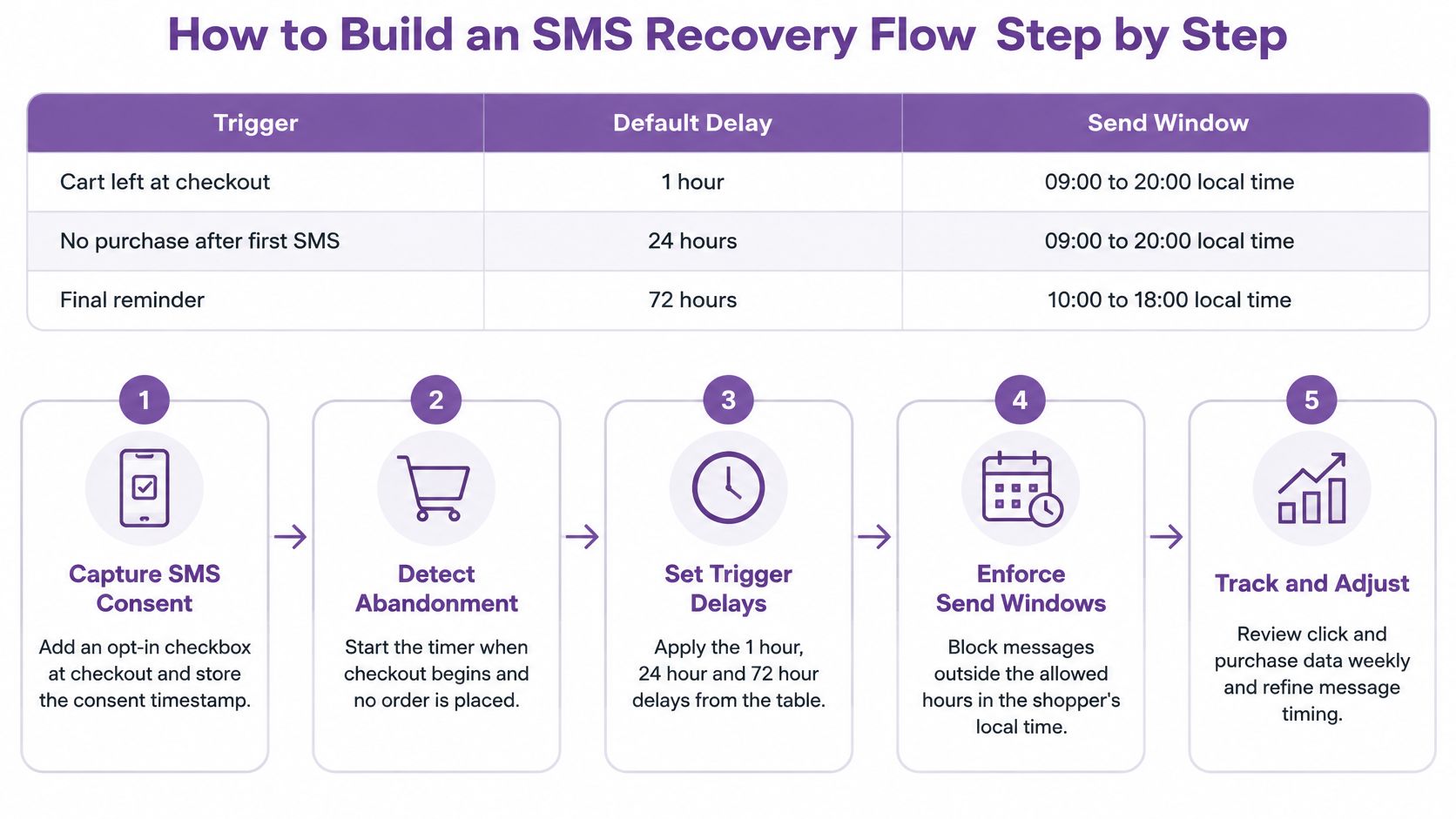
A single reminder per unique abandonment event, sent within 48 hours and only to shoppers who opted in, is a practical limit that can protect deliverability. The Postscript's SMS marketing compliance overview supports the consent requirement: a cart, checkout, or phone number alone does not establish permission to send marketing texts. Schedule commercial messages for 8 a.m. to 9 p.m. in the recipient's local time zone, and hold any message that would otherwise arrive overnight.
Build it in this order
- Capture consent in the phone field. Use clear wording and an unticked box, then store the timestamp. The flow should not start without a valid opt-in.
- Separate the events. Track checkout initiation, payment submission, payment errors, and session inactivity independently. Record each event's timestamp, cart value, device, and error code when available.
- Deduplicate by session. Repeated payment errors should not queue repeated texts. Keep one queued message for the session.
- Check consent and exclusions. Before scheduling, exclude anyone without a valid opt-in and anyone who has already purchased or recovered the cart.
- Schedule, then check the sending window. Start testing at 60 minutes after inactivity or 15 minutes after a payment error. If the send would fall outside 8 a.m. to 9 p.m. local time, hold it until the window opens.
- Send one cause-based message. Keep to a single reminder for the event. A second promotional text adds frequency without fixing a payment, delivery, or cost issue.
- Cancel on purchase or opt-out. Remove the queued message as soon as an order is placed or consent is revoked.
The 60-minute and 15-minute delays are test starting points, not universal rules. A payment failure calls for a faster, service-style message because the shopper was trying to complete the purchase. For ordinary inactivity, waiting an hour gives the shopper time to finish without receiving a premature nudge. If the checkout page is broken, a reminder cannot fix it.
If you want to see how a checkout event becomes a send, this demo shows the flow's moving parts.
Compare both delays with a holdout before shortening them. Faster sends may reach shoppers sooner, but they can also send people back to a checkout that still has the original problem.
Message Examples for Each Recovery Scenario
Still thinking about that throw, or did the total change on you?
That is the voice that works. A short question from a person, not a billboard. Each text below stays under 160 characters so it can land as one segment, and each one does a single job. Every live version needs your brand name, one opt-out line, and a single link.
Cart still intact, no discount
“Linen Co: Hi Maya, your sage linen throw is still in your cart. Checkout takes about a minute: [link] Reply STOP to opt out.”
It names the item and asks for the order. It does not invent a sale. Use it when inventory is stable and the cause was not price.
Delivery date for a slow-shipping exit
“Linen Co: Your sage throw can arrive Thu May 14. Your cart is saved: [link] Reply STOP to opt out.”
The date is the product. If you cannot state a real estimate, do not send this version.
Payment that failed
“Linen Co: Your payment didn't go through. Retry or use another way: [link] Reply STOP to opt out.”
It sounds like support, because it is support. Send it only after the error is fixed, or you will text people back into a broken page.
A code, and only for a price-sensitive segment
“Linen Co: Still want the sage throw? 10% off with THROW10: [link] Reply STOP to opt out.”
Check the code against margin first. If the leftover profit is thin, send the no-discount cart line instead. Do not teach the whole list to wait for a code.
Browsers who never reached payment
“Linen Co: The sage throw you viewed is back in stock: [link] Reply STOP to opt out.”
Swap “back in stock” for a real price drop or a short care note when that is the true event. These people did not abandon a checkout. A coupon treats them as if they did.
One clear ask per message. No fake countdown, no “only 2 left” unless the inventory system says so, and no second link “just in case.”
Read each text out loud. If it sounds like a banner, cut words until it sounds like a clerk who remembers the item.
KPIs, Benchmarks and Holdout Testing
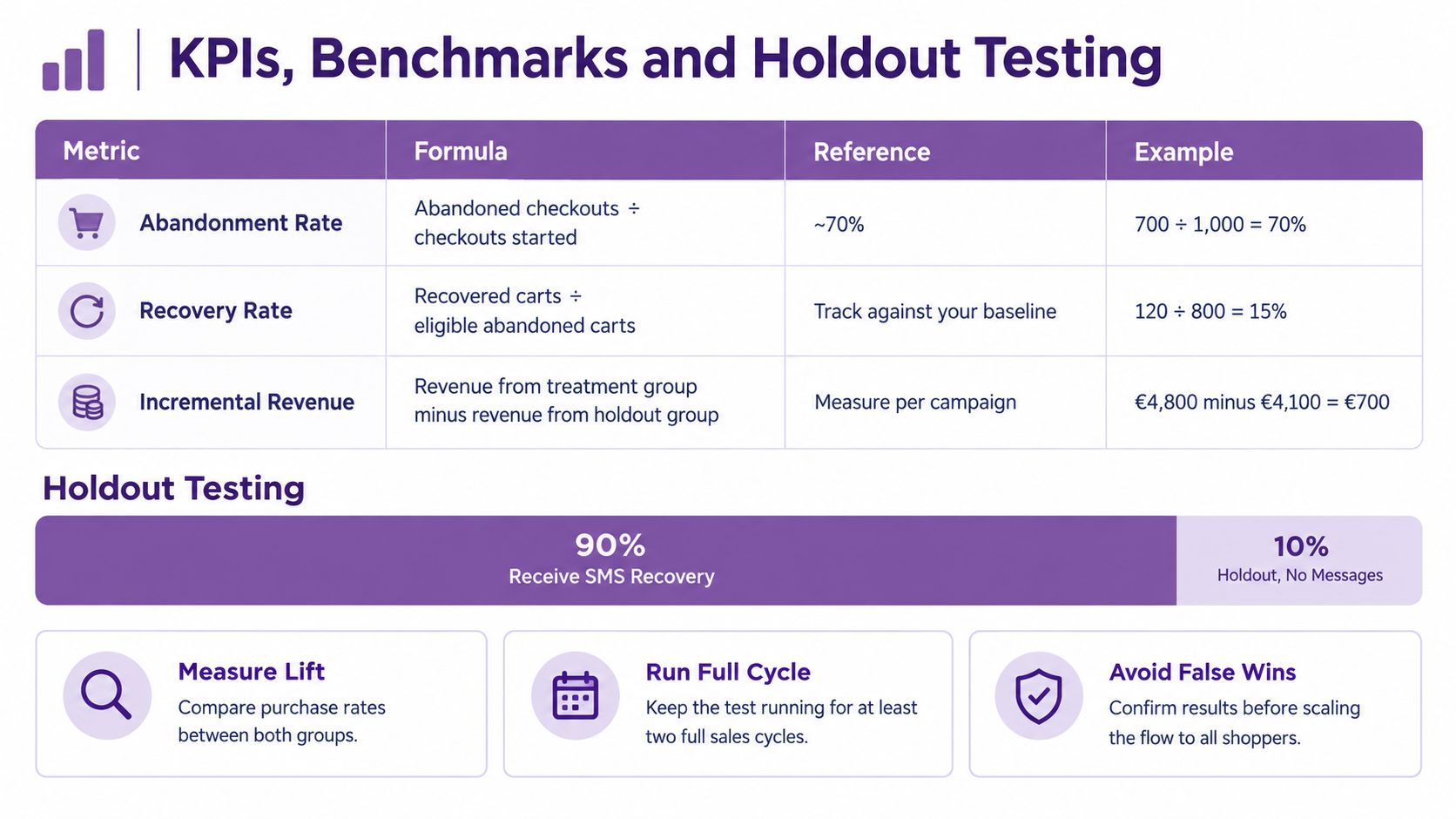
A flow can recover orders and still lose money. Measure recovery against eligible carts and the profit the message actually adds. An eligible cart has a valid phone number and SMS consent, with no purchase before the message is sent.
Core recovery KPIs and directional benchmarks
| KPI | How to calculate | Directional benchmark |
|---|---|---|
| Abandonment rate | Abandoned checkouts ÷ checkouts started | About 70%, according to Baymard's cart abandonment research |
| Recovery rate, single email flow | Recovered carts ÷ eligible abandoned carts | 3%–5% for email alone, as reported in Appbrew's abandoned-cart recovery benchmarks |
| Recovery rate, optimized multi-step email | Recovered carts ÷ eligible abandoned carts | No reliable range established here; compare against your own baseline |
| Recovery rate, SMS plus segmentation | Recovered carts ÷ eligible abandoned carts | 15%–25% or higher, as reported by Appbrew |
| Recovered revenue | Recovered orders × average order value | Use your own average order value |
| Click-to-checkout rate | Checkout clicks ÷ SMS delivered | Compare with your previous flow |
| Opt-out rate | Opt-outs ÷ SMS delivered | Compare with your baseline sends |
| Recovery latency | Median time from abandonment to recovered order | Track the median hours for your orders |
Treat these recovery figures as directional, not as targets. Results vary with category, traffic quality, the size of the consented audience, the offer, and the attribution window. Appbrew reports 3%–5% for email alone and 15%–25% or higher for abandoned-cart SMS. The figures do not establish a separate benchmark for optimized multi-step email, so use your own baseline for that comparison. More messages will not necessarily improve the result.
Compare SMS and email using the same eligible-cart definition and measurement window. Track recovered revenue, opt-outs, click-through, and profit after discounts and message costs. A higher click rate can still mean a worse outcome if the orders have thin margins.
The holdout is the only honest test
Randomly withhold 10% of eligible carts from every recovery message. Compare gross profit per eligible cart in the holdout group with the treated group, then subtract discount and message costs. This shows whether the message added profit, rather than receiving credit for orders that would have happened anyway. Run the comparison for at least four weeks so a weekly purchase cycle does not look like a recovery lift.
Separate technical failures from inactivity. In Baymard's checkout usability testing, technical problems such as an unresponsive server or error page caused immediate abandonment in 8 of 9 observed instances. Record timestamps, cart value, checkout status, error code, device, and consent state to distinguish a failed payment from an inactive cart. Deduplicate events so one broken page does not trigger several reminders. For a payment failure, the relevant recovery step is a retry or another payment method. For inactivity, use the product and cart context.
Monitor delivery rate, click-to-checkout rate, payment success after the reminder, opt-outs, complaints, and recovery latency. Keep these measures alongside the flow in SMS campaign analytics, not in a report that shows revenue alone.
What to change when the numbers move
- Opt-outs or complaints rise above your baseline. Reduce frequency and narrow the segment. Changing a few words without addressing the audience or timing will not fix the cause.
- Discounted orders have thin margins. Test a no-discount reminder first. A discount makes recovery more expensive.
- Payment-error texts recover few orders. Fix the checkout problem before revising the message. Better copy cannot repair a failed payment step.
Close the measurement loop by recording consent wording and timestamps for each send, mapping abandonments to their causes rather than treating them as one group, and keeping a holdout in the flow. YipSMS Inc. offers Shopify stores prebuilt SMS flows for cart and checkout abandonment, with delayed reminders, cart links, and suppression after an order is placed. That setup supports a consent-first, one-reminder process instead of sending to every phone number entered at checkout. Find out more about YipSMS Inc..
How this article was made: the YIPSMS team drafts some articles with AI writing tools, then checks pricing, compliance and product details against how YIPSMS actually works before publishing. Spotted something wrong? Tell us through your YIPSMS account.