SMS Notification App Guide for Shopify Stores
A customer leaves a shopping cart open at 11:47 p.m. The store owner sees the $180 jacket still sitting there the next morning, but by then the shopper's attention has moved on. Later that evening, another customer asks where a shipment is at 9:14 p.m., when the support team has already gone offline.
Those moments explain why merchants install an SMS notification app. Customers want quick, relevant answers, while Shopify stores generate events around the clock. The right system connects those events to useful messages without treating every phone number as permission for marketing.
Table of Contents
- The Moment an SMS Notification App Was Built For
- What an SMS Notification App Actually Does
- Features That Move Revenue and the Ones to Ignore
- How a Shopify SMS Notification App Connects to Your Store
- Pricing, Deliverability, and the Engineering Behind the Messages
- Consent Is the Foundation of SMS
- How to Evaluate an SMS Notification App Before You Sign Up
- Building Your SMS Channel the Right Way
The Moment an SMS Notification App Was Built For
The cart and the shipping question look like separate problems, but they share the same operational gap. The store has information, such as an abandoned checkout or a tracking update, but nobody is available to turn that information into a timely customer touchpoint.
An SMS notification app closes that gap by listening for store events and sending a message when the event meets defined rules. A shopper might receive a short reminder that returns them to an active checkout. A buyer whose order has shipped might receive a tracking link before opening a support ticket. Neither message requires a team member to watch the Shopify admin continuously.
The channel became powerful because it grew from telecommunications infrastructure rather than from a single shopping app. The first SMS was sent on 3 December 1992 in the United Kingdom, when engineer Neil Papworth sent “Merry Christmas” from a computer over Vodafone's GSM network to Richard Jarvis's Orbitel 901 handset. In 1995, GSM customers sent an average of only 0.4 messages per month, but by the end of 2007, approximately 2.4 billion of the world's 3.3 billion mobile subscribers were active SMS users, about 74% of the total, according to the history of SMS messaging.
Merchant perspective: SMS works best when it answers a customer's immediate question or captures an existing intent. It works poorly when a store uses it as a louder version of every other marketing channel.
That history still matters to Shopify merchants. SMS doesn't depend on a customer remembering to open a particular retail app, and it can support both order-related alerts and permission-based promotions. The strategic opportunity isn't just “send more texts.” It's building a dependable layer between Shopify activity, customer consent, carrier networks, and human support.
What an SMS Notification App Actually Does
Think of the app as a translator between Shopify and a mobile phone. Shopify records an event, the app applies rules, a messaging provider sends the text, and the carrier attempts to deliver it to the recipient.
The first distinction is essential:
- Transactional alerts respond to a customer or order event. Examples include order confirmation, fulfillment, shipping, delivery, refund, back-in-stock, account, and security notifications.
- Promotional messages attempt to create or recover demand. Examples include campaigns, segmented offers, product recommendations, and abandoned-cart reminders.
Those categories can overlap in the customer's inbox, but they shouldn't share the same consent logic. A shipping update serves an existing order expectation. A cart reminder or discount campaign is generally promotional and needs a clearly documented marketing opt-in, with regional rules applied to the recipient.
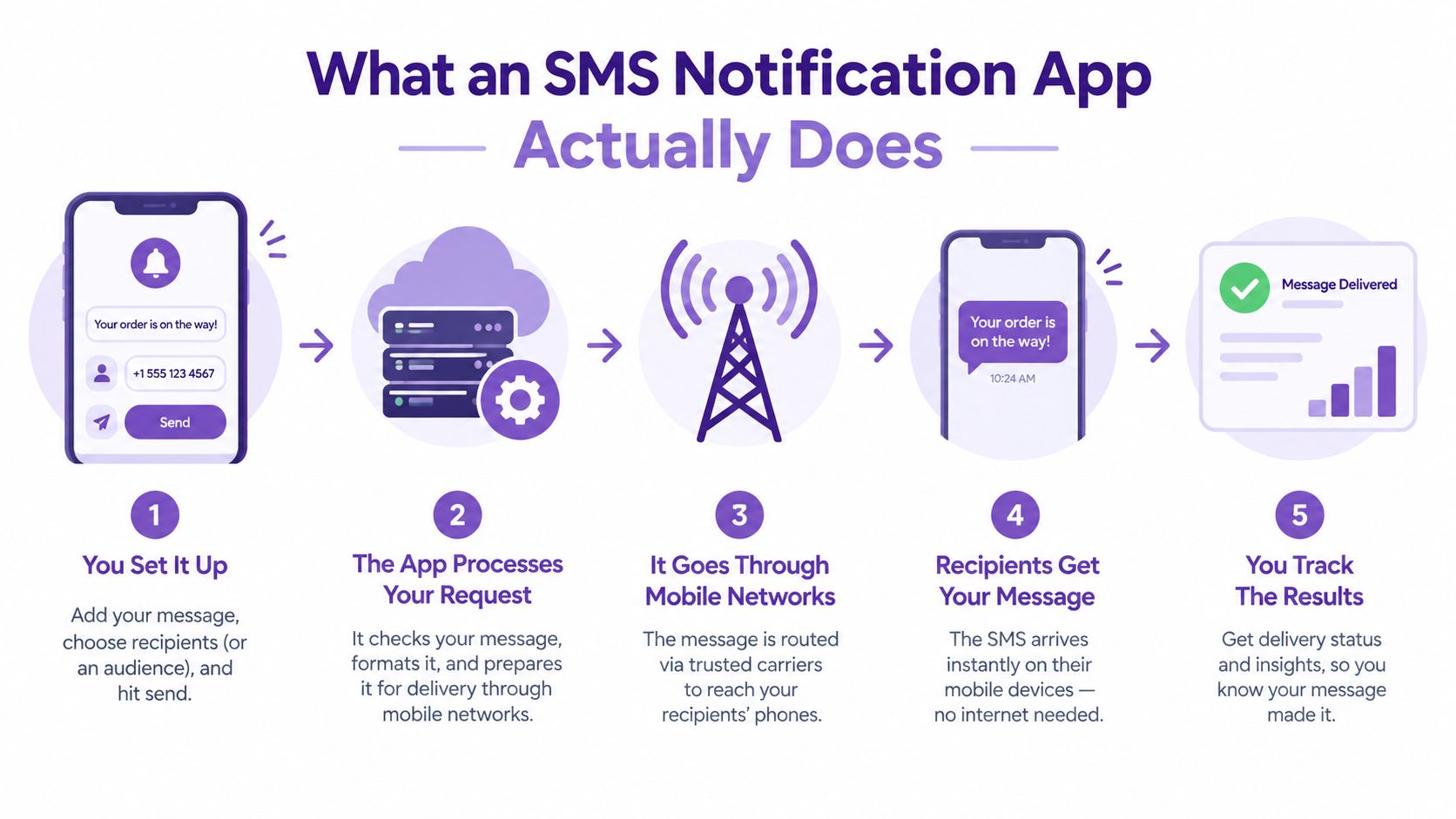
An app also has to manage the physical constraints of messaging. Short codes can support up to approximately 100 messages per second, registered U.S. 10DLC routes commonly support about 5 to 15 messages per second, and toll-free routes support around 3 messages per second, although carrier approval and trust status affect the actual limit. Those figures and the need for rate-limited queues are covered in SMS delivery guidance for high-volume sending.
That means an app isn't making one simple API call for every message. It may place sends in a queue, retry temporary failures with exponential backoff, separate transactional traffic from campaigns, process delivery receipts, and suppress a contact after an opt-out. Merchants comparing platforms can also use these practical SMS marketing tips by Yassine Malti to strengthen the campaign side without overlooking the operational details.
Features That Move Revenue and the Ones to Ignore
Most SMS app pricing pages present a long feature list. A small Shopify store rarely needs every item on that list. The useful question is whether a feature changes a customer action, reduces manual support work, or improves the quality of future targeting.
Cart and checkout recovery usually deserves early attention because it responds to intent that already exists. The automation should return a shopper to the correct checkout, prevent duplicate reminders, respect the shopper's consent status, and apply country-specific rules. It shouldn't depend on a generic blast sent to everyone who visited a product page.
Shipping and delivery updates solve a different problem. They give customers information they would otherwise request from support, especially when a tracking event changes. A concise message with the order reference and a tracking destination can reduce uncertainty without turning a transactional alert into a sales pitch.
List growth and segmentation compound over time. A keyword opt-in, a compliant checkout choice, or a well-placed popup can add subscribers during normal store activity. Tags or segments based on purchase history, lifecycle stage, product category, and consent purpose then help the merchant send a more relevant message to a smaller audience.
| Feature | Likely Impact for Small Shopify Stores |
|---|---|
| Shipping and delivery flows | High, because they answer predictable customer questions |
| Cart and checkout recovery | High, when consent, timing, and suppression are configured correctly |
| Consent-aware popup and keyword capture | High, because it grows the usable audience |
| Basic lifecycle segmentation | Medium to high, especially for repeat-purchase categories |
| Delivery receipts and revenue reporting | High, because they reveal whether sends produce orders |
| AI copy generation | Usually low, unless the team lacks basic copy resources |
| Multivariate send-time optimization | Usually low before the store has enough consistent traffic |
| Deep loyalty and social integrations | Variable, and often unnecessary during initial setup |
| Complex journey branching | Usually low until the store has multiple proven flows |
Cart abandonment is large enough to justify a dedicated recovery flow. Approximately 70% of online shopping carts are abandoned, while 18% of customers in Klaviyo and Recharge research preferred abandoned-cart notifications by SMS, according to Klaviyo's ecommerce SMS guidance. Those figures support testing the automation, not sending indiscriminately.
For U.S. recipients, abandoned-cart SMS has specific constraints. The guidance requires express consent for cart-abandonment reminders, double opt-in, only one message per recipient, and delivery within 48 hours of abandonment, as explained in Klaviyo's cart-abandonment requirements. Configure eligibility before the trigger fires, and reserve incentives for segments where the margin supports them.
How a Shopify SMS Notification App Connects to Your Store
The connection begins when the merchant installs the app and approves OAuth permissions. Those permissions determine which Shopify resources the app can access, such as customers, orders, checkouts, products, and fulfillment information. A responsible app should request only what its functions require and explain why each permission matters.
The app then subscribes to Shopify webhooks. Events such as orders/create, orders/fulfilled, and checkouts/update can trigger different workflows. The app may use the Admin API to retrieve the product name, order total, shipping status, and tracking number needed to personalize a message.
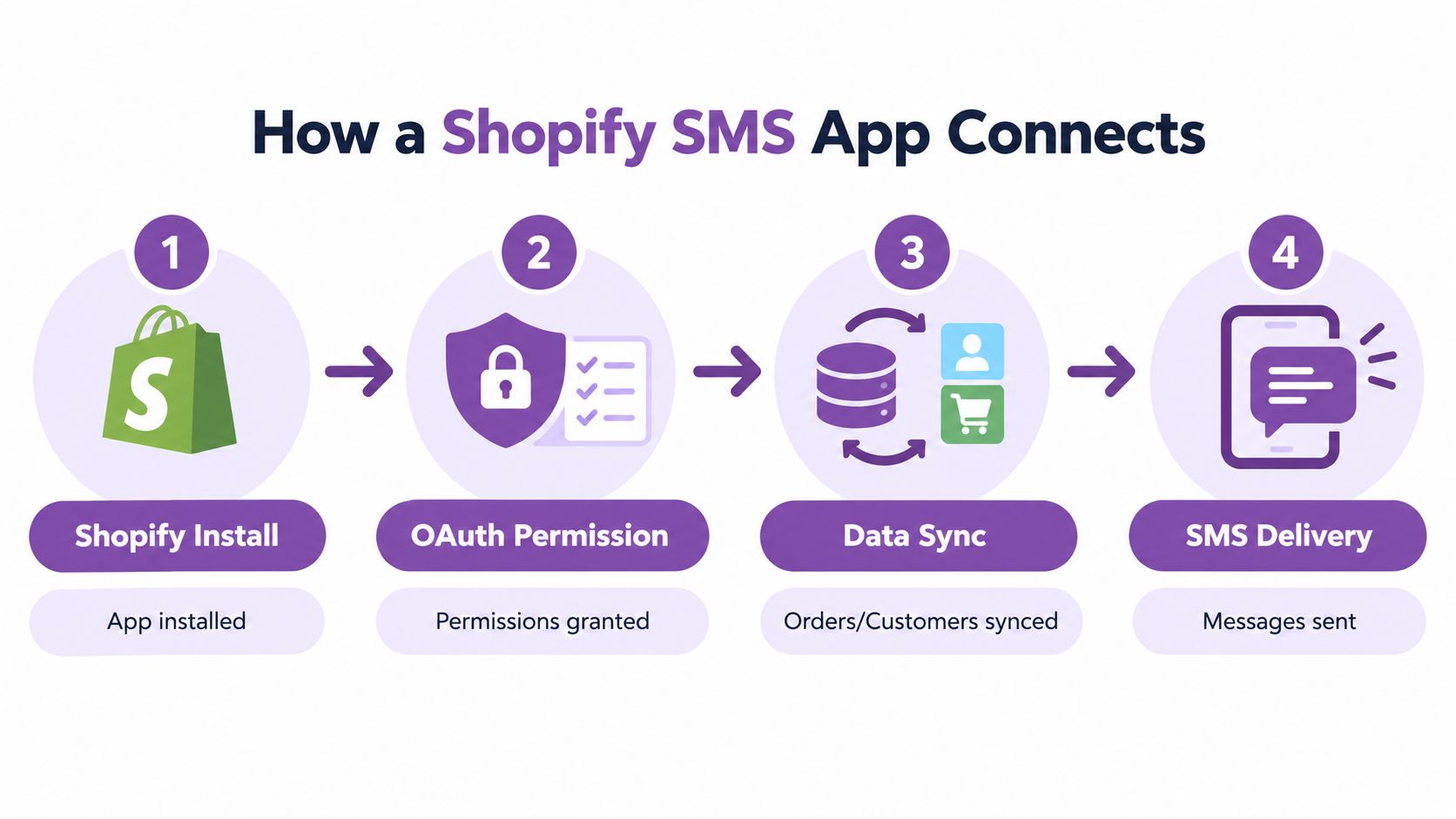
A practical data path looks like this:
- Shopify creates an event. An order is placed, a fulfillment is completed, or a checkout changes.
- The app validates the event. It checks consent, country, quiet hours, suppression status, and whether the event has already been processed.
- The app loads message data. It may retrieve a customer's first name, product title, order reference, or tracking URL.
- The message enters the provider queue. The provider applies sender rules, carrier limits, retries, and delivery-receipt processing.
- Shopify data records support targeting. Customer Tags, Order Tags, and metafields can identify VIP customers, product groups, or lifecycle stages.
A cart token can expire, so a recovery message shouldn't rely on an old session remaining valid indefinitely. Historical numbers also can't be treated as automatically marketable just because they appear in Shopify. The app needs a documented consent record tied to the contact.
Watch how the app handles ownership and infrastructure. Some platforms keep the merchant's workflow inside Shopify's event and queue model, while others rely on an external messaging service and sender identity managed outside the store. The distinction affects setup, troubleshooting, reporting, and the way a team handles delivery failures. A practical overview of the connection is available in this guide to Shopify SMS integration.
The following video can help merchants visualize the installation and delivery path:
Pricing, Deliverability, and the Engineering Behind the Messages
An SMS budget has more parts than the platform subscription. Start with the destination country and the provider's per-message or per-segment rate. Then account for the sender type, number rental or provisioning, carrier pass-through charges, registration costs, and any monthly automation or contact fee.
| Component | Typical cost (US) | What it covers |
|---|---|---|
| Message usage | Variable, based on destination and message length | Carrier and provider delivery charges |
| Sender number | Recurring or provisioning-based | A short code, long code, or toll-free sender |
| 10DLC registration and carrier fees | Variable pass-through charge | Registered application-to-person traffic in the United States |
| Platform subscription | Monthly, depending on the app | Automation, list management, templates, and reporting |
| Failed or retried messages | Usage-dependent | Attempts that consume provider or carrier resources |
| Premium routing | Variable | Additional infrastructure or direct-carrier options |
Sender type affects throughput as well as cost. A short code may suit a high-volume program, while a registered 10DLC or toll-free route may fit a smaller store. Merchants comparing those choices can review this explanation of long codes and short codes, then ask vendors how carrier approval changes the available capacity.
Deliverability is a queueing and consent problem, not a promise made by an API response. A system can accept a message for processing while a carrier later throttles, rejects, expires, or filters it. Content, sender identity, timing, volume spikes, link reputation, opt-out handling, and trust status can all affect the final result.
High-volume systems should separate API response time, queue-processing delay, and end-to-end delivery time. Technical guidance describes targets below 50 milliseconds for API responses and below 100 milliseconds for queue delay during spikes, while persistent SMPP connections can sustain hundreds or thousands of messages per second when carrier capacity allows. The same enterprise SMS delivery criteria recommends requesting latency percentiles, peak throughput, retry behavior, failover targets, and country-specific routing rather than accepting one average delivery figure.
A polished Shopify app may use Twilio, MessageBird, Sinch, Plivo, an aggregator, or direct carrier routes underneath. That underlying chain still determines whether the handset receives the text. Compare platform charges carefully, and use a neutral plan comparison resource from LunaBloom AI when you need a broader way to organize software costs. Budget for retries and failed messages, then test a campaign burst before scaling it.
Consent Is the Foundation of SMS
A shopper enters a phone number to receive delivery updates. That permission does not automatically cover a product launch, promotional campaign, or abandoned-cart reminder. Treat the phone number as an identifier, and the consent record as the rule that determines which workflows may use it.
Section 2 divided messages into transactional and promotional. Here is what that split looks like as an operational consent record. Shopify requires stores to explain how phone numbers are collected, used, stored, and shared. The disclosure should cover message frequency and data rates, provide opt-out instructions, identify SMS providers in the privacy policy, and account for regulations such as GDPR, CPRA, and TCPA. The Shopify SMS requirements also place vendor governance on the merchant.
Record the purpose at the point of opt-in:
- Order confirmation: permission connected to a completed purchase and expected order information.
- Shipping and delivery update: permission connected to fulfillment or delivery activity.
- Marketing promotion: a separate, explicit opt-in for promotional content.
- Abandoned-cart reminder: documented eligibility and country logic, since the message may promote a purchase.
The legal treatment of transactional messages varies by jurisdiction and message design. A sales reminder does not become transactional merely because it mentions a cart or order. Store the consent language, source, timestamp, country, phone number, and purpose beside the customer record. That evidence gives support and compliance teams something concrete to inspect when a workflow is questioned.
Consent test: Ask whether a reasonable customer would understand the exact message type they are about to receive. If the answer is uncertain, revise the opt-in language.
Test suppression like any other production control. Send STOP, UNSTOP, and HELP from a test number, then confirm suppression reaches campaigns and automations instead of only one workflow. Define how a shipping question is handled too. Route replies to a human queue or a documented answer, rather than leaving customers in a silent inbox.
Use this TCPA compliance checklist for SMS programs to organize the review. The goal is a clearly governed audience the store can contact for the stated purpose, not the largest possible list.
How to Evaluate an SMS Notification App Before You Sign Up
Treat a vendor trial like an operations interview. A good-looking template editor tells you little about sender ownership, carrier handling, or the quality of consent records.
Start with the sender. Ask whether the short code, long code, or toll-free number is dedicated or shared, who owns it, how provisioning works, and what information the merchant receives when a carrier rejects traffic. A shared sender may simplify setup, but it can also make reputation and troubleshooting less transparent.
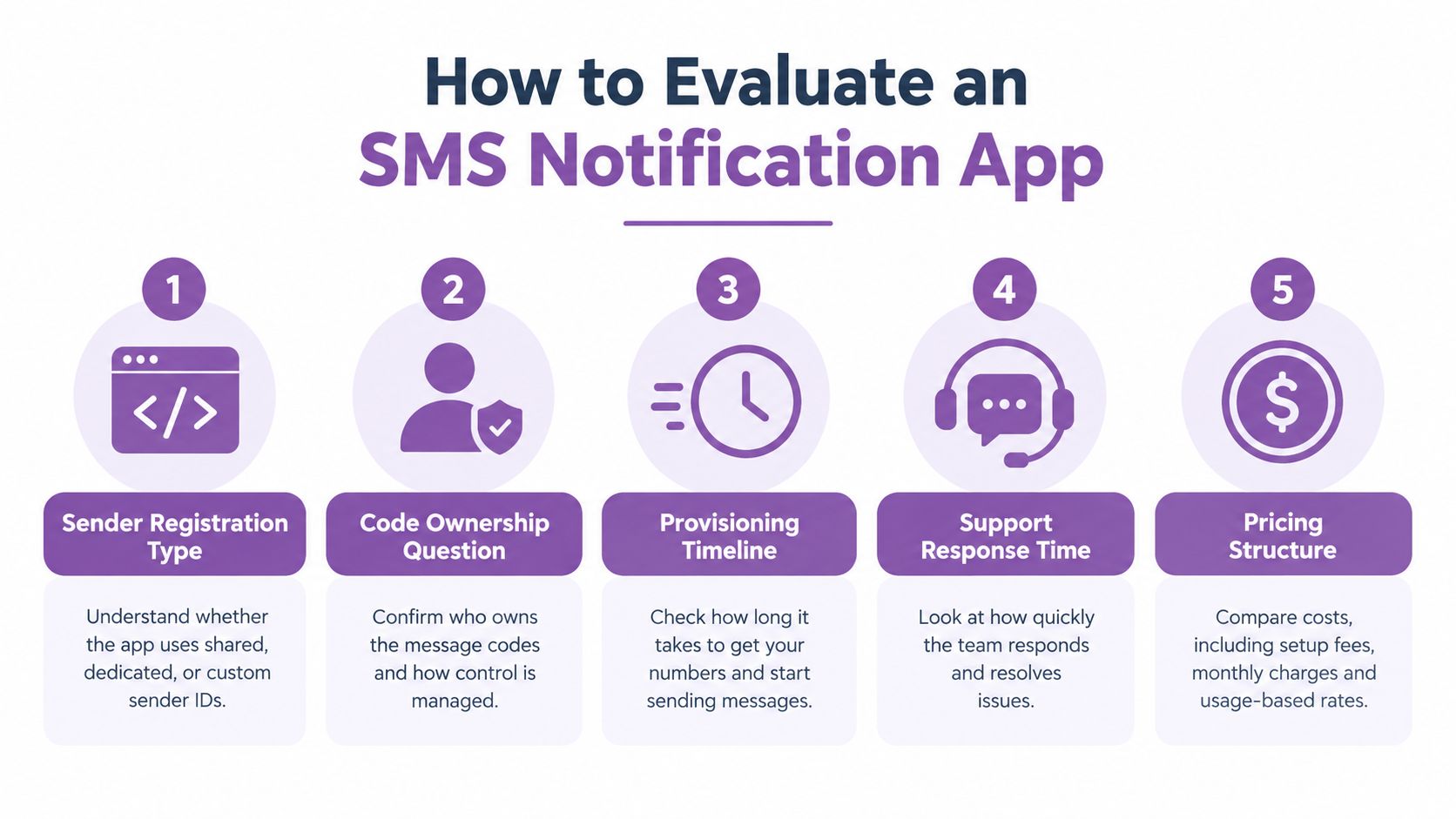
Use these questions during the trial:
- Where is consent captured? Request screenshots of checkout, popup, account-page, and keyword opt-in forms. Check whether the app records the disclosure text, timestamp, source, country, and consent purpose.
- Which triggers are available? Confirm support for order creation, fulfillment, delivery events, checkout activity, customer tags, and suppression after opt-out.
- How does timing work? Test quiet hours across recipient time zones, delays, retry behavior, duplicate webhooks, and country-specific abandoned-cart rules.
- What does delivery reporting show? Look for accepted, delivered, expired, rejected, and filtered states, along with queue age and delivery-receipt latency.
- What exactly appears on the bill? Separate message usage, recipient charges, sender fees, carrier pass-through costs, platform tiers, and retries.
Use a small seed list before a major campaign. Compare the app's dashboard with actual handset delivery, inspect failed messages, and reply to a notification to test support routing.
Red flags include vague consent logs, fees that appear only at billing, hard automation caps, unclear sender ownership, and support that takes days to answer a basic integration question. A vendor that can't explain what happens after a carrier throttles a message won't become more transparent when your volume increases.
Building Your SMS Channel the Right Way
Start with two transactional flows, shipping confirmations and delivery updates. Once those behave reliably, add one cart-recovery automation with country, consent, deadline, and suppression rules already defined.
Create a consent page that states the message types, explains opt-out instructions, and identifies the provider. Store the source and timestamp with the contact record, then review the records regularly. Keep email for receipts and detailed instructions, push notifications for app-based customers, and a helpdesk for conversations that require context.
SMS is a useful layer, not a replacement for the rest of the customer communication stack. Run the first implementation on transactional flows, measure delivery and reply behavior, review failed events, and only then decide whether promotional sends belong in the plan.
YipSMS Inc. offers Shopify-connected SMS notifications for shipping, delivery, cart and checkout follow-ups, campaigns, and customer replies, with automation and delivery activity reporting in one platform. If you want to test a consent-aware SMS workflow for your store, visit YipSMS Inc. and review the available setup options.
How this article was made: the YIPSMS team drafts some articles with AI writing tools, then checks pricing, compliance and product details against how YIPSMS actually works before publishing. Spotted something wrong? Tell us through your YIPSMS account.