What Does Fulfilling Order Mean in Shopify
Fulfilling an order means the store picked and packed the items, handed the parcel to a carrier, and marked it fulfilled in Shopify with tracking. It does not mean the customer has received it.
The popular advice to automatically send a shipped text as soon as an order is paid is bad operating advice. Payment tells you the checkout succeeded, not that anyone has touched the box. Build your SMS notifications around verified warehouse and carrier events instead.
Table of Contents
- What Fulfilling an Order Means
- How Pick Pack and Ship Becomes Fulfilled
- What Fulfillment Does to Inventory
- What to Text at Each Fulfillment Event
- Delays Partial Orders and Returns
- Send the Right Text After You Mark Fulfilled
What Fulfilling an Order Means
Give your team a definition they can use at the packing bench: verify the paid order, allocate stock, pick the units, pack them, hand them off, and record tracking. That's the operating standard behind a trustworthy Fulfilled status.
Fulfillment is broader than shipping. The U.S. Bureau of Labor Statistics' warehousing and storage overview includes order entry, inventory control, packaging, pick-and-pack work, and transportation arrangement among warehouse services. Someone has to manage both the physical goods and the records that describe them.
For a merchant asking what does fulfilling order mean, the useful answer is therefore operational, not just technical. A status update should describe completed work, not work you hope the warehouse will finish later.
Order status and who holds the parcel
These are the operating meanings your team should follow. Payment, fulfillment, and delivery belong to separate status categories, even when your order screen displays them together.
| Status | What happened | Who holds the parcel |
|---|---|---|
| Paid and confirmed | Payment captured, nothing picked | Store |
| Unfulfilled | No shipment recorded | Store |
| In progress | Fulfillment request accepted | Store or fulfillment service |
| Partially fulfilled | Some lines shipped, others open | Carrier for shipped lines, store for the rest |
| Fulfilled | All shippable lines handed to a carrier and marked with tracking | Carrier |
| Delivered | Carrier confirms arrival or pickup | Customer |
| Declined or on hold | Request rejected, or stock or fraud review paused it | Store |
Treat this table as a handling standard, not proof that a software flag guarantees physical possession. A merchant can update a record prematurely. Your dispatch process has to prevent that mismatch.
A declined fulfillment request returns the work to Unfulfilled; an on-hold order needs a separate decision before work resumes. Neither means the customer cancelled. Assign someone to investigate the rejection or hold rather than leaving the order in an unattended queue.
Packing-bench rule: Update the record to match the parcel. Don't move the status forward to make the queue look cleaner.
Keep separate clocks
Record payment capture, pick start, and carrier handoff separately. If you combine them into a single processing timestamp, your support team can't tell whether an order is waiting on a shelf or moving through a carrier network.
Split shipments make that distinction essential. A parcel can already be travelling while another item remains unfulfilled, so staff must inspect line items rather than assume the whole purchase has moved.
Before you automate delivery order workflows using OrderOut's operational guidance, name the person responsible for each handoff. Automation should pass a verified event between those people, not replace verification.
How Pick Pack and Ship Becomes Fulfilled
Treat fulfillment like a relay. Each person hands over both the goods and enough information for the next person to finish the job.
Shopify's fulfillment documentation covers manual, automatic, bulk, batch, third-party, dropship, and mixed fulfillment, including routing by proximity and available inventory. Choose the model that fits your operation, but keep the physical checks intact.
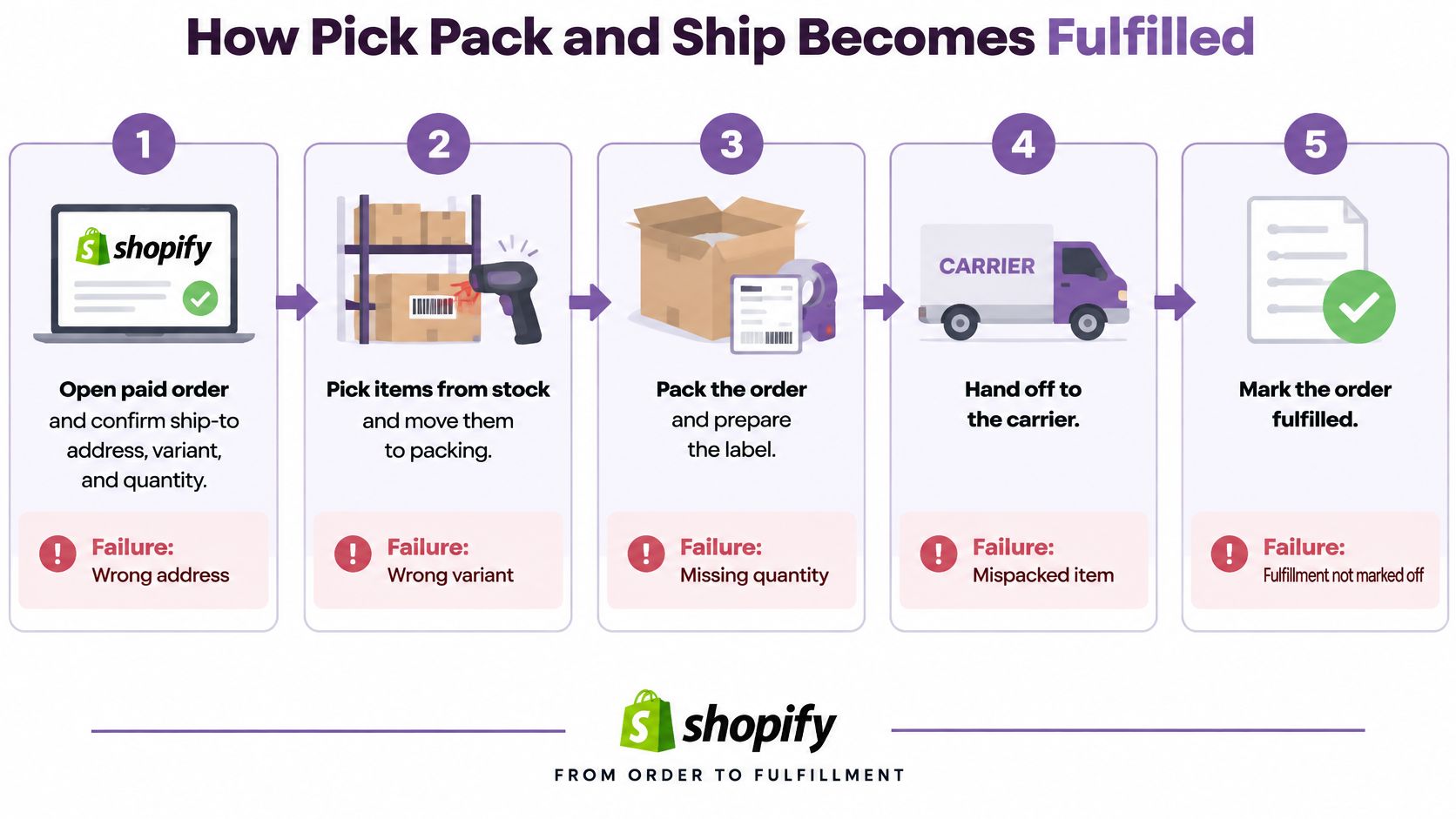
Run the handoffs in order
Open the paid order and check the details. Confirm the ship-to address, product variant, and quantity before anyone walks to the shelf. A missing apartment number won't become easier to fix after dispatch.
Assign the correct fulfillment location. Check that the assigned warehouse holds the SKU. Stock elsewhere in the business won't help if the request goes to a location that can't pick it.
Pick against the order lines. Match the exact size, color, quantity, and any personalization. For bundles, check every component rather than scanning the outer product name and assuming the contents are complete.
Pack for the product and the promise. Protect fragile goods with suitable cushioning; use a protective mailer for soft goods when appropriate. Check promised gift wrap and inserts before sealing, because reopening finished parcels creates avoidable work.
Generate the label and save tracking on the fulfillment. Don't leave the tracking number in a spreadsheet or carrier dashboard that support staff can't connect to the order. A valid label attached to the wrong fulfillment still creates a customer problem.
Complete the carrier handoff. Check that the parcel joins the scheduled pickup or drop-off, then use the first carrier scan to authorize on-the-way language. A printed label sitting beside the packing station isn't evidence of movement.
Mark only the shipped lines fulfilled. Match the quantities in Shopify to the contents of that parcel. Accidentally including a backordered item can close work that the warehouse still owes the customer.
Let external services respond to their requests. If a third-party warehouse, dropshipper, or another location owns part of the order, check acceptance or rejection before editing inventory yourself. Otherwise, the store and supplier may both act on the same units.
Publish instructions that match the warehouse
Keep your shipping-policy page, order-status explanation, and support macros consistent with this workflow. If your site says dispatch means carrier collection, your automated messages shouldn't use dispatch to mean label purchase.
Teams maintaining those pages can use Rankira's guide to keyword research and publishing platforms to organize customer-facing explanations around the questions shoppers ask. Operational accuracy still comes first; search-friendly wording can't fix a false shipping promise.
A label in a drawer isn't completed dispatch. Close the handoff only when the carrier has the box and Shopify has the matching tracking record.
What Fulfillment Does to Inventory
Inventory should follow the physical goods. Available stock falls when units become committed; on-hand stock falls when those units are fulfilled. Customer payment alone shouldn't create an additional physical stock deduction, and delivery shouldn't deduct the same units again.
Keep those movements separate when reconciling Shopify with a warehouse app. Otherwise, a correctly shipped order can still leave the store selling stock that doesn't exist.
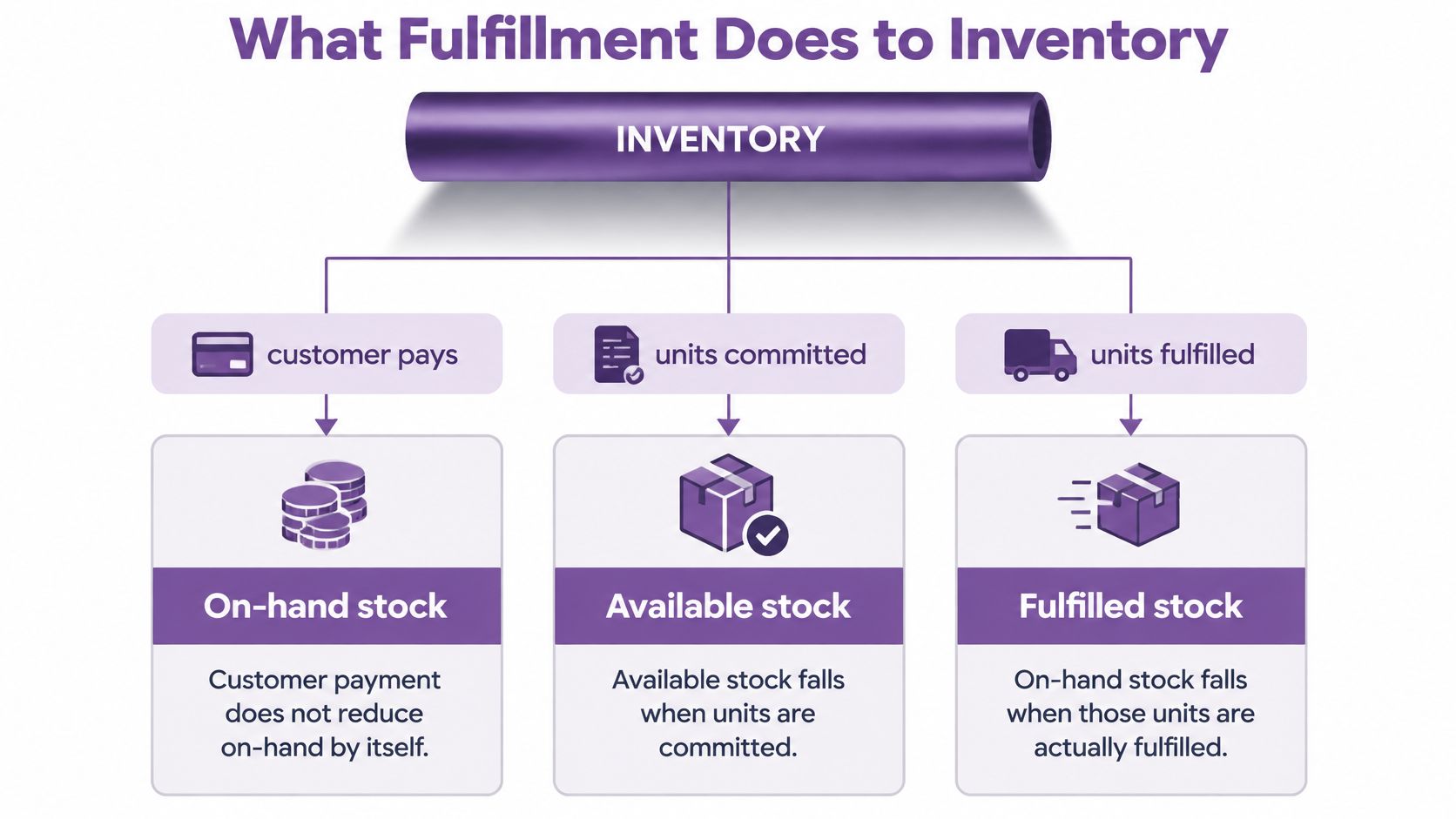
Follow the stock through common cases
A single-location shipment should reduce only the shipped SKUs and quantities at the location that supplied them. Check variant-level records, not just the total product count. A surplus of medium shirts doesn't compensate for overselling large shirts.
A partial fulfillment removes the shipped line from the warehouse's remaining obligation while the unshipped line stays committed or backordered. Don't treat missing stock as available just because you expect replenishment. Only promise incoming units against a credible replenishment date.
A multi-location order must remain attached to the location doing the picking. Shopify's order-processing guidance specifically addresses changing inventory location when moving from an external fulfillment service to self-fulfillment to preserve accurate tracking. Reassigning the work without reassigning the location is how counts drift between systems.
A decline, cancellation, or return-to-sender requires a different stock action. A declined request may need rerouting rather than releasing the customer's allocation. A cancellation can release unshipped committed stock; returned goods need receipt and inspection before restocking.
Make returns part of reconciliation
An estimated 19.3% of online sales in the United States were expected to be returned in 2025, according to the National Retail Federation and Happy Returns. Don't leave return-to-stock decisions as an informal task after the refund.
Use Jumpstart Partners' inventory accuracy guidance for founders to connect stock reconciliation with financial records. Record whether returned goods are sellable, damaged, or awaiting inspection instead of placing everything back into available inventory.
Digital downloads and gift cards need their own fulfillment treatment. They don't require a physical pick, so their completion must not deduct physical on-hand units.
Run this closing check after a busy dispatch day:
- Location: The recorded warehouse matches the shelf used.
- Quantity: Fulfilled units match the parcel contents.
- Open work: Leftover lines remain unfulfilled.
- Cancellations: Eligible unshipped units are available again.
- Returns: Only inspected, sellable goods rejoin available stock.
What to Text at Each Fulfillment Event
The merchant means the parcel has entered the delivery process. The shopper hears that it's arriving soon. Your text must explain the event in customer language, not repeat an internal status and expect the recipient to interpret it.
In Stord's 2025 Mystery Shopping Report, 56% of consumers preferred receiving order updates and tracking information by SMS, while only 12% of brands met that expectation. Fix timing and accuracy before adding another discount campaign.
Delivery promises also influence the purchase itself: DHL's 2025 global findings found that 81% of consumers would abandon a purchase if their preferred delivery option were unavailable. Don't undermine the option they selected with vague or premature updates.
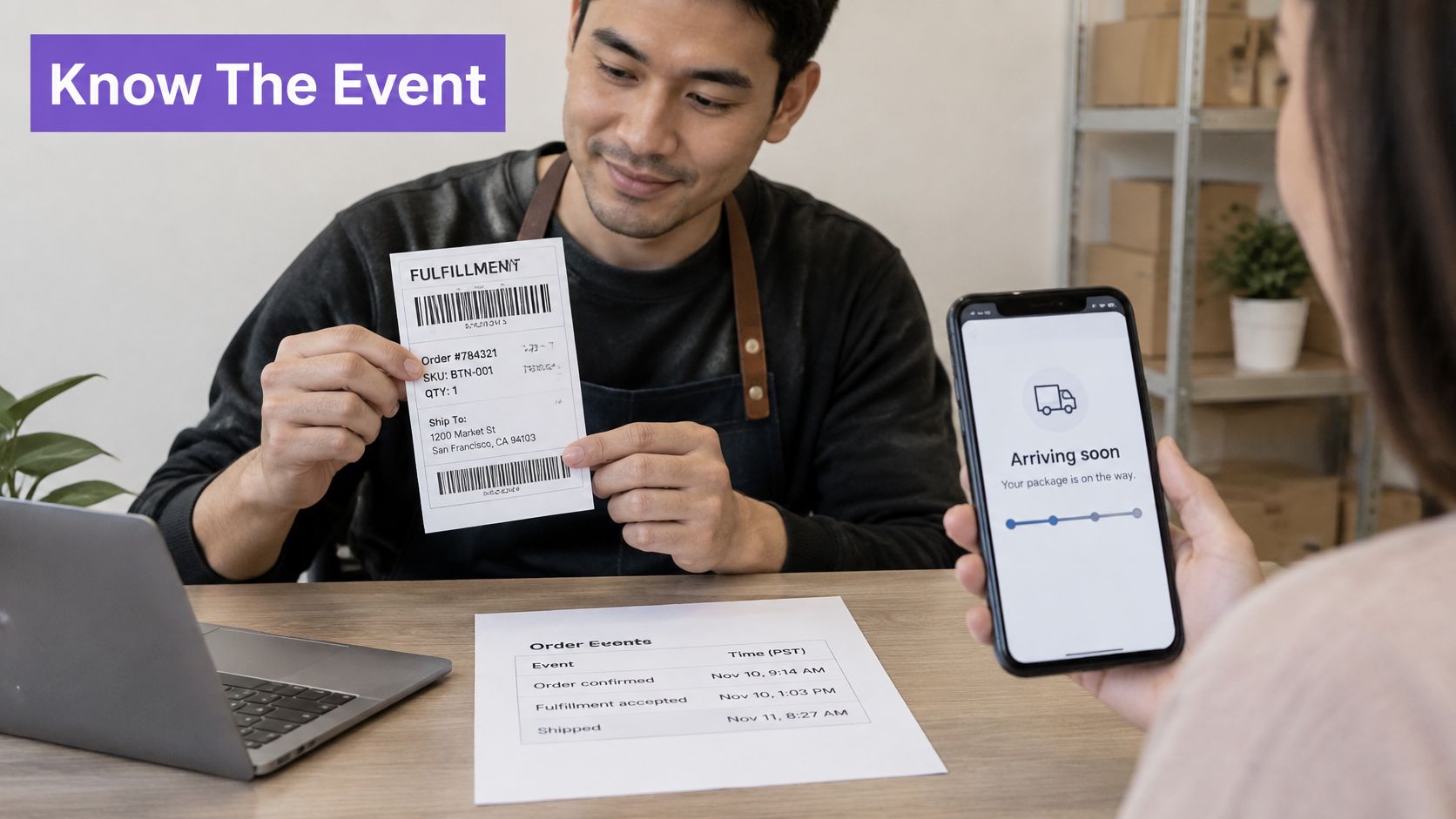
Which fulfillment text to send and when
Use this send sheet to map the event, evidence, and approved wording. The sample copy is operational guidance, not a promise to send a message at every possible transition.
| Event | Send when | Say this | Do not say |
|---|---|---|---|
| Order confirmed | Payment is captured | We got your order and are preparing it | Your order has shipped |
| Fulfillment accepted | Request is in progress | We started picking your items | It is out for delivery |
| Label created | Tracking exists, no carrier scan yet | Tracking will move after the carrier scans it | Delivered |
| Carrier handoff | First carrier scan | Fulfilled and on the way, plus the tracking link | It has arrived |
| Partial shipment | Only some lines have labels and scans | These items shipped; the rest is still being prepared | Your whole order is fulfilled |
| Delivered | Carrier delivery or pickup scan | Your package was delivered, with time and place | Here is 20 percent off in the same text |
| Exception | Attempt failed, address issue, or delay | What went wrong and the next choice | Everything is fine |
Check the meaning of each integration event before enabling it. A service accepting a fulfillment request may not mean a picker has started walking the shelf. If acceptance only reserves a place in the queue, say the warehouse received the request, not that picking has started.
Similarly, skip a label-created text if it adds no useful information between confirmation and dispatch. When you do send one, explain why tracking hasn't moved. Don't train shoppers to interpret an inactive tracking page as a lost parcel.
Customer-language test: Could the shopper read this text, open tracking, and see evidence that agrees with it?
For the message structure and event mapping, use this practical guide to SMS delivery notifications. Keep the order reference, relevant item names, current event, and next action easy to find.
Give special orders their own wording
A preorder should state its expected ship date, not imply current warehouse preparation. A backorder should identify the affected item and expected restock date, with an honest statement when that date isn't confirmed.
For a digital download, say the file is ready and explain how to access it. Don't send parcel-tracking language because the platform marks the digital order fulfilled.
A failed delivery attempt needs a practical next step: confirm an address, arrange redelivery, or collect the parcel from the stated location. An out-for-delivery message and a failed-attempt message must not use the same copy.
Split-shipment texts should name the items in that package. Include the matching tracking link and explain the status of the remaining items without promising a departure date you haven't verified.
Separate service messages from SMS marketing
Don't attach a promotion to a delivery confirmation. That message should help the customer find the parcel, report a problem, or understand the recorded delivery location.
The CTIA Messaging Principles and Best Practices recommend consumer consent before messaging, express written consent for marketing, and accessible ways to revoke consent. Record permission by message type, honor STOP and other opt-out requests, and don't assume a purchase authorizes promotional texts.
Use a permitted order-contact channel for necessary service communications. If SMS permission has been revoked, don't assume that calling a message transactional gives you permission to continue texting; use an appropriate alternative channel.
For shoppers with marketing consent, schedule a care tip or replenishment offer after delivery as a separate flow. Waiting until at least the following day is a sensible operating choice, not a reason to combine it with the delivery notice.
Cart recovery belongs in another automation. Klaviyo's ecommerce SMS overview cites Baymard's estimate that about 70% of online shopping carts are abandoned and research cited by Klaviyo and Recharge finding that nearly 18% of customers prefer abandoned-cart notifications through SMS. Start with a permission-based reminder containing the product name and a direct return-to-cart link, alongside email rather than instead of it.
Audit what the recipient can verify
Review tracking-link clicks, where-is-my-order tickets, opt-outs, and messages sent before a carrier scan. Don't treat a standard SMS delivery receipt as proof that the customer opened or read the message.
Inspect individual failures. A correct template attached to the wrong trigger is still a misleading text, and changing the wording won't repair the trigger.
Delays Partial Orders and Returns
Ship within the window you advertise. Under the FTC's Mail, Internet, or Telephone Order Merchandise Rule, if no shipping timeframe is stated, a seller generally must ship within 30 days of receiving the order; if it can't meet the promised date, it must give a delay notice and offer cancellation for a full, prompt refund.
A vague apology isn't enough. State the revised date when known and provide an actual cancellation path that your team monitors.
Delay type and the notice the customer must get
The FTC's prompt-delivery guidance distinguishes a definite delay of up to 30 days, where silence may generally count as agreement, from longer, indefinite, or repeated delays requiring explicit consent. Apply the relevant notice conditions rather than treating silence as universal approval.
| Delay | Consent rule | SMS must include |
|---|---|---|
| Definite delay of up to 30 days | Silence may count as agreement | Revised ship date and a cancel-for-refund option |
| Delay longer than 30 days | Explicit yes required | Revised date or a statement that the date is unknown, plus refund if they decline |
| Indefinite delay | Explicit yes required | The fact that no date is known and a prompt refund path |
| Second or later delay | Explicit yes required again | The new date and refund of everything paid if they do not agree |
| Cannot ship at all | No delay offer | Cancellation and a full prompt refund |
Keep consent responses attached to the order. Don't let a reply asking for cancellation sit in a marketing inbox while the warehouse continues processing.
Assign an owner to the broken promise
For self-fulfilled stock, the merchant owns the warehouse investigation and customer update. A third-party logistics provider owns its accepted picking work, but the store still owns the customer communication.
A dropship supplier controls its dispatch timing. Require handoff evidence rather than marking the order complete because the supplier acknowledged receiving it.
Alternative delivery and return locations need deliberate handling: DHL's 2025 research across 24,000 shoppers in 24 countries found that 25% of global shoppers choose out-of-home delivery locations, while 66% prefer returning items through parcel lockers or shops.
For each exception, state what happened, who has the parcel, and what the customer can do:
- Customs: Explain the hold and any verified action needed.
- Missed delivery or locker hold: Give redelivery or collection instructions.
- Exchange: Distinguish receipt of the original from dispatch of the replacement.
- Return-to-sender: Confirm the return journey before promising a replacement or refund outcome.
Use a specific message for delivery updates, not a generic reassurance. Send the exception notice when your team learns about the event, and keep unshipped lines open until the responsible party resolves them.
Send the Right Text After You Mark Fulfilled
Set up the event map today. Don't enable every automation at once and hope the messages arrive in a sensible order.
Put the setup into production
Inventory your events. List paid, in progress, fulfilled, partially fulfilled, delivered, and cancelled. Confirm which originate in Shopify and which require carrier data.
Write a short text for each useful transition. Reserve delivered for a verified delivery event, and suppress duplicate updates from overlapping apps.
Split service and marketing permissions. Keep order notices separate from campaigns. Test STOP handling before sending to customers.
At YipSMS Inc., our prebuilt automations include Shipped Notification and Delivered Notification, alongside Popup Subscriber Welcome, AI Chat Response, Keyword Opt-in Reply, and Shopify Segment Entry. Installation takes one click, and a first Scratch-to-Win popup and abandoned cart automation can launch in under 10 minutes; keep those acquisition flows separate from service texts.
Complete sender registration. Our Shopify SMS app setup guide covers installation, 10DLC registration, and the first campaign. Complete applicable registration before live sending; it doesn't replace consent or guarantee delivery.
Review the initial week's support tickets alongside shipment events and send timestamps. Aim for no premature shipped messages, investigate every mismatch, and correct the actual trigger rather than assuming payment is always the cause.
Release check: Place a test order, follow its parcel, and verify every text against the event that authorized it.
YipSMS Inc. offers Shopify-connected SMS automation, including prebuilt shipped and delivered notifications, so order updates can stay separate from promotional campaigns. Visit YipSMS Inc. to set up your flows, then test a real fulfillment journey before switching customer notifications on.
How this article was made: the YIPSMS team drafts some articles with AI writing tools, then checks pricing, compliance and product details against how YIPSMS actually works before publishing. Spotted something wrong? Tell us through your YIPSMS account.