SMS and MMS Texting for Shopify Campaigns
Adding a photo to a text doesn't upgrade it. It only raises the fee, slows the send, and gives carriers another reason to filter you, unless the picture does work the words can't do. For most Shopify stores, SMS and MMS texting isn't a format contest. It's a margin question. You pay for every segment, every discount, and every STOP reply, so the plain text should win until an image proves it creates enough extra profit to beat it.
Table of Contents
- Why a Product Photo Is Not an Upgrade
- SMS vs MMS Specs Stores Actually Compare
- Characters, Segments, and the Real Send Fee
- UK Consent and Opt-Out Rules Before You Text
- How to Tell If the Image Lifts Profit
- Copy and Creative That Get the Click
- Pick SMS or MMS for Each Shopify Send
Why a Product Photo Is Not an Upgrade
Most store texts fail before format enters the discussion. They read like every other sale alert in the inbox. Same percent off. Same urgency. Same link. A product photo won't fix generic copy, and it can make a weak message slower, heavier, and more likely to arrive broken.
Shoppers gave you permission for something short and useful. In 2025, 86% of surveyed consumers said they opted in to receive business text messages, according to EZ Texting's 2025 Consumer Texting Behavior Report, based on 1,074 respondents surveyed in November 2024. That's broad permission, not patience. Waste it with a bloated rich message and you're teaching buyers to ignore you or opt out.
Keep two drafts in mind, because you probably have both open right now. One is an abandoned checkout reminder. The buyer already saw the product, picked a size, and stalled at payment. That send needs one clear line and a link back to checkout. A photo adds cost and delay and changes nothing.
The other is a Friday drop for a jacket nobody has seen. There, the visual might be the pitch. The fit, the color, and the fabric are hard to sell in a sentence. If you're shooting that kind of creative, strong on-model photography matters because the image has to show scale and wear, not just fill a template. Even then, it's a test, not a default.
The Rule I Would Apply
Use SMS for speed, reach, and a low fee. Use MMS only when seeing the product changes the action enough to pay for the file. If the buyer can act without seeing it, send plain text. If the buyer has to see it to want it, test the image against a plain control and make it earn the spend. The lookup table that follows sorts the specs fast, then the math, the profit test, and the copy do the heavier work.
SMS vs MMS Specs Stores Actually Compare
| Criterion | SMS | MMS |
|---|---|---|
| Body length | 160 GSM-7 characters per segment, or 70 if Unicode | About 1,600 characters plus media |
| Media | Text and a link only | One image, GIF, or short video |
| Handset reach | Nearly every mobile phone, no data required | Needs carrier and handset support |
| Deliverability | Simple payload, best for time-critical alerts | Richer file, more risk of delay, filtering, or a missing image |
| Relative fee | Billed per segment | Commonly near twice one plain SMS segment |
Read that table as a buying decision, not a technical one. SMS is a small, simple payload built for a short line and a link. It doesn't need data, it works on nearly every phone, and it has fewer moving parts when minutes matter. A cart link, a delivery update, or a code should not wait for a media file to load.
MMS gives you room, both for words and for a visual. You can show the product instead of describing it, and you aren't counting every character as tightly. That room tempts stores to write longer copy, which is usually a mistake. The point of MMS is the image. The text around it should get shorter, not longer.
Reach Has Always Favored Plain Text
That gap isn't new. The history of Multimedia Messaging Service notes that Verizon launched MMS in the United States in July 2003, and a 2011 estimate projected 249 billion MMS messages worldwide compared with approximately 6.9 trillion SMS messages, meaning SMS volume was roughly 28 times larger. MMS grew, but it never matched plain text for universality. Simpler delivery and broader handset compatibility kept SMS ahead.
Deliverability follows the same pattern. A plain payload gives carriers less to inspect, compress, delay, or strip out. An MMS file can arrive late, arrive resized, or arrive without the picture you paid for. If the offer depends entirely on that picture, a stripped file leaves the buyer with a confusing caption and a link.
Where RCS Fits
RCS sits beside both formats, not on top of them. Reported RCS volumes in North America increased 14× in 2024, according to Infobip's messaging trends regional snapshot, but that growth complements SMS rather than replacing it. Plenty of recipients don't have RCS available or switched on, so SMS remains the fallback you need to keep every urgent and transactional send working.
Cost is the last row, but it's the one that decides most sends. One MMS commonly lands near twice one plain SMS segment, before encoding surprises push a plain text into multiple segments. That comparison sounds simple in a table. On a real send, character choices can flip it.
MMS is a complement to SMS, not a replacement for it.
Characters, Segments, and the Real Send Fee
Send a 306-character message in plain GSM-7 and you pay for two segments. Send the same 306 characters in Unicode and you pay for five. One emoji can cause that jump. So can a curly apostrophe pasted from a doc, a smart quote, or a character hiding in a customer's first name. The draft looks identical. The invoice doesn't.
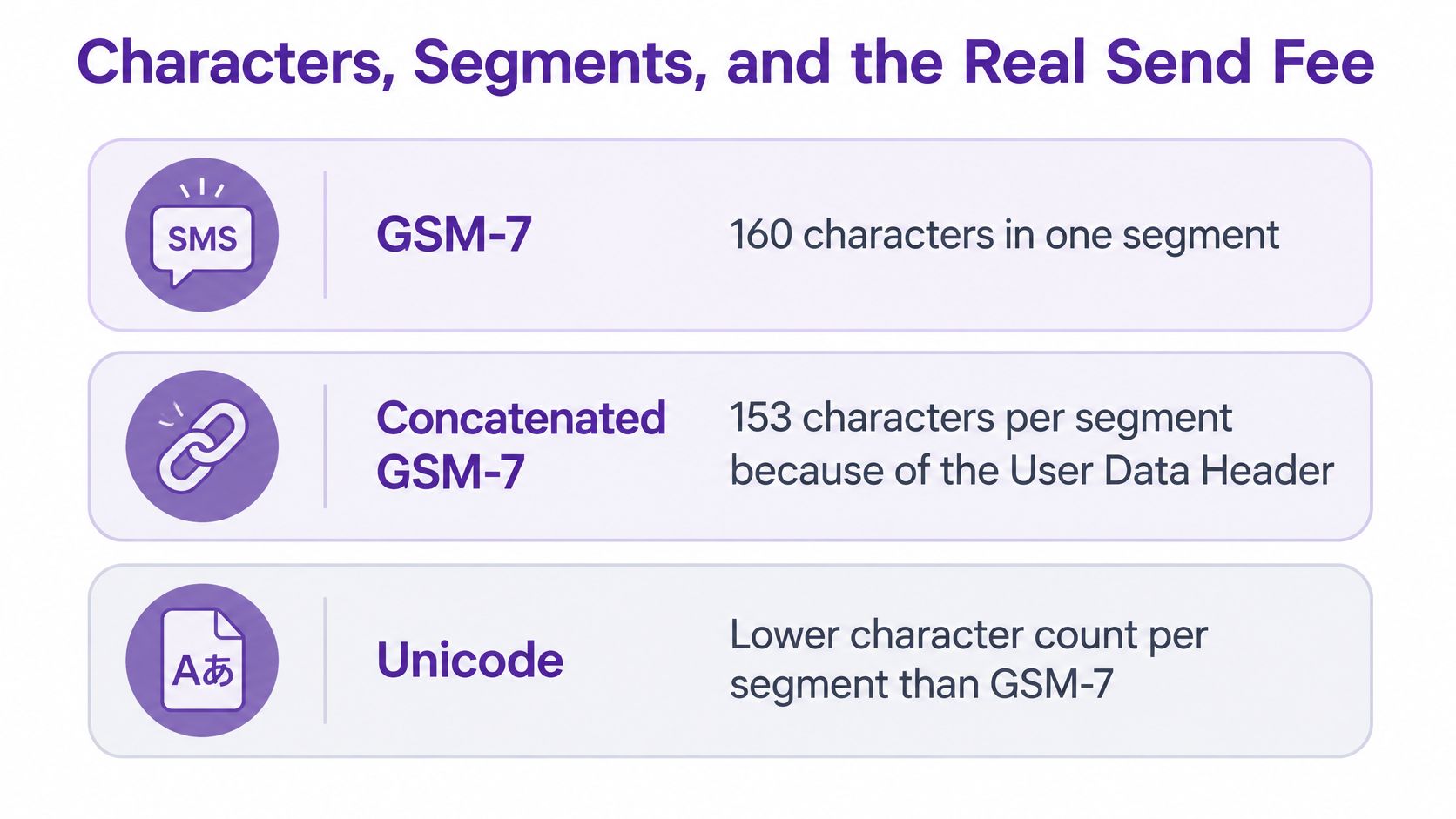
The limit starts with a 140-byte payload. The AWS end user messaging guide on SMS scale limits explains that GSM-7 supports 160 characters in one segment, concatenated GSM-7 falls to 153 characters per segment because a User Data Header is required for reassembly, and Unicode supports only 70 characters per single segment or 67 per concatenated segment.
| Encoding | Single segment | Concatenated segment | Segments in 306 characters |
|---|---|---|---|
| GSM-7 plain text | 160 characters | 153 characters | 2 |
| Unicode, emoji, or many non-Latin characters | 70 characters | 67 characters | 5 |
What Eats Your Budget
Personalization tokens, discount codes, and long product URLs all spend the same characters as your pitch. A first name that's fine for Anna can push a longer merged message into another segment. A tracking URL pasted straight from Shopify can eat half the message before you've made the offer. Preview the real merged message, not the template, because the billed version is the one with the customer's name, product, code, and shortened link already inside.
This visual breaks down how the encoding changes your character allowance before you write a word.
Keep promo copy in GSM-7 where you can. Type apostrophes and quotes in plain text instead of pasting from a word processor. Shorten links. Skip the emoji unless you've counted what it costs, because a decorative sparkle at the end of a long message can be the most expensive character in the send. If you want the fee mechanics in one place, our breakdown of what SMS fees actually include walks through the per segment logic.
When MMS Beats a Unicode Novel
Here's the twist most format advice misses. An MMS is one richer unit, commonly near twice a single SMS segment, with room for about 1,600 characters plus a visual. A long Unicode SMS split into four or five segments can cost more than that single MMS and deliver no picture at all. If your message genuinely needs length, non-Latin characters, and a product shot, MMS can be the cheaper, cleaner unit.
Deliverability still pulls the other way. A short GSM-7 cart text has fewer pieces to fail or reassemble out of order. A multipart Unicode message has more chances for partial delivery. An MMS can be filtered, delayed, or shown without its file, which means you paid for a picture the buyer never saw.
This walkthrough shows the segmentation behaviour in practice, so you can see where the extra units appear.
Practical check: Count segments on the merged message a real customer will receive, then compare that fee against one MMS before you choose the format.
UK Consent and Opt-Out Rules Before You Text
Consent gates every send, and it isn't interchangeable across channels. For UK Shopify stores, promotional texts to individuals generally require specific consent under PECR, according to the ICO guide to PECR on electronic and telephone marketing. An email opt-in doesn't cover texts. Consent for texts must specifically cover SMS, name your brand, and come from a clear affirmative action.
Build the permission properly from the start:
- Add a separate, unchecked SMS box: Put it at checkout, in a popup, or at account registration, naming the brand and the SMS channel.
- Record the evidence: Keep the date, source, and exact wording each subscriber accepted, so you can demonstrate consent later.
- Identify yourself in every text: Use a recognisable brand name and include an opt-out, such as replying STOP, that your platform processes.
- Suppress everywhere at once: Apply unsubscribes across broadcasts, automated flows, and scheduled sends so a stopped number isn't re-added by another workflow.
The requirement to identify the sender and explain how to unsubscribe applies on every marketing text, not just the first one, as the ICO guidance on marketing and data protection in detail sets out. Test that opt-out path before launch. A STOP instruction that nobody monitors is worse than useless, because it proves you knew the rule and didn't run it.
The Soft Opt-In Is Narrower Than You Think
The soft opt-in lets you text prior buyers about your own similar products without a new opt-in, but only if you collected the number during a sale or negotiation, offered a clear refusal when you collected it, and include an easy opt-out in every message. It doesn't cover prospects who never bought, abandoned cart visitors who never purchased, or unrelated products. Segmenting by purchase history and product category is a compliance control here, not just a targeting tactic.
Purchased lists fail the same test. The ICO says a bought-in list works for texts only when every person specifically consented to texts from your business, as its guidance on using marketing lists explains. Grow the list through first-party points instead, and keep your records in order using a clear consent documentation process. Stores outside the UK should check their local rules, but the same discipline travels well.
How to Tell If the Image Lifts Profit
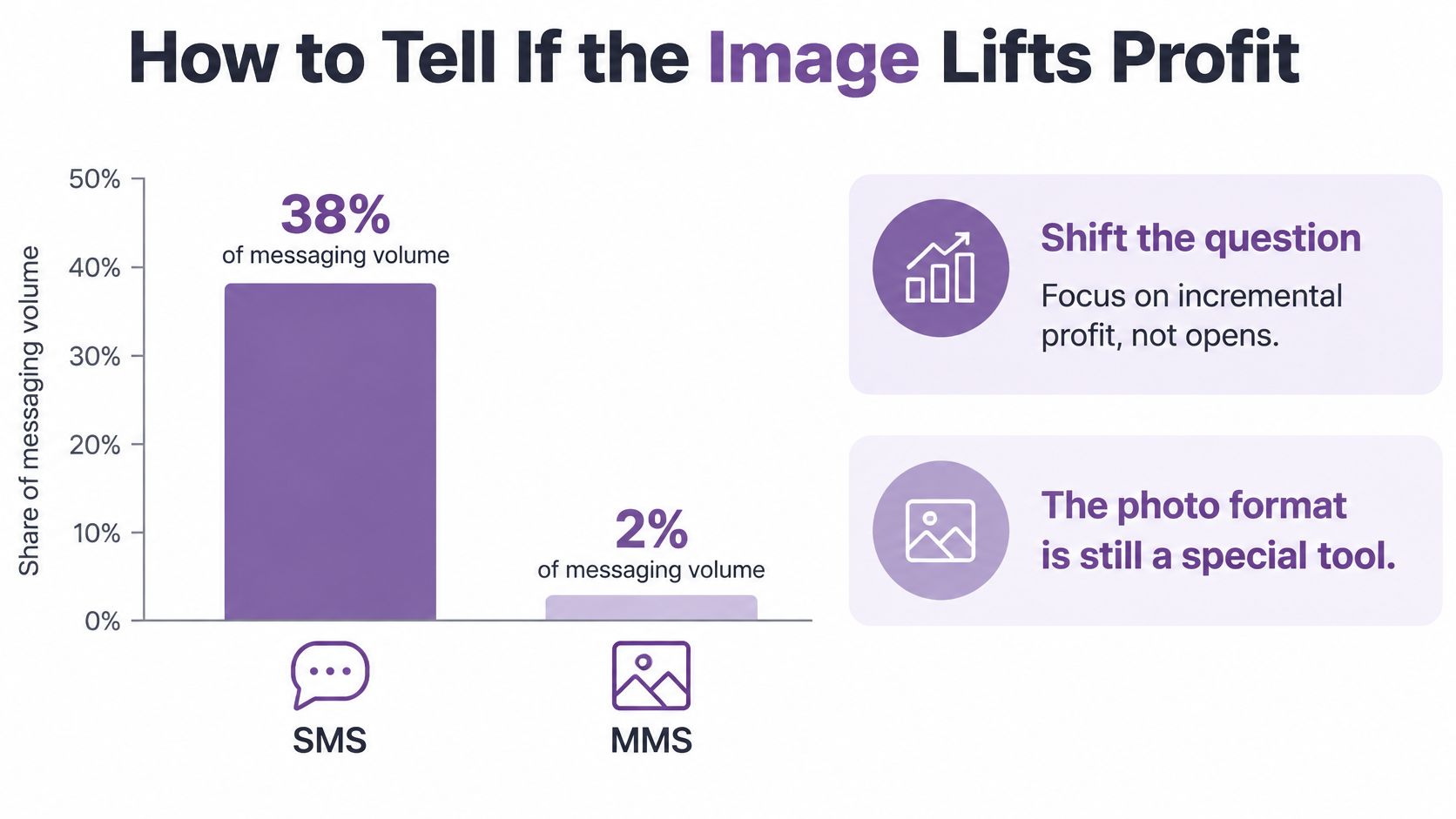
MMS is still the specialist tool, and the volume split proves it. A 2025 industry snapshot reported SMS at 38% of messaging volume but MMS at only 2%, and a 2025 messaging report found 60% of businesses consider deliverability the most important provider-selection factor, according to Bandwidth's State of Messaging report. Arrival comes before clicks. A beautiful message that lands late or never lands earns nothing.
Opens and clicks flatter MMS because a picture begs to be tapped. Profit is stricter. A high click rate can still lose money once you subtract the higher message fee, the discount you gave away, refunds and returns, the future value of people who reply STOP, and the sales email or push would have captured anyway that same morning.
The Contribution Line to Copy
Run every format test through the same formula, in this order:
- Start with incremental revenue: Sales the text caused, not every order it touched.
- Minus message fees: SMS segments or MMS units, counted on delivered messages.
- Minus discount cost: The margin you handed back through the code or offer.
- Minus refunds: Returns and cancellations tied to those orders.
- Minus opt-out cost: The value of subscribers who left because of this send.
- Minus channel overlap: Orders email, push, or a site banner would have won without the text.
What's left is the number that decides the format. Report it as profit per delivered message so a small test and a full-list send compare cleanly.
Run a Test That Can Actually Answer
You need three groups. A holdout gets no text, which tells you what would have sold anyway. A matched SMS group and MMS group get the same offer, the same audience profile, the same send time, and the same quiet hours. Change only the format. If the MMS group also gets a better discount or a warmer segment, you've learned nothing.
Report delivered messages, unique clicks, assisted conversions, unsubscribe rate, complaint rate, and profit per delivered message. Don't crown a winner on opens or last-click orders. Last-click credit rewards whichever message arrived nearest the purchase, which is often the one you sent last, not the one that caused the sale.
Say you run a hypothetical test on a $60 item with 15% off. MMS costs about twice one SMS segment, so the image has to create enough extra orders to cover both the higher fee and the $9 of margin given away on every discounted sale, including sales to buyers who'd have paid full price. If the plain SMS already converts and the photo adds only a handful of clicks, keep the plain text and bank the difference.
A format wins when its incremental margin beats its fees, discounts, and opt-outs. Anything less is an expensive decoration.
Run this on one hero campaign first. Small brands don't need to test every flow. One clean result on a big drop tells you more than muddy numbers across a dozen small sends.
Copy and Creative That Get the Click
Plain SMS should sound like a person, not a banner ad shrunk to fit a phone. One curiosity or status hook, one offer, one link. That's the structure. If you need a second sentence to explain the first, the hook is wrong.
Four patterns earn the tap because each one opens a small loop the link closes:
- The direct question: "Quick question about the jacket you left behind?" It names the item and invites a reply or a tap.
- The almost-done status: "Your order is ready... almost" works for a cart because it frames checkout as the last step, not a new decision.
- The make-good: "We owe you one" fits a delayed delivery or a sold-out frustration. It leads with accountability, then the offer.
- The open window: "Open" suits real VIP early access. It's short, specific, and only credible if access closes.
You'll find more angles in our roundup of SMS hooks that get clicks for ecommerce brands, but the principle stays the same. Curiosity and status beat hype. A buyer taps to resolve something, not to admire your adjectives.
Creative Rules for the Image
With MMS, the photo does the work the adjective used to do. Use one product shot with a tight crop. Put a price or a "back in stock" line on the image only if it stays legible on a small screen, and test it at actual phone size before sending. Learning to choose better backgrounds for product shots helps here, because a clean background keeps the thumbnail readable when carriers compress the file.
Skip the gimmicks. GIFs that loop a logo add weight without information. Videos that need sound lose most viewers. Three products in one frame shrink everything to postage stamps. The text beside the image should be shorter than your SMS version, not a caption essay explaining what the buyer can already see.
Personalize with a first name or product token only after checking the merged length. A token that renders as a long product title can shove a tidy draft into extra segments.
Before any send, run the five-line self-check:
- One idea: A single reason to tap, stated once.
- One link: Shortened, trackable, and working on mobile.
- Brand visible: The buyer knows who sent this.
- Working opt-out: Present, processed, and tested.
- Clean characters: No emoji or smart punctuation increasing the fee.
Pick SMS or MMS for Each Shopify Send
Decide by job first, then test the picture. Most Shopify jobs are status, speed, or a code, and those belong on plain text. A smaller set of jobs depends on recognition or desire at first sight, and those earn an MMS test. This table is the schedule I'd start from.
| Situation | Send | Why |
|---|---|---|
| Abandoned checkout within an hour | SMS | Speed and a short link beat a slow image |
| Shipping or delivery update | SMS | Status does not need media |
| Login, discount, or referral code | SMS | Universal reach and a plain payload |
| Replenishment of a known product | SMS | The buyer already knows the item |
| Flash sale under a few hours | SMS | Extra seconds and fees hurt a short window |
| Win-back after 60 quiet days | SMS | A cold number rarely justifies MMS |
| New drop with a hero shot | MMS test versus SMS | The photo is the pitch; confirm the margin |
| Back in stock on a visual product | MMS test versus SMS | Recognition may pay for the file |
| VIP early access | SMS, MMS only for a small slice | Exclusivity is the hook; the picture is optional |
The Sends I'd Build First
Start with one plain cart flow. "Your cart is ready to ship. Finish checkout:" plus a short link, no emoji, no photo. It'll do steady, measurable work every day. Then build one visual drop as a matched test, not a full-list photo blast. One square product photo, the product name, the price, and the same short link against a plain control, with a holdout behind both.
Keep VIP early access on SMS unless the unreleased photo is itself the reward. Exclusivity sells that send. A small MMS slice can prove whether the sneak peek adds orders or just adds cost. And don't put order numbers, payment details, or addresses in a flashy promotional thread. Transactional facts belong in clean, plain sends where delivery and clarity matter most.
Rule of thumb: If the offer fits one plain sentence, send SMS. If the customer must see it to want it, test MMS.
Your Next Three Moves
First, fix any emoji or curly punctuation sitting in your current templates and recount the merged segment total. Second, confirm consent and opt-out handling across every flow, not just broadcasts. Third, run the matched SMS versus MMS test against a holdout and judge both on profit per delivered message.
Pricing makes the comparison concrete. Confirm the current figures on the live pricing page before you budget, but the Premium plan runs $299 monthly with SMS at $0.015 and MMS at $0.030, so the photo costs exactly double per send on that tier. YipSMS offers a 14-day free trial with no contracts and pay-as-you-go message fees, plus 10 prebuilt revenue automations you can switch on with one click for cart, browse, and post-purchase jobs. Load the plain flow, run the visual test beside it, and let the margin, not the format hype, decide your default.
Start your next campaign with YipSMS Inc. and put this decision to work, with a 14-day free trial, prebuilt automations for cart recovery and post-purchase follow-up, and both SMS and MMS ready in the same Shopify workflow. Build one fast plain-text flow and one visual drop test, watch profit per delivered message instead of clicks, and keep the format that pays off.
How this article was made: the YIPSMS team drafts some articles with AI writing tools, then checks pricing, compliance and product details against how YIPSMS actually works before publishing. Spotted something wrong? Tell us through your YIPSMS account.