SMS Marketing 14 Day Free Trial: What to Test First
Abandoned-cart text flows generated $4.48 in average revenue per recipient in an analysis of more than 110,000 ecommerce customers published by Klaviyo. That makes a working cart-recovery flow a more useful trial target than a polished dashboard. For a Shopify merchant evaluating a 14 day free trial, the first question isn't whether to subscribe. It's whether you can connect the store, collect valid permission, deliver a relevant message, and measure what happens.
A trial should prove setup and compliance readiness before you commit money. Live messages may still incur usage charges, so separate free access to the software from the cost of sending texts.
Table of Contents
- Why Most SMS Tools Use a 14-Day Free Trial
- Consent, Opt-Outs and Renewal Risks to Check
- Your 14-Day Trial Plan, Day by Day
- How to Launch One Revenue Flow Before Day 7
- Which SMS Results Show Real Value During the Trial
- Is 14 Days Enough? Judge Activation, Not Just Sales
- Start Your Trial With a Day-14 Decision Rule
Why Most SMS Tools Use a 14-Day Free Trial
A 14-day free trial lets a merchant evaluate an SMS tool before committing to ongoing payment. Full-feature access and no-card signup are useful terms to look for, but neither should be assumed across providers.
Two weeks is a common software convention. A 2026 PulseSignal analysis of 813 companies publishing an exact trial length found a median of 14 days, with 409 companies, or 50%, using exactly that duration. Separately, 1Capture's coverage of ChartMogul's survey reports that 62% of 200 surveyed software products used a 14-day trial in 2026. These findings describe a norm, not proof that the duration is optimal.
What a merchant can actually test
Say you run a Shopify skincare store. You can install the app, add an SMS signup form, configure cart recovery, and send a controlled test during the evaluation window. Those tasks reveal whether the tool fits your workflow.
Keep the evaluation focused rather than treating the trial as unrestricted browsing.

The merchant-side benefits are practical:
- Lower commitment: Test the connection on your live Shopify store without buying a long-term subscription.
- Controlled spending: With pay-per-send terms, limit expenditure to approved test messages.
- A decision deadline: Give someone responsibility for finishing the evaluation rather than leaving an unused app installed.
A short trial won't establish performance at your eventual list size or prove which provider will cost least over time.
The trial shows whether the tool works for your store, not whether it's the cheapest option.
Before starting, write down the questions you'll resolve: what to do each day, which results to judge, and which risks to clear before expiry.
Consent, Opt-Outs and Renewal Risks to Check
The expensive failure in a trial is a post-trial charge you did not plan for. The Federal Trade Commission's dark-patterns report identifies inadequately disclosed post-trial recurring charges and difficult cancellation as subscription dark patterns. Treat billing review as part of setup.
Confirm the exact charge date, price, billing frequency, payment method, renewal conditions, and cancellation path before day 1. Save the terms and set your own reminder. For broader retail software budgeting, UI Lib's no-monthly-fee POS guide is a useful companion when comparing fee structures beyond the SMS app. Put the person who will approve spend on the reminder, not just a shared calendar.
Permission must match the channel
For UK subscribers, ICO guidance on electronic and telephone marketing explains that consent must be freely given, specific, informed, and expressed through a positive action. Use a separate, unchecked SMS box identifying your business and message purpose. Retain the timestamp, signup source, wording displayed, and phone number. Email permission is not SMS permission, and purchased lists do not belong in a trial.
The ICO's electronic-mail marketing rules require marketing texts to identify the sender and explain how to stop messages, with easy withdrawal of consent. Configure an instruction such as Reply STOP to unsubscribe, then keep opted-out numbers on a suppression list. Deleting the record makes it easier to text someone again by mistake.
US-facing teams should also work through the TCPA compliance checklist. UK guidance does not cover US consent rules or the records you need if a number is challenged.
The video below supports the setup review. It does not replace checking your own configuration.
Clear consent and billing before day 1 so the remaining days test activation.
Finish this preflight checklist before day 1:
- Billing: Save terms, note the renewal date, and locate cancellation controls before you send a test.
- Consent: Publish channel-specific wording and verify that the timestamp, source, and exact wording are stored.
- Opt-outs: Test suppression with your own number, including a STOP reply and a later send attempt.
- Ownership: Assign one person to review expiry, approve spend, and record the keep, switch, or cancel decision.
Your 14-Day Trial Plan, Day by Day
14-day trial plan by phase
| Days | Goal | Check before moving on |
|---|---|---|
| Day 0 | Connect Shopify and complete one-click setup | Store connected and first subscriber capture defined |
| Days 1-3 | Finish the core activation workflow | Abandoned-cart flow live and test message received |
| Days 4-7 | Read first performance data | Delivered count and click rate reviewed for the first flow |
| Days 8-11 | Quantify delivered value | Attributed orders and revenue per recipient recorded |
| Days 12-14 | Compare cost and decide | Cost per message compared and keep, switch or cancel logged |
Get from installation to delivery
Day 0: Connect Shopify using the Shopify integration walkthrough, completing the one-click setup where available. Define a visible first success, such as a subscriber entering the correct list with a usable consent record. An installed app isn't enough if customer events aren't arriving.
Days 1-3: Finish the core activation workflow. Configure the cart trigger, verify exclusions, and receive a test message on your own phone before enabling customer sends. Record when setup began and when the first message arrived, so you can distinguish configuration work from approval delays.
Days 4-7: Read delivery and click results before rewriting the offer. A message with no delivery needs technical investigation; a delivered message with no clicks needs a different review. Check the destination page, product availability, and whether the reminder still matches the shopper's cart.
Measure before the deadline
Days 8-11: Record attributed orders and revenue per recipient, using the same reporting settings throughout the test. Separate flows from campaigns and note any simultaneous promotion that could affect purchasing. Don't change the audience, timing, and discount together, because you'll lose the ability to interpret the result.
Days 12-14: Compare message costs against your current provider on equivalent terms. Confirm what happens to active campaigns at expiry, preserve your reports, and log a keep, switch, or cancel decision with a reason.
Trial decisions don't all happen at signup or expiry. A peer-reviewed SaaS study published by SAGE, covering a product with a 30-day trial, found a median conversion time of 9 days and an average of 23 days. The difference indicates an extended conversion tail, not a deadline every merchant follows.
Practical rule: Collect evidence before expiry week, when billing pressure can distract you from evaluating the product.
Tick each table row before moving forward. If a check fails, fix the failed dependency rather than building more campaigns on top of it.
How to Launch One Revenue Flow Before Day 7
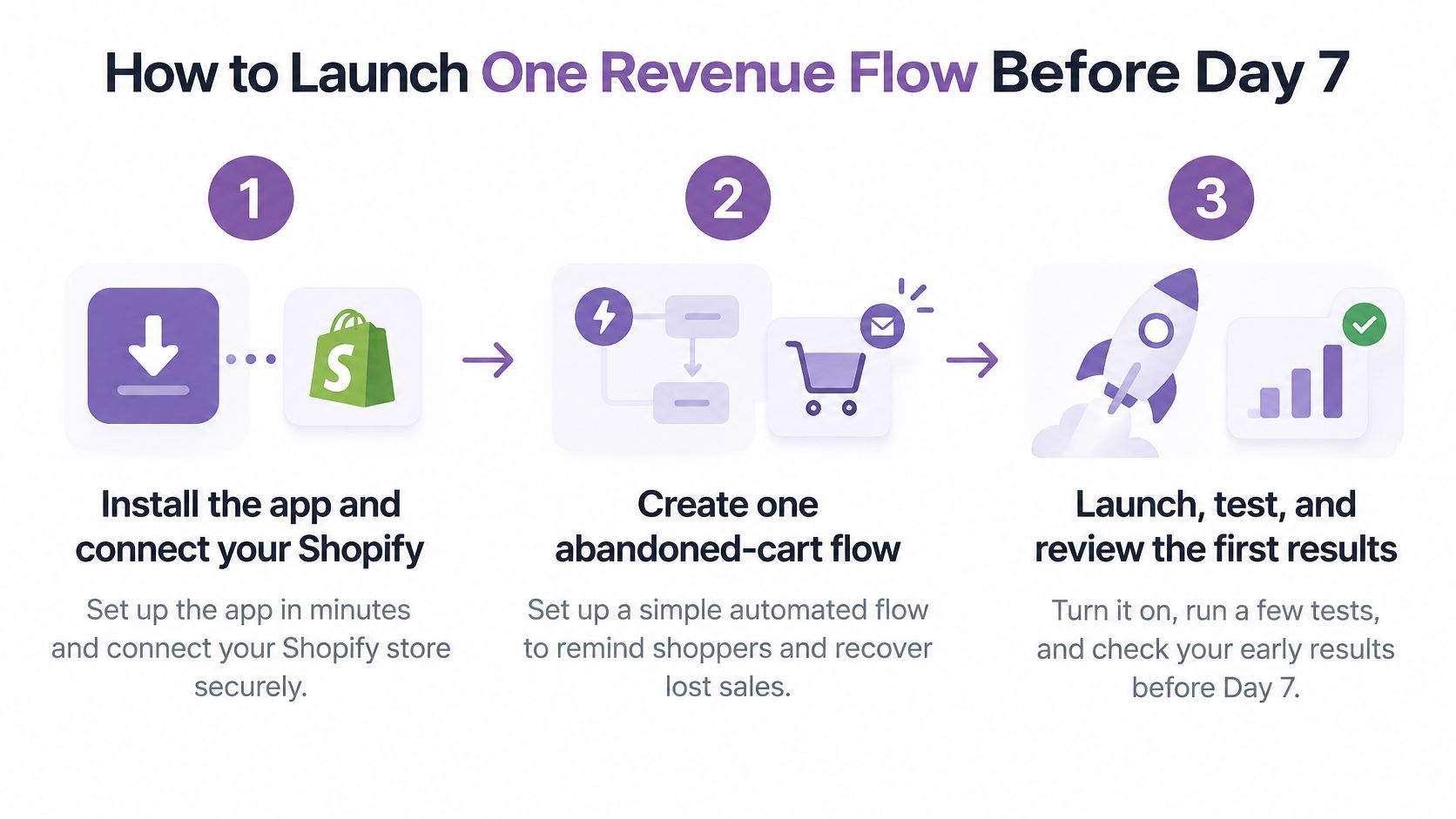
Start with abandoned-cart recovery because the trigger is concrete: a shopper leaves a qualifying cart without completing a purchase. Keep the initial message simple enough that you can troubleshoot the workflow without also untangling a complex offer.
Use this sequence to build and validate the flow.
Build the dependencies first
Install the app and connect Shopify. Confirm the correct store is connected and that relevant events appear before designing messages. The usual mistake is assuming installation proves the integration works.
Register the sending number through the applicable process, including 10DLC registration for US sending where applicable. Allow time for approval and verify sending readiness; queuing a launch while registration is pending wastes evaluation time.
Add the SMS consent box. Submit your own signup and inspect the saved timestamp, source, wording, and number. A visually correct popup can still fail the test if the consent record isn't retained.
Build an abandoned-cart flow that starts only after a qualifying event and checks whether the shopper has purchased before sending. The common failure is checking purchase status only when someone enters the flow, then reminding a buyer after they've already completed checkout.
Test the customer experience
Configure STOP and HELP handling. Send the relevant replies from your test phone and verify that an opt-out blocks later promotional sends. A reply appearing in an inbox isn't proof the subscriber has been suppressed.
Send a test to your own phone and open the link on mobile. Check personalization tokens, the recovered cart, and intended send timing; unresolved placeholders and links to an empty cart make an otherwise functioning automation unusable.
Activate the flow and record its start date. Save the audience rules and message version with that timestamp. Without a clear launch record, you'll struggle to separate test activity from live results when reviewing day 7.
Our Shopify SMS app setup guide covers installing the app, registering 10DLC, and sending the first campaign. Treat those as operational checkpoints rather than permission to skip recipient-consent checks.
Keep the first live version restrained. Add a discount only when you have a reason to believe an incentive is necessary, and judge the resulting orders against margin as well as revenue.
Which SMS Results Show Real Value During the Trial
Automated flows vs one-off campaigns
| Format | Order rate benchmark | What to judge in the trial |
|---|---|---|
| Automated flow | 1.9% | Revenue per recipient from abandoned checkout and viewed-product follow-ups |
| One-off campaign | 0.27% | Clicks, orders and unsubscribe rate per send |
| Difference | About 7 times higher for flows | Whether flows beat broadcasts in your store |
Klaviyo's published SMS benchmarks report 1.9% order rates for flows versus 0.27% for campaigns, approximately seven times higher for automated journeys. Use these as directional comparisons, not a promised outcome for a new store or a small trial audience.
Keep the formats separate
A cart reminder reaches someone who has already shown purchase intent. A scheduled campaign may reach subscribers who aren't currently shopping. Combining their results hides whether your targeting or your promotional creative did the useful work.
For each flow, record delivered messages, recipients, clicks, attributed orders, attributed revenue, and opt-outs. For each broadcast, preserve those measures by send. Use a consistent attribution window so you don't credit the same order differently merely because one report uses different settings.
Revenue per recipient is attributed revenue divided by recipients. It makes comparisons more useful when audience sizes differ, but it still doesn't establish that every attributed order was caused by SMS. The SMS marketing ROI guide can help you extend the calculation beyond gross revenue.
Protect the interpretation
- Suppress purchasers: Remove completed buyers from pending cart reminders.
- Control overlap: Prevent competing automations from messaging the same shopper for the same event.
- Limit frequency: Check the subscriber's recent message history before another trigger sends.
- Preserve comparability: Note changes to offers, audience rules, and store promotions.
Rising revenue per recipient is a useful signal, not proof of incremental revenue.
If that measure improves across comparable periods, keep testing. Where feasible, use a no-message holdout to assess whether SMS adds orders beyond purchases that would've happened anyway. If results stay flat, inspect list quality, timing, delivery, and destination pages before deciding the platform is the problem.
Is 14 Days Enough? Judge Activation, Not Just Sales
A randomized field experiment involving 680,588 users across 190 countries found that extending trials increased adoption and delayed conversion without significantly improving immediate conversion. Product functionality and the economic and cultural context moderated the outcomes.
Subscription rate by trial length (generic software study)
| Trial length | Subscription rate | Note |
|---|---|---|
| 7 days | 15.36% | Highest overall rate in the experiment |
| 14 days | 14.96% | German users converted at 13.1%; don't infer a segment result from the overall rate |
| 30 days | 14.67% | Lowest overall rate in the experiment |
A separate randomized test of 337,724 users of a complex software product, summarized by MarketSplash's free trial calculator analysis, produced the rates in the table and the 13.1% German result for the 14-day trial. The overall gap between the seven-day and 14-day groups was 0.40 percentage points. This isn't an SMS experiment, so treat it as evidence against assuming one duration works best everywhere.
Define sufficient before you start
For a Shopify store, completion means:
- Connected: The app receives the store events needed for targeting.
- Permission-ready: Subscriber consent is captured and retrievable.
- Operational: The cart flow is configured and a test campaign has been sent.
- Measurable: Attributed revenue can be recorded and inspected.
Usability belongs in that assessment. Wecomeet's guide to testing usability beyond visual polish asks whether you can finish the task, not just whether the screen looks good.
If the activation path is complete by day 14, the window was sufficient to evaluate readiness. It still may not provide enough purchasing activity for a confident revenue conclusion. If approval, integration work, or list growth blocked activation, request more evaluation time rather than rushing into payment. A trial that ends with the four checks complete has proved setup and compliance readiness even when revenue is thin. That distinction keeps a low revenue result from hiding a finished setup.
Start Your Trial With a Day-14 Decision Rule
Keep the tool only when activation is complete and the commercial terms work. That means the app is installed, compliant opt-ins are collected, a cart flow is live, a test campaign has been sent, and attributed revenue has been recorded for a flow. Track the opt-out rate and retain written billing terms too.
Use a decision log rather than relying on whether the trial felt promising.
Choose an outcome deliberately
- Keep: The workflow functions, reporting is usable, and the expected cost fits your margins.
- Switch or negotiate: Setup works, but equivalent sending costs exceed your current provider's without a worthwhile operational advantage.
- Pause or cancel: A required activation check is missing. Stop before any applicable charge date rather than funding an unfinished setup.
If revenue is absent because too few eligible shoppers entered the flow, record that limitation explicitly. Don't confuse an untested commercial outcome with a broken integration.
We offer a 14-day free trial, with free signup, no credit card required to start, and payment only when you send. New merchants receive $20 free credit after their first review. Keep that conditional credit separate from your initial evaluation budget.
Before beginning, confirm the trial length and what happens at expiry on the signup page. For any paid commitment you authorize, save the charge date and cancellation terms.
Start your trial when you can complete the setup tasks, then run the day-by-day checks so your decision rests on recorded evidence rather than a countdown.
YipSMS Inc. offers a Shopify SMS marketing trial for evaluating subscriber capture, campaigns, and automated messaging. Visit YipSMS Inc. to start your trial, connect your store, and make a tested cart-recovery flow your first milestone.
How this article was made: the YIPSMS team drafts some articles with AI writing tools, then checks pricing, compliance and product details against how YIPSMS actually works before publishing. Spotted something wrong? Tell us through your YIPSMS account.