Subscriber Management Software for Ecommerce SMS
Grow the list. That's the first line of nearly every SMS guide, and it's the fastest way to build a subscriber file that costs you money.
A list is not an asset. A file of phone numbers you can prove consent for, segment by intent, and message without burning them is an asset. The gap between those two things is subscriber management software, and most stores buy it for the popup, then never touch the part that protects them.
Here's the position I'd defend in any argument about SMS. A bigger list is not the win. Consent quality, message purpose, and a per-customer send budget decide whether your software grows revenue or complaints.
The test that matters: open any number in your file and answer three questions in under a minute. What did this person agree to, which messages does that cover, and how many texts have they had in the last seven days? If you can't, you don't have a subscriber file. You have a liability with a phone number attached.
Table of Contents
- What Subscriber Management Software Actually Runs
- The Subscriber Record to Keep Before You Text
- Promotions Order Updates and STOP Rules
- Segments Quiet Hours and a Send Budget
- Retention Campaigns That Earn the Next Text
- Choose Software and Clean the List This Week
What Subscriber Management Software Actually Runs
Say a store pulls 9,000 numbers out of a spreadsheet an old agency left behind and blasts a Black Friday text. A few hundred reply STOP. A few dozen hit report spam. The carrier flags the sending number, and deliverability drops for everyone on the file, including the customers who asked to hear from the brand.
That's not a list problem. It's a records problem. Subscriber management software is the system holding your phone numbers, the consent history behind each one, the segments those numbers sit in, and the rules deciding which message may go out at what time. It's the labeled mailroom, not the pile of envelopes.
Don't confuse it with subscription billing software. Billing tools handle plans, renewals, proration, and invoices for recurring orders like a coffee club or a monthly box. Subscriber management handles the audience: who is reachable, why, and with what message. A spreadsheet holds the digits, but it holds no source, no timestamp, and no opt-out.
The opportunity is real. In 2025, 84% of U.S. consumers had opted in to receive SMS messages from businesses, according to SimpleTexting's surveys of 1,000 consumers and 400 business owners or marketing managers conducted in December 2024. Reading that as an invitation to text everyone is the mistake. Only sends matched to a proven purpose and a proven number count toward revenue.
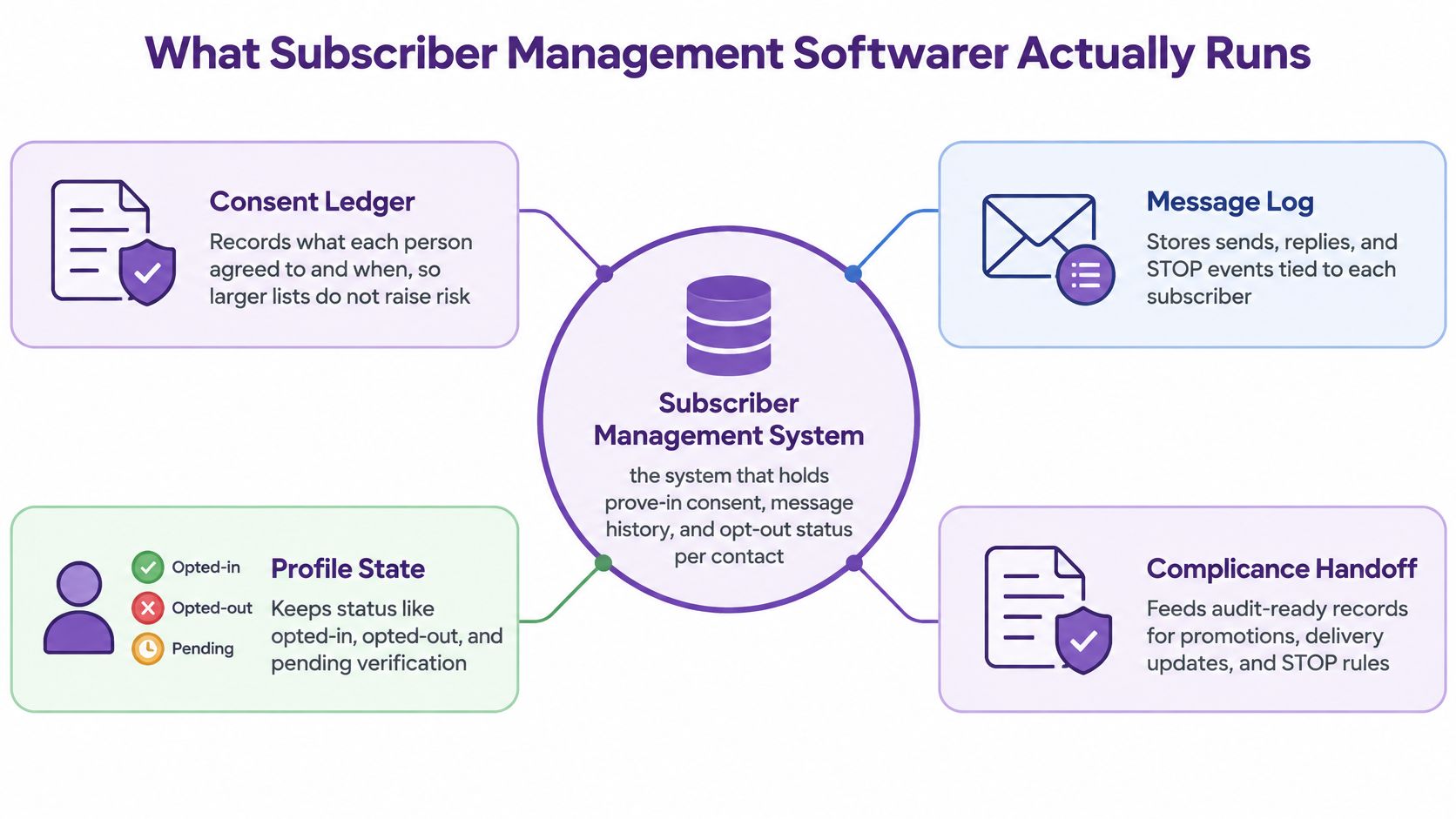
Four jobs sit inside a working system, and everything else is decoration on top of them:
- Capture the opt-in with its source. The popup, the keyword, the QR code, the CSV: each one leaves a different trail.
- Classify the message purpose. Promotional, transactional, and support are three different permissions.
- Cap frequency per person. One budget per subscriber, shared across every flow.
- Run retention with the brakes on. Welcome, cart, post-purchase, and win-back all check the same suppression layer.
The first thing to build isn't a campaign. It's the record underneath it.
The Subscriber Record to Keep Before You Text
A checkbox is not a consent record. It's the moment before one.
Treat consent as a history you can replay, not a yes or no field you flip. Twilio's compliance guidance lays out the architecture: consent records distinguish opt-in and opt-out states, keyword signals update status, and opted-out recipients are blocked from delivery. Its recommendation is to keep the consent event, timestamp, collection source, message purpose, disclosure text or policy version, jurisdiction, and every later opt-out or re-opt-in for each phone number.
Here's the row structure I'd insist on before a store sends another campaign.
| Field | What it proves | Store this | Fail if missing |
|---|---|---|---|
| Normalized phone | One person across lists | E.164 format such as +14155550100 | Duplicates and mismatched formats |
| Opt-in event | Prior express consent | Timestamp and submitting page | Only a Boolean opted-in flag |
| Disclosure shown | What the shopper actually agreed to | Disclosure text or policy version naming the store | Generic offers from partners language |
| Collection source | How the number entered | Popup, keyword, QR, AI chat, checkout, or CSV | Unknown import with no source |
| Message purpose | Which sends are allowed | Promotional, transactional, or support | One consent used for every message type |
| Market | Which rules apply | Country or storefront and language | U.S. consent reused on every site |
| Opt-out history | Revocation is honored everywhere | STOP time, keyword, and re-opt-in if any | Suppression only inside one campaign |
The rows most stores leave empty
Normalization comes first because +1 415 555 0100 and 4155550100 are the same shopper and two different rows. Without E.164 formatting, the same person gets a welcome text twice and a STOP that only suppresses half of them.
Disclosure is the row marketers skip. "Offers from partners" tells you nothing about which store the shopper said yes to, or what the copy on the page promised. Save the text, or the policy version number, next to the record.
Message purpose is the row that decides everything downstream. A shipping number is not a marketing opt-in, and a support conversation the customer started isn't either. Market belongs here too, because a U.S. promotional consent carries assumptions that don't travel to another storefront.
When a list arrives as a CSV, the import has to do real work. In YipSMS, an uploaded CSV is deduplicated and formatted, and opt-ins are tracked rather than assumed. Popup opt-ins are timestamped and logged, and the popup builder captures phone, email, and name in one tap with TCPA-compliant consent language and Privacy Policy links built in.
One screen, no developer
The audit: if a customer emails and asks what they signed up for, someone on your team should answer from one screen, without opening a support ticket for a developer.
That screen is the whole point of a single customer view built on the subscriber record rather than on campaign reports. If the answer requires a database query, the record is incomplete.
Promotions Order Updates and STOP Rules
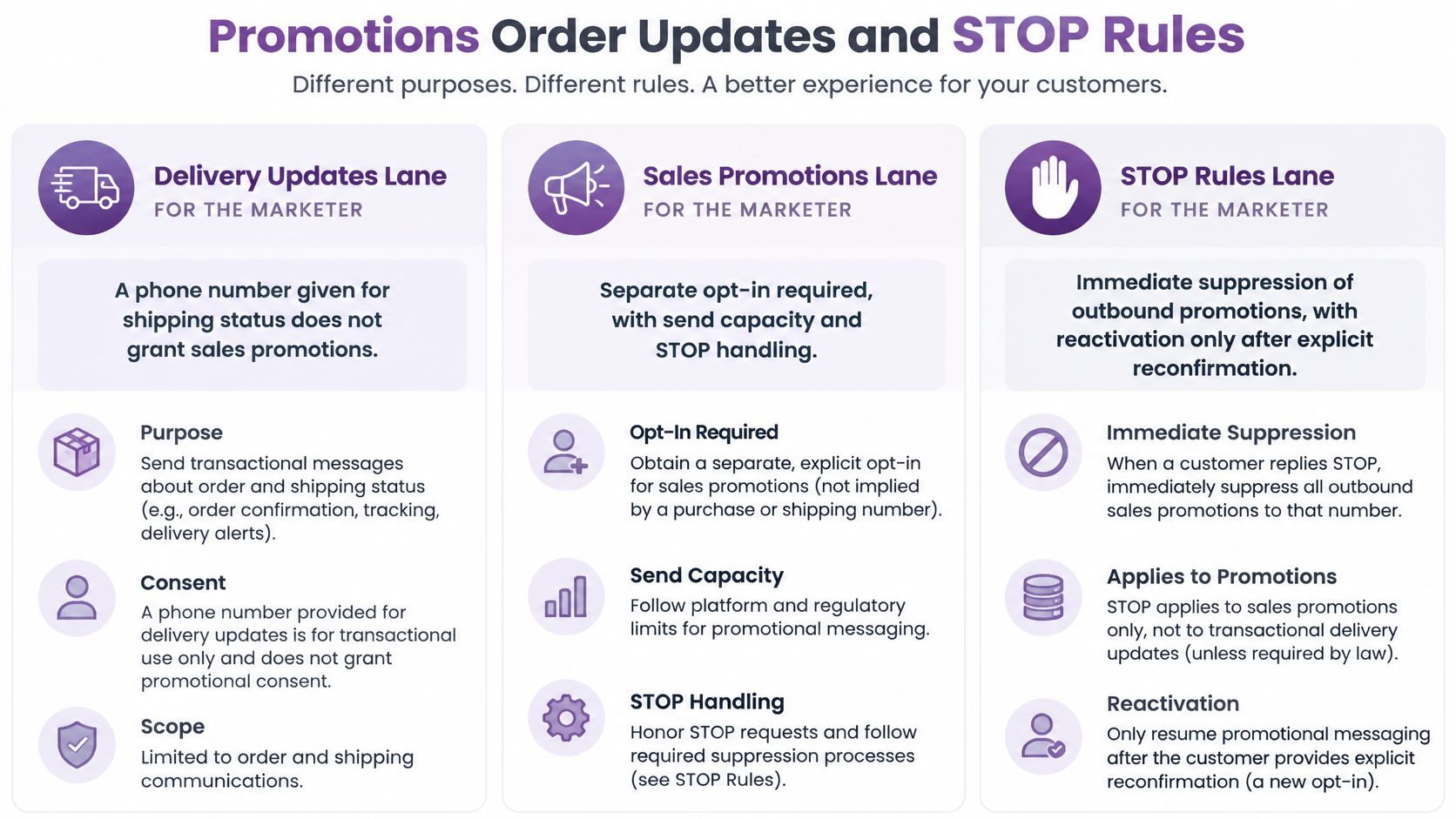
A phone number handed over for delivery updates is not permission to send sales texts. That answer settles most arguments about SMS, and stores keep re-litigating it because the two messages feel identical from the inside.
They aren't. The FCC treats commercial robotexts differently from purely informational messages, its consumer guidance explains, with commercial texts generally requiring written consent while some informational texts may rely on oral consent. Discounts, launches, abandoned-cart nudges, and product recommendations are commercial. A shipping notice is not.
| Lane | Examples | Consent required | After STOP |
|---|---|---|---|
| Promotional | Discounts, launches, abandoned cart, product recommendations | Prior express written consent naming this store, clear disclosure matching the collection page, FCC one-to-one rule effective January 27, 2025 | Suppressed until a new affirmative opt-in |
| Transactional | Shipped and delivered updates tied to an order | Order relationship only, never a marketing opt-in | Revocation applies across the company's robotexts, not one flow |
| Support | A reply the customer started | The conversation the customer opened | Opt-out honored, promotions stay off without fresh consent |
The promotional bar is higher than most stores assume. For U.S. marketing SMS, businesses must obtain prior express written consent before sending autodialed or prerecorded promotional texts, under the FCC's one-to-one consent order. That consent must identify a single seller, carry a clear and conspicuous disclosure, and be logically and topically related to the interaction where it was collected. The one-to-one rule took effect on January 27, 2025, which retired the "offers from partners" checkbox for good. Keep the phone number, the timestamp, the disclosure text, and the source page.
What STOP actually turns off
A STOP applies across the company's robotexts, not just the flow that annoyed the person, as the Congressional Research Service explains. Cart recovery, win-back, broadcasts, and recommendation automations must all read one suppression layer before queueing. A fresh opt-in is the only thing that reopens promotions.
Every campaign we send automatically adds opt-out language, and STOP and HELP replies are handled without a human watching the inbox. Test it the boring way: text STOP from your own phone, then try to trigger a cart flow for that number. If anything lands, you're not done.
The same discipline applies outside retail. A golf shop that needs to fill last-minute tee times by text is running a promotional lane and needs the same written opt-in a sneaker brand does.
If you'd rather see the mechanics than read them, this walkthrough covers how the flow behaves end to end.
Before you build any automation, walk the TCPA compliance checklist against your current setup. It's cheaper than discovering the gap in a carrier audit.
Segments Quiet Hours and a Send Budget
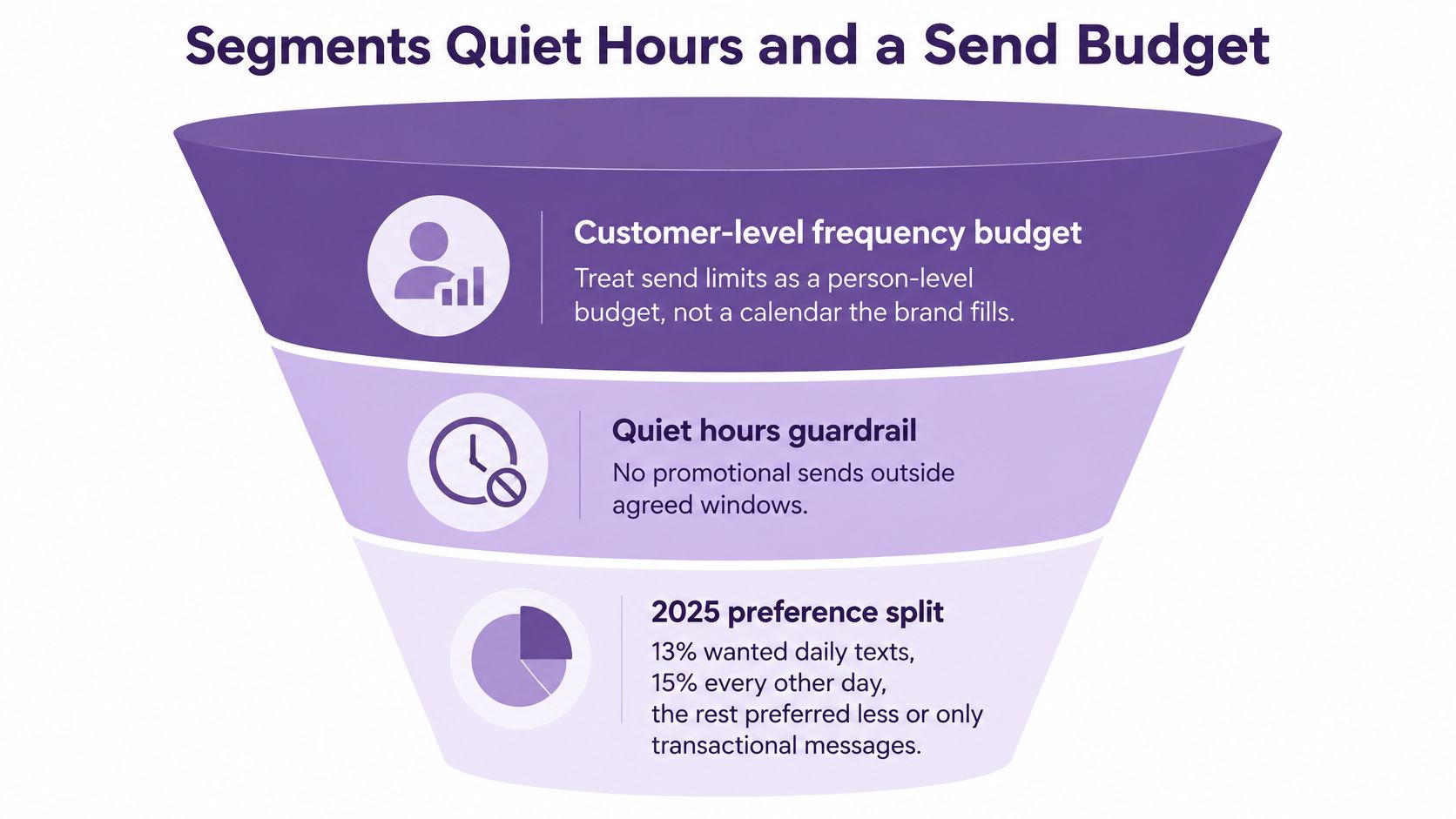
Cadence is the part of SMS nobody wants to own, because there's no single right answer. In a 2025 survey, 13% wanted daily texts, 15% preferred messages every other day, and 21% wanted several messages per week, while 25% said messages arriving too early or too late felt irritating or spammy, according to MediaPost's reporting on the survey. Pick a cadence from any of those numbers and you're right for one group and wrong for another.
So stop scheduling from a calendar and start budgeting per person.
The rule I'd apply this week: every subscriber gets a frequency budget, and every flow spends from it. Welcome, cart, broadcast, and win-back draw from the same account. When the budget is gone, the next message waits.
Four segments a small team can maintain
- New promotional opt-ins who haven't bought. High intent, zero history. Two messages in the first week, then move them out.
- Recent buyers inside 30 days. They already converted. Fewer discounts, more useful product context and delivery reassurance.
- High-intent browsers. Viewed a product, started checkout, didn't finish. One follow-up tied to the specific item, then stop.
- Preference and quiet-hour holds. People who asked for less, plus anyone outside their local sending window. Promotional sends pause; order updates don't.
That last segment needs a time zone field on the record, not a guess from an area code.
Every opt-in from a popup, scratch card, keyword, AI chat, QR code, or CSV lands in a master All Customers list, and named lists are unlimited, with a QR code generator for offline sign-ups. That structure lets a preference segment exist without rebuilding your audience.
Reply speed is a segment, not an afterthought
57% of consumers expected a business to respond within 15 minutes, and 47% had given feedback by SMS, per the same 2025 survey coverage. A two-way segment without staffing is just another blast channel with a friendlier name. Either someone answers, or the auto-reply sets honest expectations and offers a call-back window.
Judge segments by opt-outs, complaints, reply latency, repeat purchase, and profit per subscriber. Clicks tell you someone was curious. Customer data segmentation tells you who's still willing to hear from you next month.
Retention Campaigns That Earn the Next Text
Assume the subscriber is allowed to receive promotions and has budget left this week. Five flows cover it. Build those before you build a sixth.
Five campaigns, five stop conditions
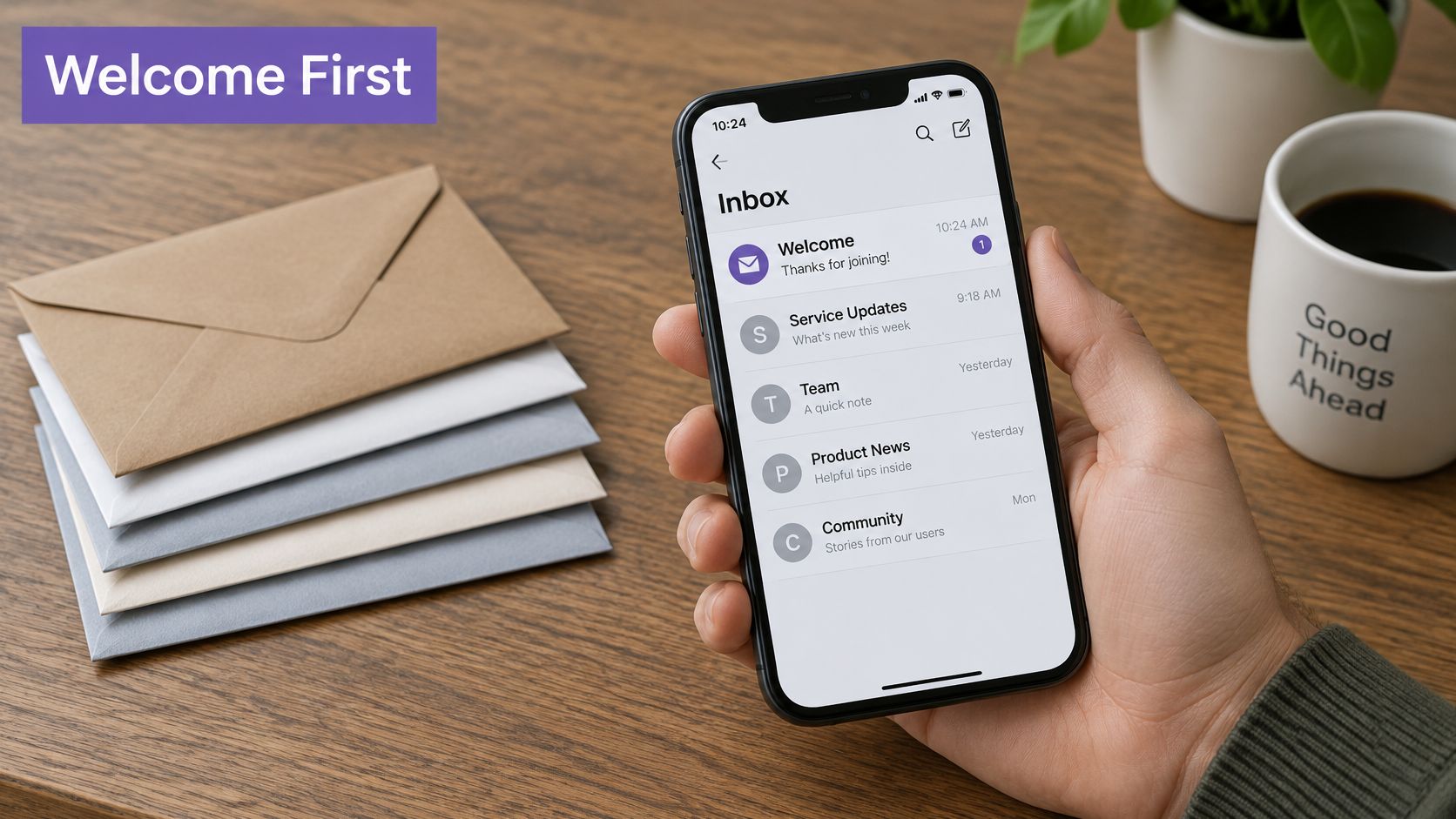
Welcome, within minutes of opt-in. Confirm the brand name and what the texts will cover. No hard sell in the first message; the person just agreed to hear from you and deserves to know what they agreed to.
Browse or cart follow-up, sent once. Anchor it to one product: "Still thinking about the linen shirt?" Then stop. Buying, replying, or texting STOP all end the flow.
The shipped and delivered notes stay transactional and reference the actual order. A promotional ask only goes underneath if promotional consent exists. Fake "your order is ready" language aimed at people who never started a checkout is the fastest way to a complaint spike.
Replenishment or second-purchase nudges should be timed to the product, not to Friday. A consumable that lasts five weeks gets a nudge in week four. A durable good gets a cross-sell after the return window closes, or nothing.
Win-back applies to subscribers who have gone quiet past their normal repurchase window and still have budget. One message with a real reason to return. If nothing happens, leave them alone until they engage on their own.
Judge a flow by the opt-outs
Thirty days is enough data. Compare repeat purchase and opt-outs against a control group that got nothing. Pause any flow where clicks rise while complaints rise, because that pattern means you're buying revenue with future deliverability.
Nine prebuilt automations aren't ten good ones. A welcome text, a keyword reply, a shipping notice, a delivery notice, and a segment entry cover most of what a Shopify store actually needs.
Those five exist as ready-to-activate flows out of a set of ten prebuilt revenue automations that turn on with one click. The starting set is reasonable precisely because the consent check still runs first, before any of them fire.
Choose Software and Clean the List This Week
Run the trial in this order, because each step catches a failure the previous one can't.
- One master list, no second database. Send opt-ins through a popup, a keyword, a QR code, a chat widget, and a CSV. All five should land on the master list and on the named list you assign. A CSV upload should dedupe the numbers and keep your custom fields so an old file isn't blasted blindly.
- Separate lanes, one suppression layer. Confirm promotional and transactional automations are distinct, then text STOP and watch whether welcome, cart, broadcast, and win-back all block before the next send.
- Quiet hours, one shared cap, segments without an engineer. Build a Shopify segment, add a frequency cap, set a sending window, and check that the revenue view shows opt-outs beside subscriber growth, campaigns, and automations rather than hiding them in a separate report.
- Rate and registration. Prefer a visible per-message rate over a contract that rewards extra sends, and confirm a path to 10DLC or toll-free registration so the first campaign ships after setup.
What a clean trial looks like
YipSMS runs that test as a Shopify app with plain text messaging, personalization tokens, short links, real-time analytics, and a 14-day free trial, with no monthly app fee on top of message costs, no contract, and no minimum. Numbers get registered for 10DLC and toll-free messaging as part of setup, and the analytics dashboard puts campaigns, automations, and subscriber growth into one revenue view.
Then clean the file, in this order. Remove anyone whose promotional consent, source, and disclosure you can't produce. Split order-update numbers away from marketing opt-ins. Run one capped retention flow. Review opt-outs next to revenue after two weeks.
Import a small consented test list, send to a single segment, and process a real STOP before you judge deliverability. A tool is only as good as the file you feed it.
Score the whole exercise by one number: how many consented subscribers you can still text next month.
Subscriber management is where SMS stops being a campaign and becomes an asset you can defend, and YipSMS Inc. builds that for Shopify stores with the consent record, the suppression layer, and the send budget in the same place. Every opt-in is timestamped, every campaign carries opt-out language, and STOP and HELP are handled automatically, so the list you grow is one you can use. Visit YipSMS Inc. and start the 14-day trial with a small consented list, then see what your opt-outs tell you before you scale the sends.
How this article was made: the YIPSMS team drafts some articles with AI writing tools, then checks pricing, compliance and product details against how YIPSMS actually works before publishing. Spotted something wrong? Tell us through your YIPSMS account.